Google Fit Compatible Watches: A 2026 Buying Guide
Discover which watches are Google Fit compatible, how syncing works, and practical buying tips for 2026. Learn setup steps, data coverage, and choosing a device that pairs smoothly with Google Fit.


Google Fit compatible watches are devices that can sync health data with the Google Fit ecosystem, typically including Wear OS watches and other Android-friendly wearables that support the Google Fit app. In practice, most Android-ready smartwatches offer robust Google Fit integration, enabling data like steps, heart rate, and workouts to flow between the watch and your phone or tablet. The Smartwatch Facts team notes that the strongest experiences come from watches with native Google Fit support or tight app integration, ensuring consistent data across devices and apps.
What Google Fit compatibility means on a smartwatch
Google Fit compatibility means a smartwatch can read, write, and sync health and activity data to the Google Fit cloud. This includes steps, active minutes, distance, calories burned, and heart-rate data, and may extend to sleep metrics where supported by the device and app permissions. For Android users, native integration tends to be the most reliable because Google Fit is designed to communicate with the watch OS and the Google Fit app. The Smartwatch Facts team notes that the clearest experiences usually occur on Wear OS devices with Google Fit either preinstalled or tightly integrated. When evaluating a watch, verify that the companion app explicitly lists Google Fit as a connected service and that data permissions allow read/write access. Data fidelity—where your steps on the watch map cleanly to Google Fit on your phone—matters for trends, workouts, and long-term history. This unified health history is the primary benefit of choosing Google Fit compatible watches, reducing fragmentation across apps and devices.
How Google Fit syncing works across Android and wearable ecosystems
Google Fit uses your Google account to store and aggregate health data from multiple sources. On a smartwatch, a companion app pushes data to Google Fit in the cloud, while the Google Fit app on your phone pulls from both the watch and phone sensors. Data types such as steps, distance, and heart rate flow through, with timestamps preserved to maintain accurate activity logs. Permissions are crucial: you must grant read/write access for Google Fit and the watch’s app, and enable background sync for continuous updates. Privacy controls let you decide which data to share and with whom. In practical terms, if your watch supports continuous heart-rate monitoring and GPS tracking, those metrics can enrich your Google Fit history and be available to other connected apps and services. Understanding this pipeline helps you diagnose syncing issues quickly if numbers seem off.
Google Fit compatibility across watch types
| Watch Type | Google Fit Support | Notes |
|---|---|---|
| Wear OS smartwatch | Yes | Native integration on most devices |
| Non-Wear OS smartwatch | Partial | Sync may rely on Google Fit app or intermediary services |
People Also Ask
Do all Wear OS watches support Google Fit, out of the box?
Most Wear OS watches offer Google Fit integration, but exact features can vary by model and app version. Always verify the watch’s companion app lists Google Fit as a connected service and review permission settings after setup.
Most Wear OS watches can sync with Google Fit, but check your model’s app to confirm features and permissions.
Can I use Google Fit on an iPhone with a Google Fit compatible watch?
You can use Google Fit on iPhone via the Google Fit app, but watch-to-phone syncing may be more limited compared to Android devices. Always confirm cross-platform data syncing capabilities for your specific watch.
Google Fit works on iPhone through the Google Fit app, but some watch integrations may have limited syncing.
Is Google Fit synchronization limited to steps, or does it include other metrics?
In addition to steps, many watches push distance, calories, and heart-rate data to Google Fit. Some devices also support sleep and activity-specific metrics, depending on sensors and permissions.
It usually includes steps, distance, calories, and heart rate, with some devices offering more metrics.
How long does it take to set up Google Fit on a new watch?
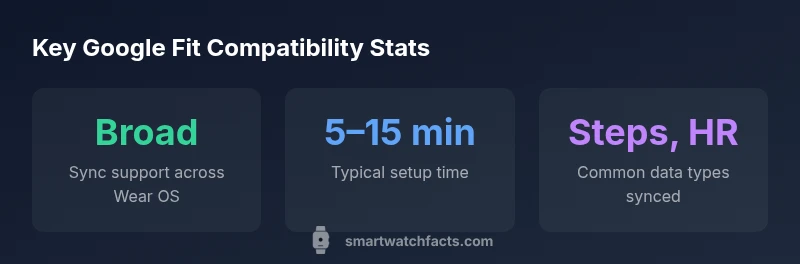
Initial setup typically takes 5–15 minutes, including installing the Google Fit app, linking your Google account, and granting permissions. Expect a quick test to confirm data syncing.
Usually under 15 minutes to set up and start syncing.
What should I do if Google Fit data isn’t syncing after setup?
Check permissions, ensure background data is allowed, re-link the Google Fit account, and verify the watch’s app is granted read/write access. If problems persist, try re-pairing the device or updating software.
Verify permissions and re-link accounts; if needed, re-pair the device or update software.
Do budget Google Fit compatible watches exist, or are premium models required?
There are budget-friendly options with solid Google Fit integration, but features like GPS accuracy, sensors, and battery life can vary. Compare models based on your priority—accuracy, battery, and app ecosystem.
Yes, there are affordable options, just compare features that matter most to you.
“Google Fit compatibility isn’t just about having an app on your wrist; it’s about a seamless data highway from the watch to your health history. Choosing a device with robust Google Fit integration ensures consistent, reviewable metrics across devices.”
Key Points
- Take inventory of watch OS and app integration before buying
- Ensure Google Fit permissions are granted for all health data categories
- Prefer watches with native Google Fit support for best syncing fidelity
- Regularly check for app updates to preserve data accuracy
- Test data syncing in the first 24 hours after setup