What Smart Watches Work with Samsung: Compatibility Guide
Explore which smartwatches work with Samsung phones, how to pair them, and what features to expect. Practical guidance for Android, Wear OS, and iOS users.


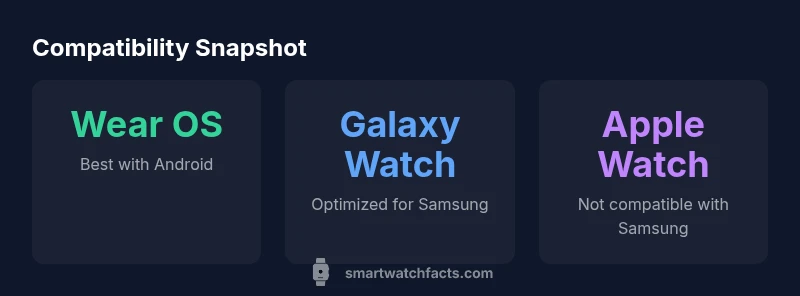
With Samsung smartphones, the strongest compatibility comes from Wear OS watches—Samsung Galaxy Watch4/5, Google Pixel Watch, and other Wear OS brands. Apple Watch is not compatible with Samsung phones. Some Fitbit watches offer basic pairing, but core features vary. In practice, if you want the smoothest experience on Samsung, pick a Wear OS watch.
Why compatibility matters for Samsung users
Choosing a smartwatch that works well with Samsung devices isn’t just about pairing. It determines how you receive notifications, track health data, and access apps. The Samsung ecosystem emphasizes health features, app availability, and seamless syncing with Samsung Health, reminders, and calendar data. If you own a Galaxy phone, you’ll likely benefit most from a watch that is built on Wear OS or Samsung’s optimized Wear OS variant. The question for many readers is: what smart watches work with samsung, and how broad is the compatibility across models and brands? The answer hinges on operating system alignment, app ecosystems, and notification handling. By focusing on Wear OS, you maximize compatibility with Samsung phones while preserving core features like fitness tracking, message replies, and third‑party app access. This alignment also future‑proofs your purchase to a degree, since Wear OS devices receive broad support across Android platforms.
What watches work best with Samsung phones
When evaluating options, you’ll hear three broad categories. First, the Wear OS lineup, including Samsung Galaxy Watch4/5, Google Pixel Watch, and many third‑party models from Fossil, Mobvoi, and similar brands. These watches typically offer robust notification support, GPS, health sensors, and access to a large app ecosystem. Second, Fitbit watches with Fitbit OS provide strong fitness tracking and sleep insights; some models can pair with Samsung phones but may lack deeper app integration. Third, Apple Watch remains outside the official compatibility scope of Samsung phones, delivering excellent performance with iPhones but limited or no pairing with Samsung devices. If your priority is the broadest compatibility and strongest app support on Samsung, sticking with Wear OS is a reliable rule of thumb.
How Wear OS and Samsung OS interact
Wear OS on Samsung-paired devices benefits from cross‑brand ecosystem familiarity. You’ll typically get reliable notifications, quick replies in messaging apps, and access to Google apps. Samsung Health data can often sync across devices, though some features may require the specific Samsung app experience on Samsung phones. Some watches use Samsung’s health sensors and algorithms, while others rely on standard Wear OS APIs. In practice, expect excellent basic functionality, with more advanced features varying by watch model and app availability. Always verify which health metrics and third‑party apps you rely on most before choosing a watch for Samsung pairing.
Practical pairing scenarios
For a typical Android user with a Samsung phone, Wear OS watches provide the most predictable experience: call handling, message previews, calendar alerts, and fitness tracking show up in a cohesive way. If you primarily want fitness tracking and basic notifications, Fitbit OS watches can suffice, especially if you already own Fitbit devices. If you own an iPhone or depend on Apple-specific apps, Apple Watch won’t integrate with Samsung phones as deeply. Consider your priorities: app variety, health metrics, or notification reliability. In all cases, verify Bluetooth LE compatibility, app access, and firmware updates to keep your watch functioning smoothly with Samsung devices.
Setup and pairing: a practical guide
Start by charging both devices. On the Samsung phone, open the Google Play or Galaxy Store to install the watch companion app. Put the watch in pairing mode and follow on‑screen prompts to grant necessary permissions. You’ll typically confirm pairing on both devices and decide what notifications to push to your wrist. If you’re coming from an Apple Watch, unpairing from iPhone and re-pairing with a Wear OS device can require a few minutes. Keep software updates current for both devices to maximize compatibility and battery efficiency.
Buying guidance: price tiers and features
Smartwatch purchases should reflect your usage. Budget options often deliver essential notifications and fitness tracking, while mid‑range devices balance performance, battery life, and app access. Premium Wear OS models add GPS accuracy, better displays, faster processors, and more robust health sensors. With Samsung in mind, prioritize watches that offer strong integration with health data, comfortable bands, and reliable daily battery life. If you plan to use many third‑party apps, ensure the watch supports the apps you rely on. Remember, the most important factor is how well the watch fits your daily workflow and the apps you need.
Common pitfalls and misconceptions
A common misconception is that any smartwatch will deliver native, full‑feature parity with Samsung apps. In reality, Android‑based watches vary in notification handling, voice assistants, and app support. Another pitfall is assuming Apple Watch can pair with Samsung phones; official compatibility is limited. Always check compatibility notes from the watch manufacturer and verify which features you will actually use on a Samsung phone. Finally, consider future OS updates; some features may be rolled out gradually or require specific app versions.
Best practices for ongoing updates
To keep compatibility strong, enable automatic software updates on both devices, periodically review watch app permissions, and monitor battery health. Subscribe to official firmware release notes for your watch and phone to understand changes to notification behavior or health data syncing. If you frequently switch between Android devices or upgrade phones, verify that the watch remains compatible with the new hardware and OS version. Regularly re‑pairing after major updates can prevent lingering pairing issues and ensure you get the latest features.
Compatibility snapshot: Wear OS vs Fitbit OS vs Apple Watch with Samsung phones
| Watch Type | OS | Phone compatibility | Notes |
|---|---|---|---|
| Samsung Galaxy Watch series | Wear OS (custom) | Best with Samsung phones; strong integration | Proprietary features like Samsung Health integration |
| Google Pixel Watch | Wear OS | Strong with Android; limited iOS support | Great health features; app ecosystem growing |
| Fitbit OS watches | Fitbit OS | Broad compatibility; notifications | Fitness‑focus with variable app depth |
| Apple Watch | watchOS | Not compatible with Samsung phones | Excellent with iPhone; limited pairing with Samsung |
People Also Ask
Can I use an Apple Watch with a Samsung phone?
Apple Watch is not officially compatible with Samsung phones, and pairing is not supported for full functionality. Users may find limited third‑party workarounds, but they won’t replicate native features.
Apple Watch doesn’t pair with Samsung phones; you won’t get full features, so consider Wear OS or Fitbit options instead.
Which Wear OS watches are compatible with Samsung phones?
Wear OS watches from Samsung, Google, and many third‑party brands generally pair well with Samsung devices, offering solid notifications, health tracking, and app access.
Wear OS watches typically work well with Samsung phones and give you the widest app ecosystem.
Do Fitbit watches work with Samsung devices?
Yes, many Fitbit OS watches pair with Samsung phones for basic notifications and fitness tracking, though some advanced features may be limited depending on the model.
Fitbit watches work with Samsung phones, mainly for basic notifications and fitness tracking.
Is Galaxy Watch compatible with iPhone?
Galaxy Watch can pair with iPhone in limited fashion, typically with reduced functionality compared to pairing with an Android device.
Galaxy Watch can pair with iPhone but with limited features.
What’s the difference between Bluetooth and LTE models for Samsung pairing?
Bluetooth models generally provide full smartwatch functionality when connected, while LTE variants rely on cellular plans and can have different setup steps.
Bluetooth models work well with Samsung; LTE adds cellular features but may require a plan.
How can I check compatibility before buying?
Review the watch OS, supported apps, and official Samsung compatibility notes. Look for user feedback on real‑world pairing with Samsung phones.
Check the OS, apps, and official notes to confirm compatibility before buying.
“Wear OS watches provide the most seamless experience with Samsung phones, but always align your choice with the apps you rely on and your health-tracking needs.”
Key Points
- Prioritize Wear OS for strongest Samsung compatibility
- Apple Watch pairs poorly with Samsung devices
- Fitbit OS watches offer basic Samsung pairing options
- Check app availability before buying
- Keep devices updated for best performance