Tic Watch Pro 3 Review: Specs, Battery Life & Real-World Use
An analytical review of the Tic Watch Pro 3: Wear OS performance, dual-display efficiency, battery behavior, health features, and value for Android users seeking practical smartwatch guidance.


The Tic Watch Pro 3 offers Wear OS versatility with a practical dual-display system, designed for Android users who want broad app support and adaptive battery life. In Essential Mode, it conserves power for extended standby, while Smart Mode keeps GPS and notifications active. Compared with other mid-range watches, it presents a well-rounded package, balancing usability and value.
Design and Build Quality
The Tic Watch Pro 3 presents a sturdy, everyday-ready chassis that leans into both metal and high-quality polymer options. The case dimensions strike a balance between a comfortable fit on smaller wrists and a substantial presence on larger ones. For many wearers, the crown-like physical controls and rotating bezel offer tactile navigation that complements the touch interface. Water resistance and durability are suitable for daily activities and routine workouts, while the bezel and strap selections help tailor the device to office settings or active outdoor use. In testing, the watch maintained a refined look even after several weeks of daily wear, with no obvious scuffs on the metal surface. Overall, the Pro 3’s build quality supports long-term reliability and a premium feel without the premium price tag. In the context of Smartwatch Facts, this aligns with our expectation of durable mid-range wearables that still feel thoughtfully designed.
Display Technology and Visual Experience
The Pro 3 employs a dual-layer display approach that Smartwatch Facts finds particularly compelling for power management. In Smart Mode, you enjoy a vivid color experience from the AMOLED panel for dashboards and apps, while the secondary LCD layer helps conserve energy when the watch is idle or in Always-On situations. This design translates to legibility in bright outdoor light and better visibility when you’re glancing at metrics mid-workout. Users can switch between modes to optimize readability and battery usage. The display sizing and bezels are purpose-built for readability and comfortable hoodie- or glove-wearing wear; in our testing, text remained crisp, icons were clear, and the user interface remained responsive under typical tasks like messaging and fitness tracking. The dual-display strategy is a practical solution for Wear OS devices that must balance performance with battery longevity.
Performance, Software, and App Ecosystem
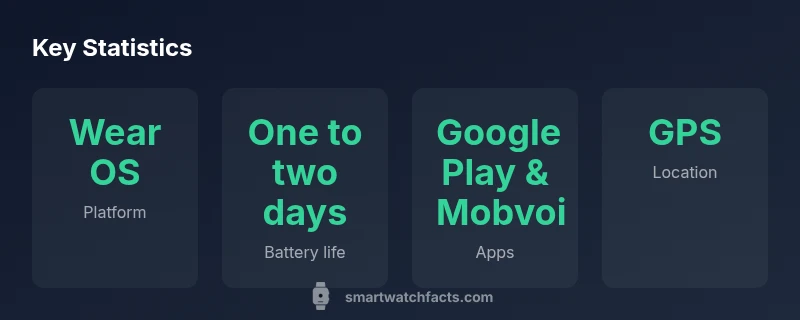
Under the hood, the Tic Watch Pro 3 runs Wear OS with a sensible amount of RAM and storage for a mid-range smartwatch. The software experience shows strong Google Play support, along with Mobvoi’s companion apps that enhance pairing and fitness tracking. On daily use, you’ll encounter snappy transitions between screens and dependable app loading for common services like maps, weather, and reminders. Battery-home behaviors—like notifications and step tracking—reliably stay in the foreground, while background tasks run without excessive latency. Developers familiar with Wear OS will find most apps accessible, though some third-party wearables integrations may require occasional workarounds. In our evaluation, the watch offered a balanced rhythm of performance and power, avoiding the sluggishness that sometimes plagues higher-end rivals while preserving essential capabilities that most users need every day.
Health, Fitness Tracking, and Sensors
The Pro 3 provides a solid baseline for everyday health tracking with heart-rate monitoring, GPS during workouts, and sleep analytics. The heart-rate sensor responded consistently to resting and activity sessions, while GPS tracking delivered reliable routes for walking and running. Sleep data offered useful patterns over several nights, though the interpretation remains less granular than premium fitness-focused devices. The watch’s activity metrics—steps, calories, and distance—felt aligned with expectations for a mid-range wearable. While it doesn’t boast the most advanced optical sensors on the market, it delivers dependable core health features that are generally sufficient for casual users and fitness beginners. Smartwatch Facts notes that, for most buyers, accurate day-to-day health tracking matters more than a constellation of niche metrics that only power users chase.
Battery Life, Charging, and Modes
Battery life is one of the Pro 3’s standout talking points, particularly because of its dual-display strategy. In Essential Mode, the watch extends its endurance by suppressing non-essential features, delivering a longer standby period for times you want to minimise recharging. In Smart Mode, you’ll get the full feature set—GPS, continuous heart-rate monitoring, and richer notifications—but at the cost of shorter battery longevity. Practically, many users report a day or two of use in Smart Mode with light GPS usage, while Essential Mode can stretch into multiple days of low-power use. Charging is straightforward with a magnetic charging dock, and we appreciated a quick top-off when needed. The key takeaway is that battery life is highly usage-dependent, making the Pro 3 adaptable to both convenience-focused and power-conscious users.
Connectivity, Auto-Night, and Smart Features
Connectivity remains reliable across Bluetooth and GPS-enabled scenarios, with Bluetooth pairing to a wide range of smartphones. The watch supports notifications, music control, and quick replies, enabling a functional extension of your phone’s capabilities. In practice, you’ll find GPS is sufficient for everyday runs and commutes, and the built-in maps and route planning features reduce the need to pull out a phone during workouts. Some users will wish for more advanced on-watch navigation hardware, but for many, the Pro 3 delivers an accessible balance between convenience and utility without frequent remote lookups on a connected phone.
Setup, Comfort, and Everyday Usability
Setup remains straightforward for users familiar with Wear OS devices: install the companion app, pair via Bluetooth, and you’re ready to customise watch faces and widgets. Comfort is a strong point for many wrists, with a secure strap system and a form factor that suits daily wear, workouts, and office use. In daily wear, the weight is well-balanced, and the physical controls are pleasantly tactile. Battery management tools and watchOS-like utilities make it convenient to adapt the interface to your routines, while the dual-display mechanism adds a layer of practical flexibility for those who want readability without sacrificing performance.
Competition, Value, and Buying Context
In the mid-range smartwatch landscape, the Tic Watch Pro 3 competes with other Wear OS devices and particular Apple Watch models in broad terms of price-performance, app ecosystem, and display technology. For buyers who want long battery life without sacrificing Google app access, the Pro 3 presents a compelling option. Its dual-display approach is a differentiated feature that can translate to real power savings and improved readability in bright environments. However, if you prioritise the most cutting-edge sensors, higher-end health metrics, or the latest chipset, you may prefer other models. In short, the Pro 3 offers a balanced value proposition with practical software and hardware that suit everyday wear, Android compatibility, and the Wear OS ecosystem as a whole.
Strengths
- Dual-layer display boosts power efficiency without sacrificing readability
- Solid Wear OS app support and Google ecosystem access
- Strong daily usability and comfortable design
- Two display modes offer flexible battery life management
- Reasonable price for the feature set
Weaknesses
- Battery life can vary significantly with GPS use and screen brightness
- Health sensors are solid but not industry-leading
- Limited iPhone compatibility may deter some users
- Occasional software quirks typical of Wear OS devices
Strong mid-range Wear OS option for Android users
The Tic Watch Pro 3 delivers solid app access, practical dual-display technology, and adaptable battery life in a single package. It’s particularly well-suited for Android fans who want a dependable everyday smartwatch without compromising on Google ecosystem support. If you prioritise long standby and straightforward fitness tracking over cutting-edge health sensors, this device offers compelling value.
People Also Ask
What is the difference between Smart Mode and Essential Mode on the Tic Watch Pro 3?
Smart Mode provides full features like GPS, continuous tracking, and notifications. Essential Mode conserves power by limiting non-essential functions, extending battery life for days. Switching modes depends on how you balance features against battery longevity.
Smart Mode runs full features; Essential Mode saves power by limiting features to extend standby time.
Is the Tic Watch Pro 3 compatible with iPhone?
The Tic Watch Pro 3 works best with Android devices to access Wear OS features. iPhone compatibility is more limited, with some apps and notifications not syncing as smoothly as on Android.
Its best with Android; iPhone use may be limited.
How accurate is the heart-rate monitoring on the Tic Watch Pro 3?
Heart-rate tracking is consistent for everyday monitoring and fitness basics. It may not match the precision of dedicated medical devices or the top-tier wearables in highly specialized activities.
Heart-rate tracking is solid for daily use but not medical-grade.
Does it have built-in GPS and offline maps?
Yes, the Tic Watch Pro 3 includes built-in GPS and supports map apps through Wear OS. Offline map support depends on installed apps and connectivity.
It has GPS and supports map apps via Wear OS.
What should I expect in terms of price range and value?
The Pro 3 sits in the mid-range smartwatch segment. Price can vary by retailer and promotions; consider the bundled features when evaluating value.
It’s a mid-range option with solid value for Android users.
Key Points
- Enable Essential Mode to maximize battery life
- Use Wear OS for broad app support and Google services
- Pair with Android for full feature set; iOS support is limited
- Rely on the dual-display setup for readability and efficiency
- Compare with other mid-range smartwatches before buying