Smartwatch Data Plans: A Practical Buying Guide for 2026
Learn how smartwatch data plans work, how to compare carriers, and how to save money with practical tips for choosing and managing wearables in 2026.


According to Smartwatch Facts, smartwatch data plans are optional add-ons that give your watch its own cellular connection, usually billed as a monthly line-item on your existing plan. Availability and pricing vary widely by carrier and region, with add-ons typically priced as a small monthly fee and sometimes bundled with family plans. When evaluating options, compare coverage, data caps, and whether the watch plan uses shared data or a separate allotment, then align with your actual usage and budget.
Understanding Smart Watch Data Plans
Smart watch data plans are not mandatory for every user. If you only use Bluetooth or Wi‑Fi, your watch can function without its own data line. A cellular-capable smartwatch can connect directly to mobile networks via an eSIM, which lets the watch send messages, stream music, or track GPS independently from your phone. These plans come in two main forms: (a) shared data add-ons that piggyback on your primary phone plan, and (b) standalone wearables plans that provide a separate data allotment for the watch. The Smartwatch Facts team notes that the best choice depends on how often you rely on your watch away from your phone and on how your carrier structures family or multi-line plans.
How Cellular Connectivity on Smartwatches Works
Most modern smartwatches use eSIM technology to connect to mobile networks. When paired with your phone, the watch can receive notifications, make calls, or stream music even when your phone isn’t nearby. Some watches support only limited features without a plan; others require an active data connection. The difference between using a shared data plan and a dedicated watch plan matters for cost and usage. If you primarily use your watch for fitness tracking and glanceable notifications, a lightweight shared data option may suffice. If you rely on map streaming, offline music, or frequent GPS, a separate data line can deliver reliability and speed.
Key Factors to Compare Across Plans
When evaluating smartwatch data plans, several factors matter. Coverage and network reliability in your typical locations (home, work, gym) should be your first check. Then review data policies: is data shared with your phone or allocated separately? Consider data caps or throttling rules, roaming options for travel, and any family or multi-line discounts that could reduce per‑watch costs. Also verify device compatibility (eSIM support, carrier locking) and whether the plan allows profile switching between devices. According to Smartwatch Facts analysis, the most cost-effective choice often balances your actual use case with the carrier’s plan architecture, rather than chasing the lowest headline price.
Typical Use Cases That Justify a Watch Plan
Not everyone needs a data plan for a smartwatch. If you run workouts with GPS on the go, rely on navigational apps away from your phone, or prefer a phone-free experience during workouts, a cellular watch can deliver value. For commuters, students, or parents who want quick replies on the move, a watch plan offers convenience and safety features. In many cases, a shared data option on your existing plan can cover light to moderate use, while a stand‑alone plan makes sense for frequent off‑phone activities. The decision should hinge on your daily routines and whether your carrier ecosystem supports meaningful savings through bundles.
Cost-Saving Strategies and Alternatives
If you’re trying to minimize cost, compare shared-data options with standalone wearables plans. Family or multi-line discounts can reduce per-device rates, especially if you already have multiple lines. Review roaming charges if you travel, and check whether the watch plan includes international access or requires separate roaming fees. Some users opt for Wi‑Fi when possible and reserve cellular use for emergencies or essential GPS tasks. Smartwatch Facts suggests conducting a usage audit for 2–4 weeks to estimate data needs before committing to a plan.
How to Add a Watch to Your Carrier Plan
Start by confirming that your watch supports eSIM on your network. In most cases, you’ll add the watch through your carrier’s app or customer service line, selecting a watch plan or enabling a shared data option. You may need to scan a QR code or enter a device ID. After activation, test a few typical scenarios: notifications over cellular, GPS without your phone, and streaming a short playlist. If you’re on a family plan, investigate the easiest way to add a watch without complicating existing line management.
Best Practices for Data Management on Wearables
To avoid overage charges, configure auto-downloads, voice assistants, and background apps to minimize data use. Use offline maps and offline audio when possible, and turn off features you don’t need when not connected to Wi‑Fi. Regularly review your plan’s usage and adjust data limits or enabling modes (e.g., only on Wi‑Fi) as needed. The Smartwatch Facts team emphasizes that disciplined data management often yields lasting savings and a more predictable monthly bill.
Smartwatch data plan comparison
| Plan Type | Data Features | Typical Monthly Cost Range | Notes |
|---|---|---|---|
| Shared-data watch add-on | Data shared with your phone plan | varies by carrier | Cheaper option if you already pay for a line |
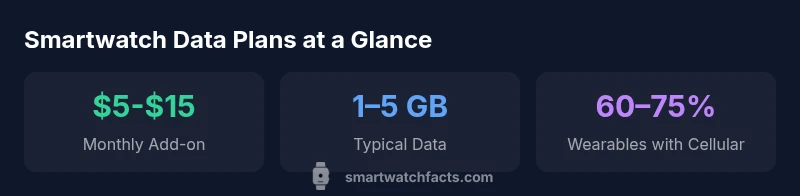
| Independent watch-only data plan | Dedicated data for watch (eSIM) | 5–15 USD per month | Best for standalone watch use |
| Phone tethering/No separate plan | No separate data plan required | N/A | Depends on watch model and OS; not always available |
People Also Ask
Do I need a separate data plan for a smartwatch?
Not always. Many watches share data with your phone plan via an eSIM or Bluetooth. If you rely on independent connectivity, a dedicated watch plan can be worthwhile.
Usually you don’t need a separate plan unless you want the watch to be fully independent for calls or GPS.
Can I use a smartwatch without a data plan?
Yes, if you only use Bluetooth or Wi‑Fi, the watch can operate without its own data line. Cellular features require a plan or a shared-data option.
Yes, you can, but cellular features won't work without data access.
Will smartwatch data plans work abroad?
Roaming policies vary by carrier and plan. Some watches support roaming features, but expect potential extra charges or coverage gaps in foreign networks.
Roaming depends on your carrier—check coverage and fees before you travel.
Are smartwatch data plans refundable?
Refundability depends on carrier terms and activation timing. Most carriers offer some window for changes, but check the agreement before purchasing.
Refund policies vary—read the terms before you sign up.
What data limit should I aim for?
Aim for a balance based on usage. If you stream GPS-heavy apps or music, lean toward higher allowances; light use may suffice with shared data.
Match your usage to data limits to avoid overages.
Which carriers offer smartwatch data plans?
Most major carriers offer some smartwatch data options. Availability and pricing vary by region, so compare locally before committing.
Check local carriers for smartwatch data options and bundles.
Is a watch data plan worth it for fitness tracking?
If GPS tracking and offline maps on the go matter to you, a watch data plan can be beneficial; otherwise, Bluetooth/Wi‑Fi may be enough.
For GPS-heavy or offline-map use, plan can be worthwhile.
“Cellular watches unlock independent connectivity, but the value depends on usage, coverage, and how a carrier structures multi-line plans.”
Key Points
- Assess your daily watch usage before choosing a plan
- Compare shared vs. independent data models for cost and reliability
- Check carrier coverage and eSIM compatibility in your region
- Use data-management practices to avoid overages
- Leverage family plans or bundles where available