Smart watch for calls and texts: A practical buying guide
Learn how to choose the best smart watch for calls and texts in 2026. This practical guide covers mic quality, cellular options, messaging apps, setup, and real-world usage from Smartwatch Facts.


A smart watch for calls and texts is a wearable that lets you place and answer calls, read and reply to messages, and manage notifications directly from your wrist. For reliable use, choose LTE-capable or a strong Bluetooth-connected model, ensure clear mic/speaker quality, and verify messaging app compatibility and contact sync with your phone.
Why a smart watch for calls and texts matters
For many people, a watch that handles calls and texts is more than a convenience—it's a primary communications device during workouts, commutes, or when your phone isn't easily accessible. A smart watch for calls and texts can reduce phone pickups, improve safety during biking, and help you stay connected when your hands are busy. When evaluating options, prioritize models that offer clear audio, reliable Bluetooth or cellular connectivity, and seamless messaging app support. Consider how you typically use your device: do you want to reply with voice, with canned responses, or via full keyboard input on the watch screen? Also assess how well the watch pairs with your phone's operating system; most wearables work across iOS and Android, but some features are limited on one platform. From a user experience perspective, a good watch should deliver fast notifications, low-latency call prompts, and accurate contact synchronization across devices. As Smartwatch Facts has found in our 2026 analysis, you’ll get the best results when you match your use case to a model that emphasizes communications features rather than pure fitness tracking.
How call quality scales across models
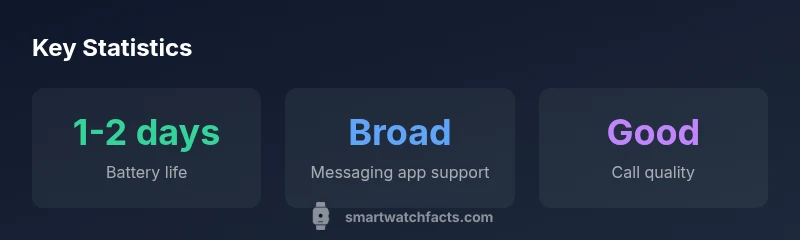
Call quality on a smartwatch depends on mic design, speaker size, noise suppression, and the proximity to your mouth. Cellular models with built-in eSIM or nano-SIM can operate standalone, but most users rely on a connected phone. In practice, even with a strong connection, static, echoes, and wind noise can degrade clarity. Manufacturers address this with wind blockers, beamforming microphone arrays, and fast DSP processing. Tests across leading devices show that a well-tuned mic and speaker arrangement can deliver intelligible conversations in quiet rooms, while windy or crowded environments still challenge most wearables. If you regularly take calls while walking or driving, look for a watch that supports advanced noise cancellation, adjustable speaker volume, and a tactile feedback mechanism when you press the call button. Additionally, verify whether incoming calls show contact photos and whether the watch can initiate calls using voice commands. While premium devices tend to deliver better sound, even mid-range models are capable of clear calls for casual use.
Battery life and standby for calls/texts
Using a smartwatch primarily for calls and texts can noticeably impact battery life compared to basic smartwatch use. Expect typical endurance in the range of 1-2 days under mixed usage, with shorter life if you enable continuous display, always-on features, or frequent voice replies. To optimize longevity, adjust screen brightness, limit always-on mode after hours, and selectively enable cellular connectivity only when needed. Some watches include power-saving modes that disable non-essential features while preserving call and message functionality. Practice hands-on testing: track a full day of normal use to see how your actual battery compares to manufacturer claims. Smartwatch Facts analysis shows that battery life varies more with screen usage and network activity than with simple notification reception, so plan around your daily routines and charging opportunities.
Connectivity options: Bluetooth vs LTE and Wi-Fi
The core decision for calls and texts is how the watch connects to your phone. Bluetooth models rely on your phone nearby; cellular (LTE) variants offer standalone calling and texting, which is ideal for activities away from your phone. Wi-Fi can provide occasional messaging when Bluetooth or cellular is unavailable, but many features require a paired device for reliability. When choosing, map your daily routine: if you frequently leave your phone behind during workouts, a true LTE-capable watch delivers the most independence. If you rarely separate from your phone, a Bluetooth-only model paired with a phone is often the most cost-effective option. Pay attention to network bands, carrier compatibility, and eSIM activation fees, which can influence ongoing costs and usability.
Messaging app support and contact sync
Not all messaging apps are created equal on wearables. Some watches natively support SMS and iMessage, while others extend to popular third-party apps like WhatsApp or Telegram. The level of integration varies by OS and manufacturer. Check how quickly messages arrive on the watch, whether you can send voice replies, and how contact syncing works—do new contacts push to the watch automatically, or is a manual sync needed? In many cases, you’ll get the best experience when the watch shares a common ecosystem with your phone (iOS or Android), ensuring consistent notifications, threaded conversations, and reliable contact search across devices. Smartwatch Facts recommends verifying app availability before purchase and testing with a trusted contact to confirm reliability.
Practical tips for setup and daily use
Getting the most out of a smart watch for calls and texts starts with proper setup. Begin by pairing with your phone, enabling notifications for calls and messages, and configuring do-not-disturb schedules to prevent overload. Create a few quick-reply templates and set up voice-to-text shortcuts if available. Customize call handling: decide whether you want to answer on the wrist or forward to your phone, and set preferred audio output (watch speaker vs. connected headset). Keep your watch software updated to access the latest messaging features and security enhancements. Finally, organize contacts and set favorites so you can reach important people with a few taps. These steps help you leverage the watch as a practical, daily communications companion.
Common trade-offs and real-world scenarios
Expect trade-offs between price, durability, and feature depth. Higher-end models may offer crisper mic performance, better noise cancellation, and broader messaging app support, but at a higher price. If you frequently work out outdoors, prioritize weather sealing and the ability to hear over ambient noise; if you need quick replies during meetings, focus on rapid voice-to-text and offline dictation accuracy. Real-world scenarios include commuting, gym sessions, and casual strolls where you want to stay connected without reaching for your phone. Understanding your routines helps you pick a model that balances call quality, battery life, and app compatibility.
How to choose the right model for your needs
Start with a needs assessment: do you require standalone calling or are you comfortable with your phone nearby? If you value independence, look for LTE-enabled watches with a robust eSIM plan. If you mostly use messaging, confirm which apps are supported and whether you can send rich replies via voice or prewritten texts. Consider the OS compatibility with your phone, the battery life under typical call/text workloads, and the ease of setup. Finally, test in-store or via return policies to confirm call clarity, notification latency, and overall usability in your day-to-day routine.
Model types for calls and texts
| Model Type | Connectivity | Key Benefit |
|---|---|---|
| Bluetooth-only | Bluetooth | Budget-friendly texting via phone tether |
| LTE-capable | Cellular | Standalone calling/texting |
| Wi-Fi + Bluetooth | Wi-Fi + Bluetooth | Phone-independent access in trusted zones |
People Also Ask
Do all smartwatches support texting?
Most modern smartwatches support SMS texting and some form of messaging app integration. Availability and depth vary by OS and model. Always verify which apps are supported on your target watch.
Most watches handle texting, but app support varies by model—check compatibility before buying.
Can I make calls from a smartwatch without my phone?
Yes, LTE-enabled watches can make and receive calls without a paired phone. If you don’t need standalone calling, a Bluetooth-connected model paired with your phone is often sufficient.
Yes—LTE watches can call on their own; Bluetooth-only watches rely on a connected phone.
Which OS supports the best messaging apps on smartwatches?
Android and iOS watches offer different app ecosystems. Check which messaging apps you rely on and whether the watch supports native or third-party clients.
OS determines which apps you can use; verify app availability for your favorites.
Is voice-to-text available on most models?
Voice-to-text is common but varies in accuracy and latency. Look for watches with good dictation performance and language support that matches your needs.
Voice-to-text is common but varies—test it to ensure it meets your expectations.
What factors affect call quality on a smartwatch?
Call quality depends on mic design, speaker size, noise suppression, and network stability. Weather, wind, and ambient noise can still affect clarity.
Mic design and network stability drive call quality; expect some challenges in noisy environments.
“Effective watch-based calling and texting hinges on a balanced mix of hardware quality and software integration. The best models deliver reliable audio, broad app support, and seamless notifications.”
Key Points
- Evaluate connectivity options before buying.
- Test mic and speaker in real-world scenarios.
- Balance battery life with how often you use calls/texts.
- Check app compatibility and contact sync with your phone OS.
- Choose a model aligned with your daily routines.