Budget Smartwatch for Seniors: Guide Under $50
Discover budget smartwatches for seniors around $49, with features, setup tips, and buying guidance to help you choose a safe, easy-to-use wearable.


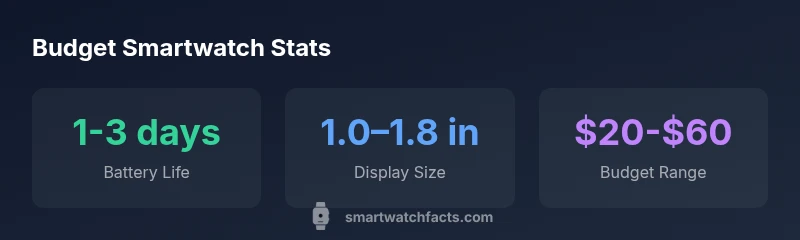
At around $49, a smart watch for seniors typically focuses on essential safety and ease-of-use features rather than premium sensors. Expect a large display, simple menus, basic health tracking, and limited app support; battery life commonly ranges from 1 to 3 days, with basic water resistance. Color screens, larger fonts, and simplified controls are typical strengths, while advanced sensors or standalone GPS are rare at this price. If you want more robust health features or LTE connectivity, plan to invest higher.
Why price targeting matters for seniors
Pricing a smartwatch around the $49 mark is not just about saving money; it’s about matching capability to need. For many seniors, a device that emphasizes readability, straightforward controls, and reliable safety features can deliver meaningful benefit without overwhelming complexity. According to Smartwatch Facts, affordable wearables in this price range tend to foreground essential functions such as large, high-contrast displays, simplified menus, and dependable battery life. Buyers should be wary of feature creep—phones and wearables that try to do too much can make everyday use frustrating. The goal is a device you actually wear every day, not a gadget you own in a closet. In the broader landscape of wearable tech, a budget option can bridge the gap between a basic fitness tracker and a full-featured smartwatch, offering enough value for daily reminders, fall alerts, and easy communication.
When evaluating a budget smartwatch for seniors, consider who will use it, what health or safety needs exist, and how much effort the wearer is willing to invest in setup and ongoing maintenance. A device that’s easy to dock on a charger, has legible fonts, and provides clear notifications tends to deliver higher real-world value. Smartwatch Facts’s analysis shows that seniors’ satisfaction hinges less on fancy sensors and more on reliability, ease of use, and clear support resources. Budget devices can still support meaningful daily routines, medication reminders, and simple fitness tracking when chosen with care.
Core features to expect at the $49 price point
At this price, most watches prioritize core, practical functionality over premium sensors. Expect a large display or adjustable font sizes, simple navigation with big icons, and basic health metrics like heart rate and step counting. You may find a small handful of life-safety features, such as a basic SOS button or quick-call options, but features like GPS tracking, advanced sleep analytics, or multi-sport modes are less common. Battery life typically ranges from 1 to 3 days depending on screen brightness and use intensity. Water resistance may be present at a modest level (IP65 or similar) but not guaranteed in all models. Always verify that the device supports easy pairing with your smartphone and has a straightforward charging approach. When shopping, compare models on readability, button size, and the responsiveness of touch targets, which are crucial for seniors with limited dexterity.
- Display and readability: Larger fonts, high contrast, and simple menus
- Safety basics: SOS/emergency call options and quick-access contacts
- Battery and charging: Manage expectations for daily or every-other-day charging
- Durability: Reasonable water resistance and robust build, but avoid fragile models
- App ecosystem: Limited, but look for an intuitive companion app with clear instructions
Screen readability and accessibility considerations
Readability is often the deciding factor for seniors choosing a budget smartwatch. Look for devices with font size adjustments, high-contrast themes (dark background with light text), and a responsive touchscreen that doesn’t require heavy tapping. Some models offer voice prompts or haptic feedback, which can ease use for people with visual impairments. If the wearer wears gloves, check for larger touch targets and physical buttons that can assist navigation. A well-designed watch should provide a simple onboarding flow that teaches contact features, how to trigger SOS, and how to review basic health metrics without navigating a long setup wizard. Always test the device’s accessibility options in-store or via a returnable trial period to ensure it fits the user’s needs.
Compatibility and smartphone pairing basics
Budget watches generally require a companion smartphone app to access most features. Android devices will typically pair through Bluetooth with more flexible app ecosystems, while iPhone users rely on specific iOS-compatible apps. Before purchasing, confirm the app is actively maintained and that it supports the wearer’s phone model and OS version. During setup, ensure the watch prompts are easy to follow, with clear steps for pairing, granting permissions, and enabling notifications. If possible, try pairing a test device with the user’s phone to verify screen readability, notification delivery, and response times. Remember that many under-$50 watches do not function as independent GPS devices; location services usually depend on the paired phone, not the watch itself.
- Check app compatibility with the user’s phone (iOS or Android)
- Ensure clear pairing instructions and permission prompts
- Verify notification reliability and readability on the target phone
- Confirm whether GPS or advanced location is smartphone-dependent
How to evaluate battery life and charging
Battery life is a perennial concern in budget wearables. Expect life between 1 and 3 days with average use, though screens set to maximum brightness can shorten this. Charging methods vary: many budget models use a magnetic dock or a small clip cable; others require a cradle. If charging speed matters to the user, compare how long it takes to reach a full charge and whether you can comfortably connect the charger with minimal dexterity. Also, assess whether the watch supports pass-through charging or has an always-on display that drains power more quickly. To maximize longevity, consider disabling nonessential features such as continuous heart-rate monitoring if battery life is short and the wearer prefers fewer interruptions during the day.
- Anticipate 1–3 day battery life with moderate use
- Prefer magnetic dock charging for ease of use
- Adjust display brightness and notifications to extend life
- Prioritize automatic sleep mode and limited always-on features
Practical buying steps and red flags
When shopping on a tight budget, plan a concise decision process. Start with essential features (readability, safety features, battery life) and then check for a straightforward setup experience. Verify the merchant’s return policy and warranty terms; a 30–60 day return window is favorable, and a basic warranty protects against manufacturing defects. Beware of models with overly optimistic marketing and limited real-world reviews. Read user feedback focusing on accessibility, battery performance, and customer support. If possible, buy from reputable sellers with clear product specifications and accessible after-sales service. Finally, ensure the device is compatible with the user’s phone and that it can be updated, as some budget wearables drop software support after a year or two.
- Prioritize readability, safety features, and easy setup
- Check return policy and warranty coverage
- Read real user reviews focused on accessibility and support
- Confirm phone compatibility and software update availability
Setup tips for immediate use and safety
To maximize early success, prepare a quick-start setup: charge fully, adjust font size to the largest comfortable setting, enable high-contrast mode, and configure emergency contacts. Add a single trusted contact for SOS and ensure notifications are configured to be audible and visible. Create a simple routine: daily reminder to check the watch, a brief morning health log, and a reminder to charge overnight. If the wearer has fall detection or health-monitoring expectations, test these features in a safe environment with a caregiver nearby. Document the steps in a simple guide so caregivers can assist if needed. Remember, simple routines reduce confusion and increase long-term use.
- Do a quick-charge test and verify full battery before first use
- Enable high-contrast display and large font
- Set up a single SOS contact and notification preferences
- Create a short, easy daily routine for the wearer
Real-world usage scenarios and case studies
Consider scenarios where a budget smartwatch can genuinely help day-to-day routines. For example, an adult caregiver might rely on the watch to remind a senior to take medications, track steps for light activity, and provide a quick way to call a family member in an emergency. In another scenario, a senior with a history of falls could benefit from an emergency button and automatic alerts if a motion sensor detects inactivity. While budget devices may lack advanced health analytics, the combination of clear alerts, simple activity tracking, and dependable notifications can improve safety and independence. Real-world reviews emphasize reliability and simplicity over a wide feature set when evaluating under-$50 wearables.
- Use reminders for medications and appointments
- Benefit from quick SOS and simple call features
- Maintain independence with reliable, visible notifications
- Favor devices with simple, caregiver-friendly setup
Maintenance, updates, and long-term support
Budget wearables often have shorter update cycles and limited ongoing support compared to premium models. To mitigate this, choose a watch from a reputable retailer and verify ongoing software update promises. Regularly check for app updates and ensure the paired phone remains compatible with the watch’s app. Consider the total cost of ownership, including replacement bands, charging cables, and potential battery degradation over time. Finally, set realistic expectations about feature longevity; a device may continue to function well for daily reminders and basic health metrics, even as software evolves. By planning for support, you’ll maximize the usefulness of a budget smartwatch for years to come.
Realistic expectations and long-term care
Budget watch comparison table
| Aspect | Budget Range | Notes |
|---|---|---|
| Battery life | 1-3 days | Depends on brightness and features |
| Display size | 1.0-1.8 inches | Larger is easier to read for seniors |
| Connectivity | Bluetooth only (no LTE) | Requires smartphone for full features |
People Also Ask
Are budget smartwatches under $50 suitable for seniors?
Yes, they can be suitable if they emphasize readability, straightforward controls, and basic safety features. They’re best when used for reminders, simple health tracking, and quick calls or alerts. Always verify the user’s comfort level with the watch’s interface and return options if it doesn’t meet needs.
Yes. They can be suitable if they’re easy to read and use, with basic safety features.
What features should I prioritize when shopping for a senior-friendly watch under $50?
Prioritize large, high-contrast displays, easy navigation, reliable notifications, basic health tracking, and a simple SOS option. Battery life and ease of charging are also critical. Avoid models that require complex setup or have small text and fiddly buttons.
Look for readability, safety features, simple setup, and good battery life.
Will these watches work with iPhone and Android phones?
Most budget watches require a companion smartphone app and work with both major ecosystems, but you may find better support on one platform. Confirm the specific model’s app availability and the OS version it supports before purchasing.
Most pair with a phone via an app; check app compatibility first.
How long does the battery typically last, and how should I charge it?
Expect 1–3 days of battery life with moderate use. Charging methods vary (magnetic dock, clip, or cradle). Choose a model with a charging method that’s easy to use and doesn’t require precise alignment.
Usually 1–3 days; pick an easy charging method.
Do budget watches have GPS or fall detection?
GPS and advanced fall detection are rare at this price. Some models might include basic SOS or emergency features, but verify feature availability for the model you’re considering.
GPS and advanced fall detection are uncommon in budget models.
“Budget wearables can deliver meaningful safety and daily-use benefits when you prioritize simplicity and support. Manage expectations by focusing on essential features rather than extras.”
Key Points
- Use price as a starting point, not a sole filter
- Prioritize readability, safety, and simple setup
- Verify compatibility with the user’s phone and app support
- Check return policy and warranty before buying
- Expect basic health features with limited premium sensors