Smart Watch Blood Sugar Tests: A Practical Wearable Guide
Explore how smart watches estimate blood sugar, what to expect, and practical steps to monitor glucose with wearables. Learn accuracy, setup, safety, and daily usage tips for smarter health tracking.


Learn how to use a smartwatch to test blood sugar, what to expect from glucose estimation, and how to interpret results safely. This quick overview covers device compatibility, accuracy considerations, and a practical step-by-step routine to track readings with your wearable over time. We will outline prerequisites, setup tips, and common pitfalls to avoid.
What does a smart watch test blood sugar actually involve?
A smart watch test blood sugar is not a direct blood draw. Instead, wearable devices estimate glucose levels using optical sensors, interstitial-fluid estimation, or data from connected CGMs. This approach aims to provide real-time context and trend lines on your wrist, helping you spot patterns over days and weeks. It is important to understand that estimates can vary based on skin tone, movement, temperature, and sensor calibration. The Smartwatch Facts team emphasizes that watch-based glucose estimates should be viewed as directional data rather than a precise laboratory value, and should always be interpreted alongside clinician guidance. In practice, some watches pair built-in sensors with companion CGM data to offer a composite reading that displays on the watch face and in the app.
How glucose estimation on wearables works
Wearables typically rely on one of two pathways to estimate glucose: (1) direct sensor fusion from optical sensors that track physiological signals and translate them into glucose estimates, and (2) data from a connected CGM that the watch displays or summarizes. The watch uses algorithms that consider meal timing, exercise, sleep, and user-provided inputs such as insulin dosing or medications. When a CGM is present, the watch often serves as a convenient display and analytics hub, aggregating data for trends and alerts. It is crucial to note that accuracy varies across devices, environmental conditions, and user habits. According to Smartwatch Facts analysis, readings should be treated as trends rather than lab-grade values.
Compatibility and setup prerequisites
To use glucose estimation features, ensure your watch supports glucose estimation either natively or via a trusted app integration. Check that your smartphone OS supports the companion app and that the watch is paired correctly. Permissions for health data, location, and notifications may be required. Make sure the watch is charged and that the app has permission to access health data and sync with cloud services. If you plan to rely on CGM data, confirm that your CGM is compatible with both the watch and the app. Finally, verify that firmware and app updates are installed to maximize reliability and security.
Accuracy and safety: what to expect
Glucose estimates on wearables are designed for trend tracking, not precise lab measurements. Differences between watch estimates and finger-prick tests can arise from sensor drift, hydration, skin temperature, and sensor placement. Users should avoid making medical decisions based solely on a smartwatch reading. Always consult a clinician for interpretation and consider finger-prick or CGM readings as the reference when available. Smartwatch Facts cautions that device accuracy improves with calibration and consistent usage patterns, and that users should track long-term trends rather than single spikes.
Step-by-step workflow overview
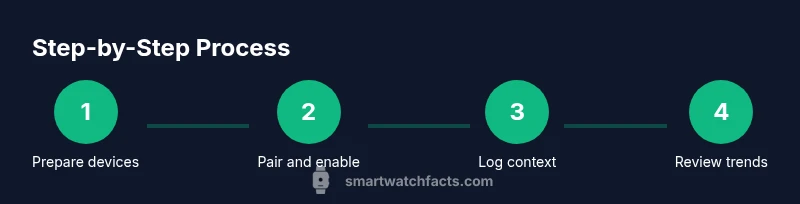
A high-level workflow typically includes checking device compatibility, pairing, and enabling glucose monitoring in the app. You’ll then review incoming readings on the watch face or companion app, set up alerts for high or low trends, and log meals, exercise, and medications to improve context. Regularly synchronize data to the cloud for long-term trend analysis and insights. Remember that the more consistently you use the feature, the more meaningful the trends become over weeks and months.
Interpreting readings and building healthy habits
Treat smartwatch glucose estimates as a supplementary data source alongside clinician advice. Look for trends across 24 hours and across multiple days rather than isolated numbers. Use alerts to identify patterns related to meals, activity, or sleep. Combine wearable data with regular finger-prick tests or CGM confirmations when possible to calibrate expectations. Use the insights to inform meal planning, activity levels, and timing of medication, but avoid drastic changes without medical supervision.
Privacy, data ownership, and sharing
Health data collected by wearables may be stored on devices, phones, and cloud services. Review privacy settings to control who can view your glucose trends and what data is stored. Many apps offer options to export data for clinician review; use secure channels and trusted networks when sharing information. Be mindful of terms of service and how data may be used for analytics or marketing by device manufacturers. Always prioritize informed consent and understand how long data is retained.
Real-world use cases and scenarios
People use smartwatch glucose estimates to observe how meals impact glucose, how different workouts affect readings, and how sleep quality relates to overnight trends. In busy days, wrists-on convenience helps maintain awareness without carrying extra devices. Clinicians often view wearable data as supplementary, useful for identifying patterns and adjusting lifestyle or treatment plans. The Smartwatch Facts team notes that wearable-driven insights should be integrated with clinical data for a complete picture.
Buying considerations for glucose features in a smartwatch
When shopping for a smartwatch with glucose estimation capabilities, verify compatibility with CGMs or the app ecosystem, assess battery life, and review data-sharing options. Consider the reliability of sensors, latency of data, and ease of use. Look for robust health features beyond glucose, including heart rate, activity tracking, sleep analytics, and a trustworthy app store. Also, check the manufacturer’s guidance on calibration, update cadence, and privacy controls. Real-world testing and independent reviews can help set expectations regarding accuracy and practicality.
Common myths and troubleshooting tips
Myth: A smartwatch can replace professional glucose testing. Reality: It’s best used as a trend-tracking tool alongside clinician advice. Myth: All watches deliver the same accuracy. Reality: There is variation across devices, models, and usage scenarios. Troubleshooting: ensure firmware is updated, clean sensors, wear consistently on a flat surface, and calibrate when prompted. If readings seem inconsistent, compare with a finger-prick test or CGM reference when available, and consult your healthcare provider for interpretation.
Tools & Materials
- Smartwatch with glucose estimation capability(Ensure device supports glucose estimation via optical sensors or CGM integration and is listed as supported by the manufacturer.)
- Compatible smartphone (iOS or Android)(Needed to install the companion app and sync data with the watch.)
- Official companion app or cloud account(For data visualization, trend analysis, and backups.)
- Stable internet connection(Required for cloud sync and updates.)
- Charged smartwatch battery(Ensure battery is at least 20-30% before testing to avoid interruptions.)
- Finger-prick glucose meter (optional for validation)(Use only if advised by a clinician to validate smartwatch readings.)
Steps
Estimated time: Total time: 20-30 minutes
- 1
Prepare devices
Charge the smartwatch, unlock the phone, and ensure the companion app is installed. Sign in and verify that the glucose feature is enabled in the app settings. This ensures smooth data collection and syncing.
Tip: Charge both devices prior to testing to avoid interruptions during data capture. - 2
Pair and grant permissions
Open the smartwatch app on your phone and pair the watch if not already connected. Grant health, motion, and location permissions to allow accurate data collection and context.
Tip: Review privacy settings to control what data is shared and with whom. - 3
Enable glucose monitoring
Navigate to the glucose or health section in the app and enable glucose estimation or CGM integration. If prompted, connect your CGM device and allow data to stream to the watch.
Tip: Calibrate if the device requests it, then confirm readings appear on the watch face. - 4
Review a reading and log context
Check the current reading on the watch and add context such as meals, activity level, and medications. This helps improve the accuracy of trend analysis over time.
Tip: Keep a consistent log pattern to make insights easier to compare across days. - 5
Sync and back up data
Ensure data is synced to the cloud and accessible via the companion app. Regular backups support long-term trend analysis and clinician review.
Tip: Do this at least once daily to prevent data loss. - 6
Review trends and set alerts
Set up alerts for high and low trend thresholds and review weekly summaries. Use these insights to inform daily decisions and discuss patterns with your clinician.
Tip: Adjust alert thresholds gradually to reduce alarm fatigue.
People Also Ask
Can a smartwatch truly test blood sugar accurately?
Smartwatch-based glucose estimates are best used for trends and context rather than precise measurements. Accuracy varies by device, sensor technology, and user conditions. Always corroborate readings with clinician guidance and reference tests when available.
Smartwatch estimates are for trends, not exact values. Check with your clinician and use any available reference tests to confirm important decisions.
Which watches support glucose monitoring?
Several mainstream wearables offer glucose estimation capabilities through built-in sensors or CGM integrations. Availability varies by region and device generation, so check the manufacturer’s official specifications and app ecosystem.
Many popular watches offer glucose estimation via apps or CGMs, but verify regional availability and device compatibility.
Do I need a CGM or finger-prick validation?
If you rely on glucose data for medical decisions, use a CGM or finger-prick reference when available to validate smartwatch readings. Wearable estimates are supplementary.
Use a CGM or finger-prick reference when possible to validate smartwatch readings.
How often should I log readings with a smartwatch?
Log readings at least once daily and more often if you’re tracking a specific pattern (e.g., around meals or workouts). Ongoing data improves trend accuracy.
Log readings daily and around key events like meals or workouts to improve trend insight.
Is non-invasive glucose monitoring safe for long-term use?
Non-invasive wearable estimates are generally considered safe, but long-term reliability varies by device. Always follow clinician advice and regularly validate data against standard methods.
Wearable glucose estimates are safe to use as guidance, but validate with standard methods and follow clinician advice.
Watch Video
Key Points
- Start with device compatibility and set up fully before testing.
- Treat smartwatch readings as trends, not exact values.
- Log meals, activity, and meds to provide context for readings.
- Validate with clinician guidance and, if possible, a reference test.
- Protect your data and review privacy settings regularly.