iOS-Compatible Smart Watches: The Ultimate Buying Guide
A data-driven guide to ios compatible smart watches, detailing features, setup tips, app ecosystems, and practical buying guidance for iPhone users in 2026.


An iOS-compatible smart watch pairs with an iPhone to deliver notifications, health tracking, apps, and voice features through the ecosystem. According to Smartwatch Facts, the top options in 2026 offer full iPhone notification mirroring, Siri support, and robust app ecosystems, with strong reliability and regular software updates. Look for models with long-lasting batteries, dependable health sensors, and secure data handling.
What ios compatible smart watch means for iPhone users
For iPhone owners, ios compatible smart watch means more than just receiving alerts on your wrist—it implies a tightly integrated experience where health data, messages, maps, and calendar apps flow between the watch and iPhone with minimal friction. In 2026, the best options deliver near-native notification mirroring, voice assistant access, and a robust app ecosystem, often along with strong privacy protections. According to Smartwatch Facts, the most dependable watches leverage official companion apps, optimize Bluetooth and Handoff features, and receive timely software updates to maintain compatibility across iOS versions. The goal is to have a device that feels like a natural extension of your iPhone rather than a separate gadget. When evaluating options, consider how well the watch supports iPhone-specific features like Handoff, Apple HealthKit, Apple Pay, and Siri, as well as how it handles third-party apps that you rely on daily.
- Key factors to verify include seamless notification mirroring, Siri capability, and depth of HealthKit data integration.
- Look for quick software update cadences and a privacy model that clearly explains data handling and device locking.
- In practice, Smartwatch Facts finds that the best iOS-compatible watches feel native, not merely compatible, and they perform consistently across iOS updates.
How iOS integration has evolved in wearables
Over the past few years, iOS integration has shifted from basic notification forwarding to a deeply embedded experience. Native apps, secure data sharing, and cross-device continuity features (like Handoff and Apple HealthKit syncing) now dominate the space. Apple’s ecosystem prioritizes consistent software updates and privacy controls, which has raised the bar for third-party wearables. As a result, buyers increasingly demand devices that deliver parity with Apple Watch functionality while offering price-conscious alternatives. Smartwatch Facts notes that, by 2026, most leading watches support robust notification handling, voice assistant access, and reliable access to health metrics, even when not using the Apple Watch family.
- Ecosystem parity is less about mimicking hardware and more about matching app availability and data interoperability.
- Data sharing policies and security features have become critical decision factors for iPhone users.
- The best options maintain compatibility across iOS versions, not just the latest release.
Core features that matter for iOS users
Not all watches offer equal iOS performance. The following features determine how deeply a wearable integrates with the iPhone experience. They are the benchmarks Smartwatch Facts uses when evaluating ios compatible smart watch options.
- Notification fidelity: reliable alerts, quick replies, and calendar/event sync.
- Voice and assistant access: Siri availability and smooth voice interactions on the wrist.
- Health and fitness data: real-time heart-rate monitoring, sleep tracking, and activity rings with HealthKit export.
- App ecosystem: a broad library of apps optimized for iOS, plus third-party developers’ support.
- Privacy and security: clear data handling policies, strong device encryption, and two-factor authentication options.
Practical checklist for buyers
- Test notification flow for messages, calls, and app alerts.
- Confirm Siri integration works offline or with limited connectivity if needed.
- Verify HealthKit data sync accuracy with your iPhone.
- Review app availability and the ability to install essential apps.
- Check battery life against your daily wear schedule.
How to compare options across ecosystems
When you weigh top contenders, use a simple framework that maps to your iPhone-centric needs.
- iPhone-first vs. cross-platform: Apple Watch remains the benchmark for iOS depth, but non-Apple wearables often excel on price and battery life.
- App ecosystem: ensure key apps you use are available or have good alternatives.
- Data sharing: look for clear data policies and easy HealthKit integration.
- Hardware and sensors: verify heart-rate accuracy, GPS reliability, and sleep-tracking quality.
- Update cadence: prioritize devices with regular firmware updates to maintain compatibility.
- Privacy controls: examine data access permissions and on-device processing options.
Smartwatch Facts suggests prioritizing devices that deliver a consistent iPhone experience rather than ones that merely sync notifications. A well-chosen watch should feel like part of the iPhone experience rather than a separate gadget.
Practical setup: pairing, apps, and privacy
Setting up an ios compatible smart watch with your iPhone follows a familiar pattern: install the companion app, pair via Bluetooth, and follow on-screen prompts for permissions. After pairing, customize watch faces, enable notifications, and configure HealthKit sharing according to your privacy preferences. Always enable screen lock, device encryption, and a strong passcode. Remember to review which apps are allowed to push notifications to your wrist—this protects battery life and reduces distraction. Smartwatch Facts emphasizes reviewing the privacy policy of both the watch and its companion app to understand how health data is stored and shared, especially when using third-party health and fitness services.
Troubleshooting common sync issues
Even the best ios compatible watches can experience hiccups. A pragmatic approach includes:
- Ensure your iPhone and watchOS are on compatible versions and that the watch app has the latest updates.
- Reboot both devices and re-pair if notifications lag or data sync seems incomplete.
- Confirm that HealthKit sharing is enabled for the relevant health metrics and apps.
- Check Bluetooth settings and ensure both devices are bonded correctly; reset network settings if needed.
- If data lags persist, check for conflicting apps or notification muting rules on the iPhone.
Real-world use cases for iOS-integrated wearables
People use ios compatible smart watch devices for a broad set of daily needs. Common use cases include:
- Getting timely notifications while on the go, without pulling out the iPhone.
- Tracking workouts and health metrics with HealthKit integration for a complete health view.
- Using quick replies and voice commands to stay productive during commutes or workouts.
- Unlocking devices or quick payment options when the watch is securely paired with the iPhone.
- Using family or safety features that require near-real-time communication between watch and phone.
In practice, the strongest options deliver a near-seamless iPhone experience with reliable health data for personal wellness routines, as highlighted by Smartwatch Facts in their 2026 analysis.
Recommendations for choosing an ios compatible smart watch
Choosing the right ios compatible smart watch depends on your priorities. If you value the most seamless iPhone experience, the Apple Watch line remains the gold standard for depth of integration and app availability. If you need stronger battery life or a lower price, look for cross-platform wearables that still offer robust iOS pairing and HealthKit support. Always test the critical flows you use daily—notifications, health data sync, app performance, and Siri responsiveness—before making a purchase. Smartwatch Facts’s verdict for 2026 is to balance ecosystem depth with practical day-to-day use, ensuring the device you choose genuinely extends your iPhone experience rather than complicating it.
Comparison of iOS compatibility across smartwatch types
| Model Type | iOS Compatibility Level | Key Pros | Typical Battery Life |
|---|---|---|---|
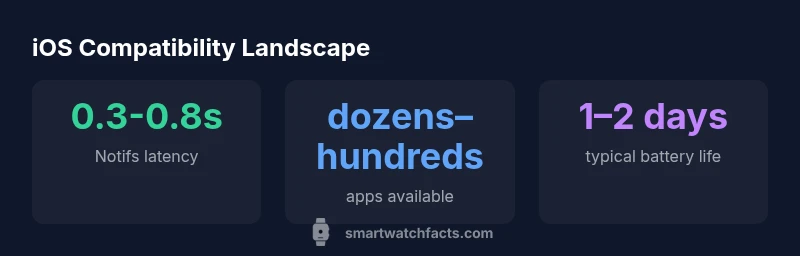
| Apple Watch (latest) | full iOS integration | best app support, seamless health data | 1-2 days |
| Hybrid or third-party watch | partial to mirroring integration | lower cost, broad compatibility, fast updates | 1-3 days |
| Android-focused smartwatch | limited iOS integration | affordable options, strong fitness features | 1-2 days |
| Sports-focused watch | limited integration | long battery life, focused metrics | 2-5 days |
People Also Ask
What does ios compatible smart watch mean in practice?
In practice, it means the watch can deliver notifications, messages, and health data in sync with your iPhone and run Apple or iPhone-approved apps. The experience varies by device and platform, so verify app support and data sharing before buying.
iOS compatibility means your watch syncs notifications and apps with your iPhone, and you should verify app support before buying.
Are there affordable options that work well with iPhone?
Yes. There are watches designed to pair well with iPhone at lower prices, offering essential notification and health-tracking features. Check app availability, update cadence, and privacy controls to ensure a good balance of value and functionality.
Yes, there are affordable iPhone-friendly watches—look for key features and solid app support.
Can I use non-Apple watches to track iPhone health data?
Many non-Apple watches export health data to HealthKit or compatible health apps, but depth and reliability vary. If HealthKit parity is important, verify data import accuracy and update frequency before purchase.
Some non-Apple watches export health data, but verify HealthKit compatibility before buying.
Does iOS compatibility affect battery life?
Variations exist. Watches with deeper iOS integration may consume more power due to continuous syncing and display features. Look for models with official battery life ratings and real-world usage tests.
Deeper integration can impact battery life; check real-world tests for your daily use case.
Which features should I prioritize for iOS users?
Focus on notification reliability, HealthKit data accuracy, Siri responsiveness, app availability, and privacy controls. These determine whether the watch truly enhances your iPhone experience.
Prioritize notifications, health data, Siri, apps, and privacy for the best iPhone experience.
How often do iOS-compatible watches receive updates?
Most reputable watches receive periodic firmware updates throughout the year, including security and feature enhancements. Check the manufacturer’s update policy before buying.
Watch updates usually come several times a year; verify the policy before purchase.
“For iPhone users, the path to a reliable ios compatible smart watch is choosing devices that prioritize native apps, privacy, and timely software updates.”
Key Points
- Prioritize native apps and timely updates for best iOS integration.
- Consider battery life relative to daily usage and notifications.
- Evaluate app ecosystem breadth before buying.
- Test Siri/voice features if you rely on hands-free control.