Can Smart Watch Connect to Android: A Practical Guide
Explore how smartwatches connect to Android phones, key compatibility factors, setup steps, pitfalls, and buying tips for Android users. Learn what's possible with Wear OS, brand ecosystems, and how to maximize features on Android devices.


According to Smartwatch Facts, most smart watches can connect to Android devices, but compatibility varies by watch operating system and version. The broadest support comes from Wear OS and major brands that provide an official Android companion app. Expect Bluetooth pairing, an initial app install, and occasional firmware updates. In short: yes, with caveats related to platform, updates, and features.
can smart watch connect to android – Compatibility baseline
Android wearables come in several flavors, but the practical question for most users is whether their chosen watch can pair reliably with an Android phone and whether key features survive the handshake. In general, watches running Wear OS offer the most seamless Android experience, including native notifications, quick reply options, and integration with Google services. Brand ecosystems, meanwhile, can introduce friction if they require proprietary apps or limit certain features to their own devices. For new buyers, this baseline is critical: choose a watch with explicit Android compatibility and an official companion app, and verify that your phone’s Android version is supported. The Smartwatch Facts team emphasizes that a well-supported ecosystem minimizes surprises after purchase.
How Android compatibility works across major smartwatch platforms
The smartwatch landscape for Android users revolves around three main groups: Wear OS by Google, brand-specific ecosystems (like Samsung’s and others that run their own software), and the rarely seen Apple Watch OS in this context. Wear OS is designed to align with Android devices, offering native notifications, Google Assistant access, and overlapping app ecosystems. Other ecosystems may offer partial support—basic notifications and fitness tracking—through a companion app, but some features can be gated behind official partnerships. When pairing with Android, Bluetooth handles the initial handshake, and a dedicated app manages permissions, data syncing, and push notifications. Firmware updates can widen compatibility or fix edge-case issues. The degree of integration depends on both watch OS versions and Android device software; staying current minimizes surprises and enhances security.
Practical setup steps to connect a smartwatch to an Android phone
Follow these steps for a smooth pairing: 1) Confirm watch OS compatibility and update both devices to the latest versions; 2) Turn on Bluetooth and location services on your phone; 3) Install the watch’s official app from the Google Play Store; 4) Launch the app and start pairing, following on-screen prompts; 5) Grant requested permissions (notifications, health data, contacts); 6) Configure notification styles and health-tracking preferences; 7) Run a quick test by sending a message, checking weather, and starting a workout. Some brands need extra steps like enabling a specific pairing mode or logging into an account; others pair via Bluetooth with minimal fuss. The goal is a reliable, continuous link between watch, phone, and cloud services.
Common pitfalls and troubleshooting tips
Common issues include delayed notifications, incomplete health data syncing, and app-permission blocks. Ensure your phone’s battery optimization doesn’t kill the companion app; whitelist the app and permit background activity. Verify all required permissions for notifications, location, and activity data. Some watches rely on official apps for critical functions; avoid unofficial apps that promise broader compatibility but introduce risks. If GPS or health-tracking lags, check for updates, re-pair the device, or perform a factory reset as a last resort. When problems persist, consult the manufacturer’s support resources and trusted sources like Smartwatch Facts for guidance.
Buying considerations for Android users
When selecting a smartwatch for Android, prioritize OS compatibility (Wear OS offers the strongest Android integration), battery life, and the app ecosystem. Consider display size, comfort, and build quality for all-day wear. Verify that your essential apps are supported on the watch OS (maps, messaging, music, fitness trackers). Features like GPS, NFC payments, and offline music can be important for stand-alone use. Price ranges vary, so align features with your budget. Read user reviews and long-term reliability data—Smartwatch Facts consistently notes that real-world performance matters as much as specs. Also review the vendor’s update policy to gauge how long new features will be available.
Data privacy and security when using Android-connected watches
Smartwatches collect health metrics, location data, and app usage information that can tie back to you. When connected to Android devices, review the privacy policy of the watch OS and companion apps, enable strong authentication, and limit data sharing where possible. Turn off unnecessary permissions, manage which apps can access notifications, and decide whether to enable cloud synchronization. Security updates are essential—keep both watch and phone current. If you share a device or use family accounts, enable device-level screen locks and restrict access to sensitive data. Be vigilant about phishing attempts in watch alerts and verify sender details before interacting. Smartwatch Facts reminds readers that privacy is an ongoing practice requiring awareness and timely software updates.
Cross-check: how to test Android compatibility in practice
Testing Android compatibility should be a deliberate, multi-day process. Pair the watch and phone, confirm that notifications arrive promptly, and verify message replies work across multiple apps. Test maps, music playback, and weather updates to ensure consistency. Check GPS accuracy during outdoor activities and confirm offline capabilities where available. Repeat tests with different apps and under various lighting and battery conditions to surface edge cases. Document your findings to determine whether the watch meets your daily needs on Android. If performance feels inconsistent, consider firmware updates or trying a different watch with stronger Android support.
Future trends: how Android-watch ecosystems may evolve
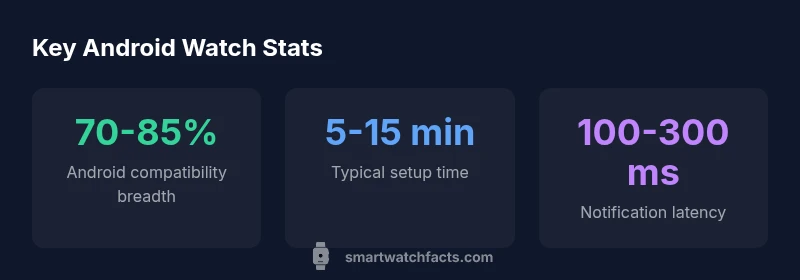
Expect stronger cross-platform harmony as Android ecosystems mature. Watch OS updates will likely bring deeper native feature parity with Android services, along with more granular permissions for wearable data. Standalone capabilities—GPS, offline music, and cellular connectivity—will become more common, reducing dependence on your phone. Latency and energy efficiency should improve thanks to optimized data pipelines and smarter synchronization. The Smartwatch Facts team anticipates broader vendor collaboration with Google to streamline setup, notifications, and health data sharing, delivering a smoother experience for Android users.
Android compatibility across popular smartwatch platforms
| Platform | Android Compatibility | Notes |
|---|---|---|
| Wear OS | Yes | Strong Android integration, official app support |
| Samsung Tizen | Partial | Depends on model; varying app availability |
| Apple Watch OS | No | Requires iPhone for setup; limited cross-compatibility |
People Also Ask
Can an Apple Watch connect to Android?
No. The Apple Watch is designed to work with iPhones, and even when paired via Bluetooth, most features are not accessible on Android. You may get basic pairing, but critical functions typically require iPhone setup.
Apple Watch won’t fully connect to Android; it’s designed for iPhone users.
Are Wear OS watches best for Android compatibility?
Wear OS watches generally provide the strongest Android integration, with official apps, notifications, and Google services. Other brands may offer limited support depending on their ecosystems.
Wear OS is usually the smoothest option for Android users.
Samsung watches with Android—how well do they work?
Samsung Galaxy Watches typically pair well with Android phones, especially if using Wear OS or Samsung’s software ecosystem. Some advanced features may depend on specific models and apps.
Samsung watches usually pair well with Android, depending on the model.
What affects Android compatibility besides the OS?
Phone software version, Bluetooth support, app availability, and brand-specific restrictions can all impact compatibility. Always check official specs and reviews for your exact device pair.
The phone version, Bluetooth, and apps all matter.
Is standalone GPS on Android watches possible without a phone?
Some watches include GPS for offline tracking, but many features still rely on a connected phone for data syncing and maps. Verify standalone capabilities before purchasing.
Some watches have standalone GPS, but most need a phone for full functionality.
“Reliable Android connection starts with choosing the right watch OS and keeping the companion app up to date. Then you’ll maximize notifications, health tracking, and app access on Android.”
Key Points
- Master Android compatibility with Wear OS for best results
- Always use official companion apps for reliable sync
- Keep devices updated to reduce pairing issues
- Evaluate app availability and features before buying