Difference Between Smartwatch and Android Watch: An Analytical Guide
Explore the difference between smartwatch and android watch, with OS, compatibility, features, and buying guidance to help you pick the right wearable for your phone ecosystem.


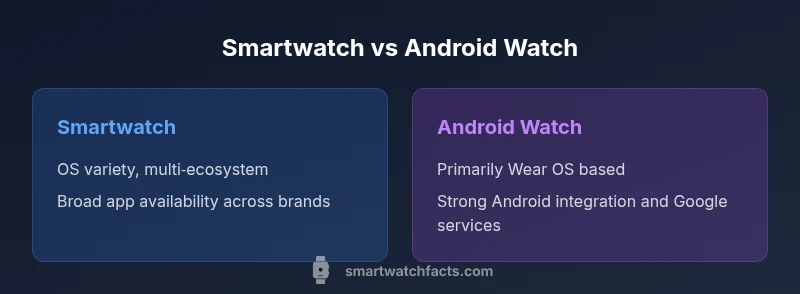
The difference between smartwatch and android watch centers on operating system and ecosystem alignment. A smartwatch is a broad category of wearables that tracks health, notifications, and apps across brands, while an Android watch usually refers to devices running Wear OS designed to work tightly with Android phones. If you use Android, a Wear OS device often yields smoother Google services and app support; if you want broad compatibility across iOS and Android, seek watches that offer cross‑platform features. In short, choose based on your phone ecosystem and your app needs.
What counts as a smartwatch vs Android watch
Understanding the distinction between a smartwatch and an android watch helps you make an informed choice. A smartwatch is a broad category of wearable devices that offer a screen, sensors, and software to perform tasks without pulling out your phone. An android watch is a subset of smartwatches that specifically runs Wear OS or an Android-aligned software layer and is designed to integrate tightly with Android devices. In practice, many brands blur the line by offering features that work across ecosystems, but the operating system and app strategy often determine how you experience notifications, navigation, and apps. According to Smartwatch Facts, the most decisive factor is your phone’s ecosystem, because it shapes app availability, updates, and cross‑device functionality. If you own an Android phone and rely on Google services, an android watch frequently provides the most seamless workflow. If you want multi‑platform flexibility or richer iOS compatibility, you may prefer a smartwatch with broader OS support. The difference, then, is not only hardware but software strategy and ecosystem alignment.
Operating systems and app ecosystems
Operating systems define the user interface, app availability, and the way you interact with features like voice assistants and notifications. A smartwatch can run multiple OS families depending on the manufacturer and model, including Wear OS, watchOS, and other proprietary systems. An android watch, by contrast, usually emphasizes Wear OS or another Android‑aligned layer that prioritizes Google services, app parity with Android devices, and smoother integration with Android smartphones. The app ecosystem matters: Wear OS tends to offer a wide range of Google apps and third‑party options, while watchOS has strong native apps and a tight integration with Apple services. For developers and users, this means the quality, performance, and availability of apps can vary significantly between platforms, even for similar hardware. This variance is one reason shoppers focus on ecosystem compatibility, as it affects everyday tasks like messaging, payments, and health tracking. Smartwatch Facts highlights that ecosystem alignment is often the deciding factor for long‑term satisfaction and software longevity.
Smartphone compatibility and cross‑platform use
Compatibility with your smartphone is a major determinant of value. Android watches typically pair best with Android phones, enabling deeper Google service integration, easier device pairing, and broader smartwatch features. Some limited functionality can remain on iPhone, but features like app availability, messaging, and health data sharing may be restricted. Smartwatch compatibility with iOS varies by brand and OS; some devices offer cross‑platform convenience, while others work best within one ecosystem. When evaluating difference between smartwatch and android watch, consider how critical Google services, Siri, or third‑party apps are to your daily routine. If you switch between iPhone and Android, you may prioritize watches that emphasize broad compatibility and easy data transfer across platforms. Smartwatch Facts notes that real‑world usage often hinges on how well your chosen watch integrates with your primary phone type.
Hardware, sensors, and health tracking
Hardware quality and sensor availability influence the user experience as much as software. Both generic smartwatches and android watches offer core sensors such as heart rate monitors, accelerometers, GPS, and SpO2 sensors, but the exact sensor suite can vary by model. Wear OS devices tend to emphasize broad compatibility and Google ecosystem integration, while devices running other OS families may excel in specific health features or battery‑friendly modes. When you compare, look for sensors that matter to you (e.g., sleep tracking, ECG, skin temperature) and verify whether the data flows into your preferred health apps. The practical takeaway is to align sensors with your wellness goals, rather than relying solely on brand prestige. Smartwatch Facts emphasizes that sensor quality often correlates with use‑case demand in health tracking and athletic performance.
App availability, performance, and updates
App availability is a practical constraint in any smartwatch decision. Android watches with Wear OS generally access Google Play‑branded apps, though app quality can vary by developer and device. Watches running watchOS or other OS variants may rely on their respective app ecosystems, which can offer more optimized integrations but fewer cross‑platform options. Software updates are uneven across brands and OS families, affecting security, new features, and compatibility with newer phone OS versions. Consumers should assess how often an OS receives updates, how long updates are supported, and whether essential apps they rely on are actively maintained. Smartwatch Facts reminds readers that ongoing software support often has a longer horizon on established ecosystems, improving long‑term value.
Battery life and charging expectations
Battery life remains a critical consideration and often drives the overall user experience more than any other feature. Across the smartwatch category, battery performance is highly sensitive to display settings, always‑on modes, GPS use, and health monitoring intensity. Android wearables with Wear OS may push battery drain when Google services remain active, while devices on other OS families might optimize for power efficiency differently. Shoppers should weigh daily charging convenience against feature set. If you frequently rely on GPS and heart‑rate monitoring throughout the day, you’ll likely favor devices with more forgiving power profiles. In any case, plan for a charging routine that aligns with how you wear the device daily.
Design, wearability, and display technology
Design aesthetics and display quality influence user satisfaction as much as performance. Smartwatches across brands come in a range of case sizes, materials, and strap options. Android watches often emphasize modularity and customization, allowing users to tailor faces, widgets, and shortcuts. Watches in other OS families may highlight premium build quality, refined watch faces, and smoother animations. For practical usage, choose a display that is legible in daylight, comfortable on the wrist, and has sufficient brightness for outdoor activities. Weight, thickness, and band material can also affect wearability during sleep or workouts. Smartwatch Facts advises open‑minded shoppers to evaluate fit, comfort, and screen readability alongside OS features.
Price ranges and value for money
Price is a major factor, and smartwatch pricing spans a wide spectrum from budget to premium devices. Android wearables often share price bands with other smartwatches, but the total cost of ownership depends on features, build quality, and after‑sales support. If you’re budget‑conscious, you’ll find competent Android watches or general smartwatches in the lower to mid range, while enthusiasts may gravitate toward premium models with advanced sensors and longer software support. When comparing value, consider not just initial cost but ongoing expenses such as replacement bands, service plans, and the likelihood of long‑term OS support. Smartwatch Facts emphasizes that value is best judged by how well the device meets your daily needs and how reliably the ecosystem continues to deliver apps and features over time.
Practical decision trees: who should buy which
If you own an Android phone and rely heavily on Google services, prioritize Wear OS devices for the tightest integration and fastest app support. If you are an iPhone user or want cross‑platform flexibility with broad app availability, consider a smartwatch with strong cross‑platform support or a platform‑agnostic option. For buyers who expect longevity and consistent software updates, weigh brand commitment and the likelihood of long‑term support. If you want a premium experience with top‑tier hardware and exclusive watch faces, target well‑established ecosystems. Smartwatch Facts suggests laying out your must‑have features (GPS, ECG, water resistance, sleep tracking) and then mapping those to the compatible OS and devices.
Setup tips and getting the most from your device
Launching a smartwatch involves pairing with your phone, adjusting notifications, and selecting fitness metrics to track. Start with a clean pairing, install core apps you rely on, and customize watch faces for quick access to essential information. Enable health data syncing with your preferred app, and configure privacy settings to control data sharing. If you frequently switch computers and phones, consider devices that support smooth data export and de‑pairing. Remember to update firmware and apps to benefit from security patches and new features. These steps help you maximize the utility of either smartwatch category while minimizing setup friction.
Common misconceptions and pitfalls
A common misconception is that Android watches always provide the best experience with Android phones, while other OS options guarantee universal compatibility. In reality, performance depends on the specific device, app availability, and software optimization. Pitfalls include assuming every feature works identically across platforms, ignoring data privacy controls, and underestimating battery drain from constant heart‑rate monitoring and GPS. Smartwatch Facts encourages buyers to test real‑world usage, confirm app parity, and review long‑term support plans before purchasing. With careful evaluation, you can avoid overpaying for features you won’t use and pick a device that genuinely fits your daily routine.
How to transition between ecosystems
If you’re moving from one ecosystem to another, plan a gradual transition to maintain data continuity. Check which apps support cross‑platform syncing, export historical health data when possible, and set up data backups before switching devices. Be mindful of service closures, cloud storage limits, and vendor lock‑in that could affect your ability to transfer information. Smartwatch Facts recommends timing your purchase to align with OS support lifecycles and verifying the ease of transferring contacts, messages, and health records. With deliberate planning, a transition can be smoother and preserve your most important data.
Comparison
| Feature | Smartwatch (Generic) | Android Watch (Wear OS) |
|---|---|---|
| Operating System | Varies by model/brand (watchOS, Tizen, etc.) | Wear OS focused on Android ecosystems |
| App Ecosystem | Cross‑brand apps; quality varies by model | Google Play and Wear OS apps; Android‑friendly |
| Smartphone Compatibility | Multi‑platform; feature parity varies by model | Best with Android; iOS support varies by device |
| Health Sensors | Core sensors; depth depends on model | Broad sensor support; emphasis on fitness apps |
| Software Updates | Brand‑dependent; update cadence varies | Wear OS updates tied to Google/partner cadence |
| Price Range | Budget to premium across brands | Mid to premium; value hinges on ecosystem |
Strengths
- Wide range of devices and price points across brands
- Flexible compatibility with multiple ecosystems
- Rich health and fitness tracking options depending on model
- Strong app ecosystems for everyday tasks
Weaknesses
- Fragmentation across OS versions and device support
- Variable app quality and optimization by platform
- Cross‑platform feature parity can be incomplete
- Battery life can vary with always‑on features
Wear OS watches excel for Android users; general smartwatches suit multi‑ecosystem buyers
Choose Wear OS if you live in the Android world and rely on Google services. If you need broader OS compatibility or iPhone integration, a more platform‑agnostic smartwatch is typically the better fit.
People Also Ask
What is the main difference between a smartwatch and an Android watch?
The main difference is OS and ecosystem alignment. An Android watch typically runs Wear OS and integrates closely with Android devices, while a smartwatch is a general term for wearables that can run various operating systems. Your experience depends on the OS and app support, not just the hardware.
The main difference is the operating system and ecosystem—Wear OS devices pair best with Android, while smartwatches cover multiple systems and brands.
Can an Android Watch work with an iPhone?
Some basic functions may work with an iPhone, but full compatibility and app support are typically limited compared with pairing to an Android device. If iPhone compatibility is important, verify supported features before purchase.
You can pair some android watches with iPhone, but many features will be limited.
Do all smartwatches run Wear OS?
No. Not all smartwatches run Wear OS; many use watchOS (Apple), Samsung’s platforms, or other proprietary systems. Wear OS is common on Android‑focused devices, but platform diversity remains significant.
No—there are several OS choices, with Wear OS being common but not universal.
Which is cheaper: a smartwatch vs an Android watch?
Prices vary widely within both categories. You can find budget, midrange, and premium options in each category, so your choice should align with features you actually use and the ecosystem you prefer.
Prices vary a lot; both categories have budget and premium options.
What should I consider when choosing between them?
Prioritize smartphone compatibility, app availability, battery life, health sensors, and overall ecosystem support. Also consider long‑term OS updates and support, as this affects value over time.
Think about your phone, apps, battery life, and data support when choosing.
Are there notable health features that differ?
Both categories offer core health sensors like heart rate and GPS; some platform ecosystems enable exclusive features or third‑party integrations. Verify which features matter most to your health goals and ensure the device supports them.
Health features vary by model and OS; check what you need before buying.
Key Points
- Define your phone ecosystem first before choosing.
- Wear OS is best for Android‑heavy users seeking Google services.
- If you use iPhone, verify cross‑platform capabilities before buying.
- Expect variability in app quality and battery life across brands.
- Budget options exist; match features to daily needs.