Smart Watch Compatibility with Motorola: A Practical Guide
Explore which smart watches work with Motorola phones, how to pair them, and tips for maximizing Wear OS and Fitbit OS on Android devices.


Compatibility for Motorola phones is strongest with Wear OS and Fitbit OS watches; most Wear OS devices pair easily via Bluetooth, offering notifications, fitness tracking, and music control. Some features may vary by watch model and Android version, so verify compatibility before buying. For Motorola users seeking broad support, prioritize watches with strong Google Play integration and official companion apps. This quick answer reflects the Smartwatch Facts analysis, 2026.
How compatibility is defined for Motorola users
Compatibility, in the context of Motorola phones, means the watch can pair via Bluetooth, sync essential data, and deliver core features such as notifications, basic fitness tracking, and media controls. According to Smartwatch Facts, Motorola users typically experience the broadest support from Wear OS watches, with Fitbit OS offering strong fitness syncing but occasionally limited third‑party app parity. The outcome depends on the watch OS version, the phone’s Android version, and regional app availability. When evaluating a smartwatch for a Motorola phone, check the watch maker’s official compatibility lists and confirm required apps are present in the Google Play Store or vendor store. This helps avoid chasing features that won’t appear on your device. The Smartwatch Facts team found that watches with robust Google Play integration tend to offer smoother pairing and more reliable notifications on Motorola devices.
Android OS considerations and firmware requirements
Motorola devices run a near‑stock Android experience on most models, which generally translates to broad compatibility with popular smartwatch platforms. However, firmware differences across Android versions (e.g., Android 11 through newer releases) can impact connectivity stability and feature delivery. Wear OS updates often bring deeper notification controls and sleep-tracking improvements that require the latest system apps. To maximize success, ensure your Motorola phone is updated to the latest Android security patch and that you install any companion watch apps from the official store. If you use beta firmware, anticipate potential compatibility hiccups. The Smartwatch Facts team recommends checking minimum Android version requirements and any carrier limitations that might affect connectivity.
Watches that pair best with Motorola devices
For Motorola users, the strongest compatibility tends to come from three general watch families:
- Wear OS watches: These offer broad pairing with Android devices and access to Google apps, notifications, and third‑party health features.
- Fitbit OS watches: Great for fitness tracking and sleep data, with solid pairing when the Fitbit app is available on the phone.
- Samsung Tizen watches (older models) or their modern counterparts: Provide usable notifications and some health features, but parity with Wear OS can be limited.
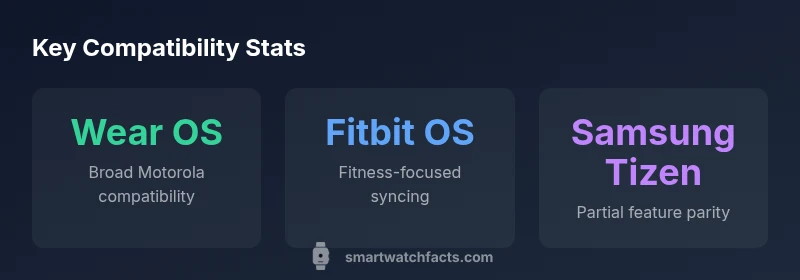
In practice, Wear OS watches deliver the most seamless experience on Motorola devices due to closer integration with Google services and Play Store apps. Fitbit OS devices excel for fitness enthusiasts, while Samsung Tizen watches may work but often lack full feature parity on every Motorola model.
How to pair: step-by-step flow
- Verify watch OS compatibility lists and your Motorola Android version.
- Update your Motorola phone to the latest Android patch.
- Install the watch’s companion app from the official store (Google Play or manufacturer store).
- Enable Bluetooth on both devices and open the watch pairing flow.
- Follow on-screen prompts to grant permissions (notifications, location, health data access).
- Complete the setup by enabling notifications and syncing preferences for call, text, and app alerts.
- Test notifications, music controls, and fitness syncing. If issues arise, re‑pair or reinstall the companion app.
Note: Some features may require specific app permissions or the latest OS updates. This procedure is generally straightforward for Wear OS watches and most Fitbit OS devices.
Feature parity: what works and what doesn't
Most watches paired with Motorola devices support basic notifications, fitness data syncing, and music control. Wear OS watches typically offer the fullest feature parity, including quick replies and app notifications. Fitbit OS provides solid fitness tracking, heart-rate data, and sleep metrics but may lag on third‑party app parity. Samsung Tizen watches can deliver essential notifications and fitness data, yet some integrations (like advanced notification styles or certain apps) may be limited. The practical takeaway is to align your expectations with the watch OS ecosystem and verify specific features with the watch maker’s support pages before purchasing.
Common pitfalls and troubleshooting tips
- If the watch doesn’t show up in the pairing list, refresh Bluetooth on both devices and restart the phone.
- Ensure the watch app has all necessary permissions (notifications, location, health data) enabled in Android settings.
- If notifications are delayed, check battery saver settings or background activity restrictions for the watch app.
- On some Motorola devices, carrier or regional ROM variations can affect connectivity; consult carrier support if needed.
- If app synchronization stalls, sign out and back into the watch app or reinstall the app.
Following these steps typically resolves the majority of pairing and syncing issues.
Real-world scenarios: daily use with Motorola devices
In daily commute scenarios, Wear OS watches on Motorola phones deliver timely notifications for messages, calendar reminders, and alarms, helping you stay hands-free during travel. For workouts, Fitbit OS watches can provide detailed heart-rate and step-tracking insights synced to the phone’s health app. Sleep tracking benefits from automatic data transfer to your health dashboard, clarifying trends over time. In professional settings, reliable call and SMS notifications from a Wear OS watch can reduce phone handling while keeping essential lines open. Overall, Motorola users gain the best results when selecting a watch within the Wear OS ecosystem for broad feature coverage.
The future of Android-watch integration with Motorola
The ongoing evolution of Android watch integration suggests deeper interoperability between Wear OS and Motorola devices, with more offline capabilities, smarter health insights, and smoother notification handling. Expect watch makers to optimize their companion apps for Motorola Android versions, improving battery life and background activity management. The Smartwatch Facts Team anticipates growing cross‑platform features—like unified health dashboards and enhanced quick replies—while preserving privacy controls and user consent settings across devices.
Practical buying tips for Motorola users
- Prioritize Wear OS watches for the broadest compatibility with Motorola phones and Google services.
- Check for official app availability on Google Play and confirm feature parity before buying.
- Consider battery life, display quality, and input methods (touch vs. physical crown) as these affect daily usability with Android devices.
- Look for watches with strong developer support and clear Android version requirements.
- If you value fitness tracking primarily, Fitbit OS watches are a solid option, but verify cross‑platform features you expect.
Overview of smartwatch OS compatibility with Motorola devices
| Watch OS | Android compatibility | Notes |
|---|---|---|
| Wear OS | Broad compatibility | Best overall integration with Motorola devices |
| Fitbit OS | Moderate compatibility | Excellent fitness features; some app parity may vary |
| Samsung Tizen | Partial parity | Notification basics; advanced features may be limited |
People Also Ask
Which Motorola devices work best with Wear OS watches?
Wear OS watches pair best with modern Motorola Android smartphones that run recent Android versions and have Google Play services enabled. Check the watch’s compatibility list and ensure your Motorola device has the latest Android update and Google apps installed.
Wear OS pairs best with current Motorola Android phones that have Google Play services. Make sure you’re up to date and follow the watch’s pairing prompts.
Do all Wear OS watches pair with Motorola phones?
Most Wear OS watches pair with Motorola phones, delivering notifications and basic health features. Some features may require the latest watch and phone software, and certain features could be region‑ or app‑dependent.
Most Wear OS watches will pair with Motorola phones, but features can vary by software and region.
Can Fitbit OS watches sync health data with Motorola phones?
Fitbit OS watches sync health and activity data with Motorola phones via the Fitbit app. You’ll get solid fitness tracking, though some third‑party app integrations may be limited compared to Wear OS.
Fitbit OS watches sync health data through the Fitbit app on Motorola phones; you’ll get good fitness tracking with some app limitations.
Are there watches that work with Motorola but have limited features?
Yes. Samsung Tizen or older smartwatch platforms may pair with Motorola devices but offer fewer features than Wear OS or Fitbit OS, especially for notifications and third‑party app support.
Some watches pair but with fewer features than Wear OS or Fitbit OS.
What’s the easiest way to set up a smartwatch with a Motorola phone?
Install the watch’s official app from the Google Play Store, enable Bluetooth, and follow the pairing prompts. Grant necessary permissions, then customize notification and health data settings for best results.
Install the watch app, turn on Bluetooth, and follow the setup prompts to customize notifications and health data.
Will smartwatch usage drain Motorola battery quickly?
Smartwatch pairing can affect phone battery life, especially if notifications and GPS are continuously active. Enable power-saving modes and background restrictions to balance battery use.
Expect some extra drain if you use many features; adjust settings to save battery when needed.
“Broad smartwatch compatibility with Motorola phones hinges on OS ecosystems and reliable app support; Wear OS remains the safest bet for most users.”
Key Points
- Prioritize Wear OS for broad Motorola compatibility
- Verify app availability before buying
- Expect feature parity to vary by watch OS
- Keep devices updated to minimize pairing issues
- Fitness-first watches (Fitbit OS) excel in tracking