How to Charge a Smartwatch Without Its Charger
Discover safe, practical methods to power your smartwatch without its original charger. This guide covers USB power banks, wireless pads, and compatible docks, with safety tips and step-by-step instructions for common models.


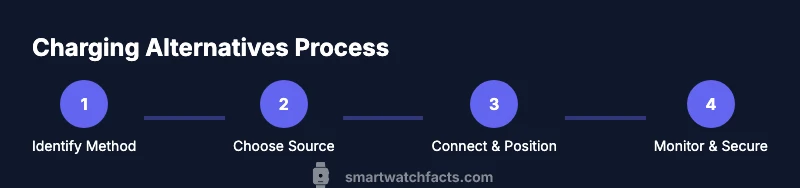
You can safely charge a smartwatch without its charger by using alternative power sources and compatible adapters. First, identify your watch’s charging method, then choose a USB power bank, a compatible wireless charging pad, or a DIY charging dock that matches the contacts. This quick guide covers safe steps, common risks, and practical tips.
Understanding charging options for smartwatches
Charging a smartwatch without its charger means leveraging alternative power sources and compatible accessories. Not all methods work for every model; some watches rely on magnetic charging docks, others support Qi wireless charging, and many Garmin or Fitbit devices use proprietary cradles. The Smartwatch Facts team emphasizes that safety starts with confirming your model’s charging method in the user manual or official support site. Once you know the method, you can choose a safe, reliable power source and avoid risky improvisations. In this section we outline the common categories and what to expect from each. Remember that using the wrong method can damage battery health or void warranties, so verify compatibility before connecting any third-party accessory.
Safety considerations and risks
Charging without the original charger introduces several risks: overheating, short circuits, or damaging charging contacts. Avoid improvised connections, exposed wires, or DIY power sources that do not specify current limits. Always use reputable third-party accessories that are certified for your watch type, and never attach chargers to wet surfaces. If your watch shows unusual heat, blinking indicators, or a warning, discontinue charging and consult official support. By understanding these risks, you can minimize harm to the battery and your device over time. From a practical standpoint, never leave a charging setup unattended for long periods, and unplug if you smell burning plastic or notice unusual smells.
Practical methods to charge without a charger
This section covers practical, commonly available options that work for many watch models. It is not a substitute for the manufacturer-provided charger, but it can keep you powered when the charger is misplaced or lost. Always check your model's compatibility. If your watch uses a magnetic charging dock, a compatible third-party dock may work; if it supports wireless charging, a Qi pad can work when the watch is designed for it; for many watches, a proprietary cradle is required. In all cases, use only reputable accessories and avoid heat buildup. Smartwatch Facts suggests prioritizing official accessories or certified third-party options to minimize risk.
Common mistakes and troubleshooting
People often try to charge a watch with incorrect adapters, dangerous DIY power supplies, or on damp surfaces. These mistakes can cause heat buildup, short circuits, or sensor damage. If charging is slow or the watch gets unusually warm, stop charging, re-check compatibility, and switch to a safer method. Use dry, stable work surfaces, and avoid metal objects that could short the contacts. If problems persist, contact the brand's support channel for guidance rather than forcing a solution.
Tools & Materials
- USB power bank(Capacity sufficient for multiple charges and a properly matched cable)
- Qi-compatible wireless charging pad(Only if your watch supports wireless charging; check compatibility)
- Official or certified charging dock/cradle(Preferred when available for your model)
- Quality charging cable(Use a good-quality cable from a reputable brand)
- Dry, non-conductive mat(Keeps the charging area clean and safe)
Steps
Estimated time: 15-25 minutes
- 1
Identify charging method
Check the watch manual or official support page to determine whether your model uses a magnetic dock, Qi wireless charging, or a proprietary cradle. Knowing the method determines which accessory you should use.
Tip: If you’re unsure, search for your model name + ‘charging method’ on the manufacturer site. - 2
Gather compatible power sources
Choose a power source that matches your watch’s charging method and is certified for safety. Gather a USB power bank, a wireless pad (if supported), and any needed cables or docks.
Tip: Prioritize certified accessories to reduce risk. - 3
Connect the power source
Attach the power source to the watch’s charging connector or pad using the correct cable or cradle. Ensure connections are snug and free from moisture or dust.
Tip: Always unplug if you smell burning or see discoloration. - 4
Position the watch correctly
Place the watch so that the charging contacts align with the charger’s pins or the pad’s center. A misalignment can slow charging or stop it entirely.
Tip: Use a flat, non-slip surface to prevent shifting. - 5
Monitor and disconnect safely
Watch the charge level and disconnect when full or after a reasonable time to avoid overcharging in the absence of smart protections.
Tip: Set a timer if your watch lacks automatic stop.
People Also Ask
Is it safe to charge a smartwatch without its charger?
Yes, safely when you use the device’s compatible alternative and certified accessories. Avoid improvised methods that could cause damage.
Yes, it can be safe when you use a compatible method and certified accessories.
What power sources can I use besides the charger?
A USB power bank, a Qi-compatible wireless pad (if supported), or a certified docking cradle are common options. Always verify compatibility first.
You can use a USB power bank, a wireless pad if your model supports it, or a certified docking cradle.
Will charging without the charger damage the battery?
If you use appropriate methods and avoid heat or overcharging, risk is minimized. Never use unsafe, makeshift supplies.
If you use proper methods and avoid heat, the risk is minimal.
Can I use any Qi wireless pad for my smartwatch?
Only if your watch supports wireless charging and is designed to work with Qi pads. Many watches use proprietary charging.
Only if your watch supports wireless charging and is compatible with Qi pads.
How long does it take to charge using alternative methods?
Times vary by method and watch model. Expect longer durations than with the original charger, and stop if heat appears.
Charge times vary by method and model; expect longer durations than with the original charger.
What safety precautions should I take?
Use dry surfaces, certified accessories, and monitor for heat or odd smells. If in doubt, consult official support.
Keep things dry, use certified gear, and watch for heat or odd smells. Check with support if unsure.
Watch Video
Key Points
- Identify the correct charging method for your watch
- Use a safe power source with proper compatibility
- Avoid improvised adapters and unsafe setups
- Refer to manufacturer guidance for best results