Smart Watch Battery Comparison: Endurance, Charging, and Efficiency
A data-driven smartwatch battery comparison analyzing real-world endurance, charging speeds, and power features across budget to flagship models. Learn practical tips to maximize life and navigate the trade-offs in wearables.


In a smart watch battery comparison, endurance hinges on display tech, sensor load, and OS efficiency rather than marketing claims. Look for models that balance real-world endurance with reasonable charging speed and power-saving features. Our data-driven approach from Smartwatch Facts helps you prioritize what matters most for daily use.
What drives smart watch battery life
When conducting a plain-language smart watch battery comparison, it’s essential to tether expectations to real-world use rather than marketing promises. The core drivers are hardware capacity, display efficiency, and how aggressively the system manages background tasks. The Smartwatch Facts team emphasizes that the biggest endurance gaps typically arise from two areas: display technology (brightness, refresh rate, and always-on capabilities) and ongoing sensor activity (GPS, heart-rate monitoring, continuous SpO2 tracking). Translating specs into everyday life means mapping typical routines—checking notifications, workouts with GPS, sleep tracking, and power-saving modes—to the watch’s energy profile. Importantly, the analysis should be anchored by practical tests across several models to avoid a single benchmark misrepresenting broad outcomes. In the broader field, the smart watch battery comparison becomes actionable when it aligns with your daily rhythm and preferred features.
Screen technology and usage patterns
Display technology is a major energy sink, especially in bright environments or when the screen uses high refresh rates. Watches with LTPO panels, dynamic refresh, or flexible duty cycles adjust performance to save power, particularly during idle moments. Resolution and color depth also influence power draw, but software optimization can often compensate. Always-on displays (AOD) are convenient but can shorten life if left on constantly. From a practical standpoint, the Smartwatch Facts team notes that a watch with efficient display management and smart wake behavior often outperforms a technically comparable model with a more power-hungry screen. When evaluating a smart watch battery comparison, consider how often you actually rely on AOD and whether adaptive brightness is enabled.
Active features that drain power
Beyond the screen, core sensors and connectivity drive battery consumption. GPS usage for workouts, continuous heart-rate monitoring, SpO2 tracking, and even NFC or cellular connectivity can noticeably reduce endurance. The level of usage matters more than the presence of these features. For instance, a watch that sails through everyday notifications with minimal background polling will often last longer than one constantly woken by every update. The takeaway for a practical comparison is to assess which features you truly rely on, and whether the watch offers granular controls to throttle sensor activity without sacrificing essential health data or fitness tracking.
Charging ecosystems and speeds
Charging architecture matters as much as stamina. Wireless charging pads, magnetic connectors, and cable-based methods each have pros and cons in terms of convenience and perceived speed. A well-engineered charging system minimizes heat, which otherwise degrades battery health over time. The smart watch battery comparison should look at how quickly a watch recovers from low battery states, how well it handles partial charges, and whether the device supports fast charging or optimized charging to protect longevity. In practice, a model with a robust charging ecosystem reduces “dead time” and keeps you productive, especially if you rely on your smartwatch for timely alerts during the day.
Software efficiency and OS energy management
Software efficiency is often the silent driver of endurance. How an operating system schedules tasks, handles background refresh, and negotiates resource allocation can have as much effect as hardware. Efficient wake/sleep cycles, aggressive power-saving modes, and thoughtful app lifecycle management are the hallmarks of a strong battery profile. The Smartwatch Facts team highlights that even two watches with similar hardware can exhibit markedly different real-world battery life due to software optimization. When performing a smart watch battery comparison, scrutinize firmware updates, power-saving options, and the ease with which you can customize notifications and background activity to fit your routine.
Real-world vs marketing claims in smart watch battery life
Marketing often paints an optimistic picture, while real-world data reveals a more nuanced picture. Independent reviews, long-term wear tests, and user surveys tend to capture variability across usage scenarios. Smartwatch Facts analysis shows that claims about endurance are most trustworthy when they include diverse test conditions—exercise with GPS, streaming music, heavy notifications, and rest-day idle periods. A balanced comparison presents both the optimistic marketing language and the grounded results from hands-on testing, helping you gauge how each model performs under your typical load. This approach reduces the risk of overpaying for unrealistic expectations.
Practical strategies to extend daily endurance
If you want to maximize life between charges, start with behavior changes and feature tuning. Enable power-saving modes during lighter days and disable nonessential notifications. Reduce screen wake frequency and consider lowering brightness or enabling adaptive brightness. Turn off always-on display when you don’t need it, and minimize GPS usage during daily commutes. Review app permissions—allow only necessary background activity—and keep firmware updated to benefit from energy efficiency improvements. Finally, learn the charging habits that fit your rhythm: bulk charging overnight or quick top-ups during the day have different implications for long-term health. The best outcomes come from aligning software settings with your actual routines.
How to pick a watch based on battery priorities
Choosing a model that fits your battery priorities requires clarity about your daily pattern. If you’re often away from a charger or rely on GPS for workouts, prioritize devices with efficient sensors, LTPO displays, and a mature power management stack. If you value compact size and lighter wear, don’t assume that smaller batteries automatically mean worse endurance; software efficiency can compensate. Budget-conscious shoppers should weigh whether an upgraded OS or optimized charging ecosystem justifies the price premium. For many, a mid-range watch with good software support and a robust charging ecosystem offers the best balance between endurance, usability, and value.
Longevity and post-warranty considerations
Battery health degrades with time, and most smartwatches will present reduced endurance after years of use. Replacement options vary by model and manufacturer: some watches allow battery swaps, others rely on complete unit replacement. In the context of a long-term smart watch battery comparison, consider the availability and cost of service, as well as the watch’s overall durability and water resistance during aging. If you expect to keep a device for several years, prioritize models with documented longevity support and accessible repair options. This approach helps you preserve value and minimize total cost of ownership over the device’s life.
Authority sources
For readers seeking deeper, external validation of battery behaviors and charging physics, consult authoritative sources on energy efficiency and battery research. Smartwatch Facts references credible fourth-party analyses alongside official manufacturer guidelines to triangulate conclusions. Examples include peer-reviewed work and engineering publications that discuss power management best practices, charging safety, and battery health. Access to these resources provides a broader context for the smartwatch battery discussion and helps you interpret model claims with greater confidence.
Feature Comparison
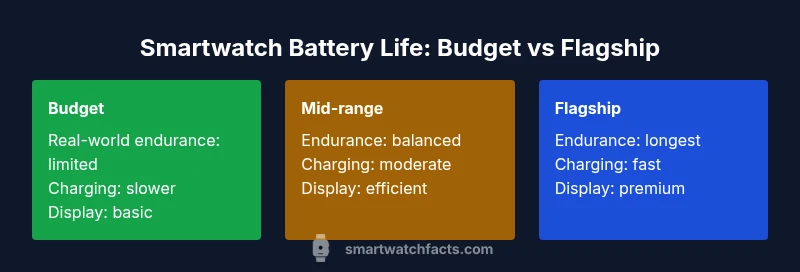
| Feature | Budget Smartwatch | Mid-Range Smartwatch | Flagship Smartwatch |
|---|---|---|---|
| Battery life (real-world) | shorter endurance | moderate endurance | longest endurance |
| Charging speed | slower | moderate | fastest |
| Display technology impact | standard LCD/OLED | efficient LTPO with adaptive refresh | premium LTPO/low-power display |
| Always-on display (AOD) | limited use | optimized use | enabled with safeguards |
| GPS & sensors load | light | medium | heavy |
| Price bracket | budget | mid-range | premium |
Strengths
- Helps buyers compare end-to-end battery behavior
- Encourages better software and hardware optimization
- Highlights trade-offs between longevity and features
- Reveals practical daily life impact beyond marketing claims
- Promotes informed charging habits and ecosystem choices
Weaknesses
- Based on qualitative descriptors rather than universal standards
- Can vary with regional networks and usage patterns
- May oversimplify complex interactions between components
Mid-range watches often offer the best balance of endurance, features, and value for battery-conscious shoppers
If endurance with a sensible price is your priority, the mid-range tier generally provides reliable real-world performance. Budget models may suffice for light use, while flagship devices excel in longevity under heavy usage but at a higher cost.
People Also Ask
What constitutes real-world battery life in smartwatches?
Real-world battery life refers to how long a watch lasts under typical daily use, including notifications, workouts, and daily routines. It’s influenced by display behavior, sensor activity, and software efficiency, and it often differs from marketing numbers.
Real-world battery life is how long you actually get from the watch in everyday use, not just the spec sheet. It depends on how you use the watch and how well the software saves power.
Is always-on display always bad for battery life?
Always-on displays improve convenience but can shorten endurance. If you don’t need constant visibility, turning off AOD or enabling a time-limited wake window can significantly extend life.
AOD makes things easy, but it can drain power. Turning it off when not needed helps save battery.
Do GPS-heavy activities drain battery quickly?
Yes, GPS and outdoor tracking typically consume more power, especially during long workouts. Look for watches with efficient GPS handling and the option to pause tracking when not needed.
GPS use during workouts drains more battery. Choose devices with efficient GPS or pause options to save power.
How can I measure battery life on a watch I already own?
Track endurance by noting the time from a full charge to a defined low battery state across typical days. Use built-in power usage graphs and compare changes after adjusting settings.
Measure by testing a full charge to the low-battery point across your usual days, using any built-in power charts.
Do OS and app efficiency affect battery life more than hardware specs?
Software efficiency often explains why two devices with similar hardware behave differently. Regular updates and well-optimized apps can noticeably improve real-world endurance.
Software efficiency can be as important as hardware specs in determining battery life.
Should I replace the battery or upgrade the whole watch as it ages?
If replacement is feasible and cost-effective, it can extend life. Often, newer devices offer better efficiency and features worth the upgrade when aging becomes evident.
Consider battery replacement if available and affordable; otherwise, a newer model may offer better overall value.
Key Points
- Prioritize real-world usage over spec sheets
- Choose LTPO displays and adaptive refresh for better endurance
- Balance GPS and sensor load with software power management
- Consider charging ecosystem compatibility for convenience
- Expect aging to reduce endurance and plan for replacement