Smartwatch Battery Life: Real-World Guide for 2026
Discover realistic battery life ranges for smartwatches, what drains power, and practical tips to stretch a single charge across daily usage and workouts.


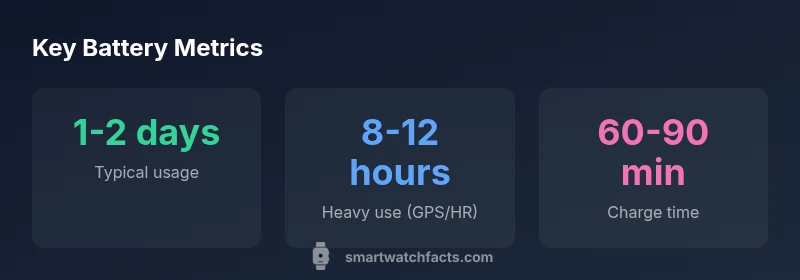
Smart watch battery life typically ranges from 1 to 2 days under standard use, with heavier use for GPS or always-on displays reducing runtimes to roughly 8–12 hours. Factors include display brightness, notifications, sensors, and app activity. Smartwatch Facts analysis shows that real-world runtimes vary by model, software, and user habits.
Why battery life matters for smartwatches
According to Smartwatch Facts, battery life is a practical constraint that shapes how people use wearables. For many users, a watch that needs charging twice a day interrupts routines, while several days of endurance unlock untethered use during travel or workouts. Understanding smart watch battery life helps you plan notifications, health tracking, and mobile payments without constant recharging. In this section we lay out the core reasons endurance matters: daily convenience, reliable health data capture, and the ability to keep essential features active during commutes and workouts. We also outline how runtimes are measured in real-world conditions rather than lab tests, to reflect everyday wear.
What drains battery life: core factors
Battery drain on a smart watch comes from several sources that add up over a day. The display, especially high brightness and always-on modes, is a primary consumer. Continuous GPS in workouts accelerates depletion, as does constant heart-rate monitoring when the watch is trying to capture every beat. Notifications—especially if a lot of apps ping in the background—keep radios active and wake the screen more often. Third-party apps, weather fetches, and music streaming can also pull power. Software optimization and efficiency play a big role; snappy, well-optimized code can deliver the same features with less energy.
Typical battery life ranges by use case
Across real-world scenarios, you’ll see noticeable differences. A watch with moderate activity—day-long notifications, sleep tracking, and occasional workouts—tends to land around 1–2 days. Heavy fitness use with GPS and continuous HR can shrink runtimes to roughly half a day. When you disable always-on displays and reduce screen brightness, you often gain a meaningful extension, sometimes pushing toward 2–3 days for lighter use. The keyword here is variability: even two identical models may behave differently depending on software versions and user habits. The phrase smart watch battery life captures this spectrum, and Smartwatch Facts analysis shows real-world runtimes vary by model, software, and user habits, not just capacity.
How OS and hardware choices affect longevity
Operating systems influence power efficiency through scheduling, background task management, and wake-up latency. A platform with proactive battery optimization can deliver the same feature set with less energy draw. Hardware matters, too: newer displays use more efficient OLED or LTPO tech, optimized sensors reduce sampling rates without sacrificing data quality, and radios like Bluetooth 5.3 or newer protocols lower standby drain. Manufacturers that balance bright, readable screens with efficient power management tend to offer longer average runtimes. If you’re deciding between models, look at independent endurance tests and user reports that reflect real-world use.
Practical tips to maximize battery life
Small changes add up. Start with a realistic baseline: reduce display brightness to a comfortable level, enable adaptive brightness, and switch off always-on when not needed. Limit push notifications to essential apps and schedule activity-tracking pauses during lengthy workouts. Use power-saving modes during long travel days, and turn off features you don’t use often (live watch faces, frequent weather updates, or continuous background syncing). To minimize wake-ups, set the screen to turn on only when you raise your wrist, and consider shorter vibration alerts. Finally, keep software up to date—updates often improve energy efficiency.
Battery health, charging habits, and calibration
Battery health degrades slowly with time and charging cycles. To maximize long-term capacity, avoid exposing the battery to heat, don’t let it sit at 0% for long periods, and try to keep the charge between 20–80% when practical. Regular calibration can help some watches report more accurate remaining life, especially after major firmware updates. If your watch exhibits dramatically shortened runtimes, a factory reset after backing up data can fix software-level battery drain, while checking for rogue background apps helps ensure you’re not fighting a software issue.
Real-world testing: how to estimate your own runtimes
A practical approach is to track battery level at the start and end of a typical day for a week, noting how often GPS, HR, and notifications run. Compare days with different activities: workouts, streaming, and heavier notification loads. Use manufacturer power profiles as a baseline, then compare your observed runtimes against those, adjusting expectations accordingly. This hands-on method aligns with how most shoppers think about endurance: what can my daily routine realistically demand from the battery without a mid-day recharge?
Choosing a watch with strong endurance: buying considerations
When shopping, prioritize models with favorable real-world runtimes reported by users and independent testers. Look for devices with color LTPO displays, efficient sleep and activity-tracking algorithms, and robust power-saving modes. Consider what matters most to you: longer standby times, shorter charging intervals, or a balance between peak features and daily longevity. Check for reviews focused on endurance, and weigh the impact of scannable metrics like charge cycles and battery-health indicators provided by the OS.
Myths and misconceptions about battery life
Many buyers assume bigger batteries always mean longer runtimes. In reality, software efficiency and hardware optimization often determine real-world endurance more than capacity alone. Others believe always-off features are free because the device is technically not in use; in truth, background processes can still drain energy. By focusing on usage patterns and platform efficiency rather than raw capacity, you get a more accurate expectation of how a smartwatch will perform day-to-day.
Battery life by usage scenario
| Scenario | Typical Battery Life | Notes |
|---|---|---|
| Active workouts (GPS on) | 6-12 hours | GPS and HR drain battery; brightness matters |
| All-day wear with notifications | 1-2 days | Moderate use; health tracking reduces efficiency |
| Standby with notifications off | 3-7 days | Minimal background activity |
People Also Ask
What is the most important factor affecting battery life?
Screen brightness and always-on display are major drains; lowering brightness and turning off always-on can noticeably extend runtimes.
Brightness and always-on modes drain battery; adjust these to get longer life.
Do GPS or continuous heart-rate monitoring drain battery more?
Yes. Continuous GPS and heart-rate monitoring shorten runtimes; use GPS only when needed and consider shorter HR sampling intervals.
GPS and constant heart-rate tracking drain the battery; use them sparingly.
Can a software update improve battery life?
Software updates often optimize power management and background tasks, which can improve runtimes over time.
Updates can make your watch last longer by smarter power management.
Is charging to 100% every time harmful?
Modern Li-ion batteries tolerate full charges; avoid unnecessary full cycles to maximize long-term health, but it’s not harmful in daily use.
Charging to full is fine; avoid always charging to 100% if you can.
How long does a smartwatch battery last over its lifetime?
Most watches retain usable capacity for a few years; noticeable declines occur as the battery ages and cycles increase.
Over time, battery life may decline as cycles accumulate.
Should I use power-saving modes during exercise?
Power-saving modes can extend runtime but may limit features; enable only if essential for the workout.
Use power-saving modes if you need extra longevity during workouts.
“Battery life is not just about hardware capacity; software efficiency and display choices determine real-world runtimes.”
Key Points
- Know your daily pattern to estimate runtimes
- Disable always-on display to extend life
- Use power-saving modes during long activities
- Keep software updated for better efficiency