Average smartwatch screen size: usability and buying guidance
Explore how the average smartwatch screen size influences readability, navigation, and app design. Practical guidance for choosing the right display based on wrist size, use case, and OS differences.


The average smartwatch screen size typically ranges from 1.2 to 1.8 inches diagonally, with 1.4–1.6 inches most common among mainstream models. Reading, tapping, and navigation improve as screens grow, but larger displays also enforce a bigger form factor. According to Smartwatch Facts, screen size strongly influences usability, glanceability, and battery trade-offs across platforms.
Why average smartwatch screen size matters
The term average smartwatch screen size is not a vanity metric; it directly affects how users interact with notifications, fitness data, and quick-glance information. According to Smartwatch Facts, a mid-range diagonal measurement tends to balance readability with comfort on most wrist sizes. In practice, screens around 1.4 to 1.6 inches diagonal are common because they fit a broad audience without producing excessive bulk. The size also influences UI density and navigation gestures, shaping how confident users feel when swiping, tapping, or typing on a tiny touch target. This section unpacks why size matters, especially for shoppers who prioritize readability and ease of use over the newest hardware.
- Readability under various lighting conditions improves with larger, higher-contrast displays.
- Glanceable metrics on the home screen become more legible with optimized typeface and layout.
- Battery life and device thickness are both impacted by screen scale, so size choices involve trade-offs.
Reading and navigation on small screens
Smaller screens demand tighter typography, simplified icons, and smarter gestures. If the display diagonal falls near 1.2–1.4 inches, designers lean on bolder fonts, higher contrast, and larger tap targets to reduce mis-taps. For users, this translates to easier reading of time, messages, and health reminders during workouts or commutes. Conversely, screens closer to 1.8 inches enable more information to be shown at a glance, but require careful UI zoning to avoid clutter. The balance between glanceability and depth is the core challenge, especially for those who rely on quick interactions during activities like running or cycling. Smartwatch OS ecosystems increasingly support adaptive fonts and dynamic layouts to mitigate size constraints.
OS design and display technology
Wear OS, watchOS, and other platforms optimize UI around screen size. WatchOS tends to prioritize glance-friendly complications and taller layouts that fit on 1.4–1.6 inch ranges, while Wear OS emphasizes scalable typography and responsive grids that adapt to 1.2–1.8 inch displays. The display technology itself—OLED/AMOLED with high pixel density—helps maintain crisp text and sharp graphics on small diagonals. As panels become brighter and more energy-efficient, manufacturers can push for larger screens without dramatically increasing device thickness. This section highlights how software and hardware choices interact to shape real-world usability across sizes.
Measuring screen size and resolution
Display size is most commonly described as the diagonal of the active viewing area. For precise comparisons, also note the aspect ratio and pixel density (PPI). Higher PPI means crisper text and icons at the same physical size, so a 1.4-inch screen with 326 PPI can appear sharper than a 1.6-inch panel with 260 PPI. When evaluating specs, look for the official diagonal (inches), resolution (e.g., 320x320), and the display technology. This trio—diagonal, resolution, and tech—drives perceived size and readability, more than any single metric. Practical testing on your wrist with font scaling options is the best final check.
Use-case driven size recommendations
Different use cases benefit from different screen sizes. If your priority is quick notifications and fitness glance data, a compact 1.2–1.4 inch display with a high-contrast UI may be ideal. For productivity, navigation through apps and longer text, a larger 1.6–1.8 inch panel can improve legibility and reduce eye strain. People with larger wrists might prefer the comfort and readability of a wider screen, while those with smaller wrists might opt for a more compact size for a comfortable, unobtrusive fit. Consider your typical day, activity profile, and tolerance for bezel width when choosing.
How to choose the right size for your wrist and lifestyle
Start with your wrist circumference and preferred wearing position. Try models in the 1.4–1.6 inch range if you want a balance of readability and form factor. If you routinely read long messages or use apps with dense data, lean toward 1.6–1.8 inches. For minimalism or lighter use, 1.2–1.4 inches keeps the device slim without sacrificing essential functions. Always verify brightness, legibility in sunlight, and button accessibility. If possible, test with your typical gloves or workout gear on to gauge usability under real-world conditions.
Common myths about screen size
Myth: Bigger screens are always better. Reality: Beyond a point, extra size yields diminishing returns on readability and can hinder wearability. Myth: Text size alone determines readability. Reality: Font choice, line height, contrast, and layout matter more on small displays. Myth: Larger screens drain battery at the same rate. Reality: Power efficiency depends on brightness, refresh rate, and software optimization. Understanding these myths helps shoppers avoid overvaluing size at the expense of other critical factors like DPI, readability, and UI design.
Tips to optimize readability on any smartwatch
- Enable larger text and high-contrast themes when available.
- Favor UI with generous tap targets and clean iconography.
- Test in real-world conditions—outdoors, in motion, and with different lighting.
- Compare models not only by diagonal size but by DPI, brightness, and software polish.
- Remember that a well-designed interface can make a smaller screen feel more capable than a larger but cluttered one.
Screen size and density snapshot
| Aspect | Common Range | Notes |
|---|---|---|
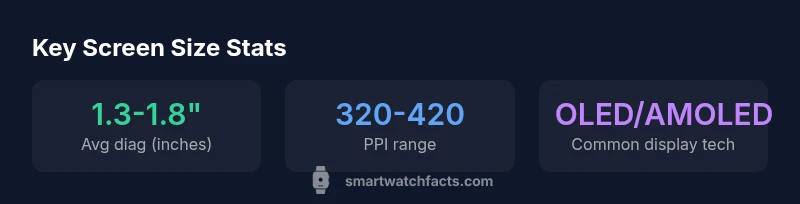
| Screen size (diagonal) | 1.2-1.8 inches | Typical range across mainstream models |
| Resolution (ppi) | 320-420 | Pixel density varies by model and panel type |
| Display technology | OLED/AMOLED common | Balances brightness and energy efficiency |
People Also Ask
What is the typical range for smartwatch screen sizes today, and why does it vary by model?
Today, screen diagonals commonly fall between about 1.2 and 1.8 inches. Variation comes from target audiences, wrist sizes, and device form factors; brands balance readability with comfort and bulk.
Typical smartwatch screens range from 1.2 to 1.8 inches; the size varies to fit different wrists and use cases.
Does a bigger screen always improve readability?
Not always. Readability depends on contrast, font size, and DPI. A well-tuned UI on a smaller screen can outperform a larger, cluttered interface.
Bigger isn’t always better—the UI matters just as much as the display size.
How does screen size impact battery life?
Larger screens typically consume more power, especially at higher brightness. Battery life also depends on software optimization and display technology.
Bigger screens can use more power, but smart software and brightness controls help manage it.
What should someone with a small wrist consider when choosing a smartwatch?
Choose a compact screen (1.2–1.4 inches) for comfort and legibility. Ensure the watch sits well on your wrist and offers easy access to essential data.
If you have a small wrist, a smaller screen is usually more comfortable and legible.
Do OS differences make a big difference at the same screen size?
Yes. Wear OS and watchOS optimize layouts differently, affecting how information is presented and how easy it is to navigate at the same diagonal size.
The OS design can change how big a screen feels and how easy it is to use at a given size.
How can I quickly measure screen size when evaluating a smartwatch?
Check the official specs for the display diagonal. If unavailable, estimate by comparing to a known reference or use manufacturer diagrams.
Look up the display diagonal in the specs—you’ll usually find it listed clearly.
“Screen size is only part of usability; a well-optimized interface can maximize readability on even compact displays.”
Key Points
- Identify your use case before sizing your watch display
- Smaller screens require smarter UI to maintain readability
- Typography, contrast, and layout are as important as diagonal size
- OS design and display technology shape how size feels in practice
- Test devices on your wrist to verify comfort and legibility