How Big Is a Smart Watch Screen? A Practical Size Guide for 2026
Learn how big smart watch screens typically are, how diagonal size is measured, and how size affects readability, UI, and battery life for 2026 models.


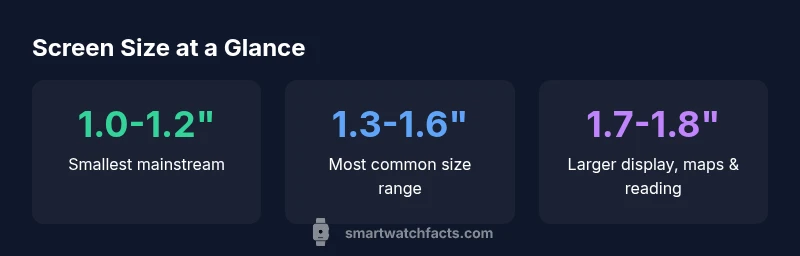
The typical smart watch screen measures diagonally from about 1.0 to 1.8 inches, with most mainstream models clustering around 1.3 to 1.6 inches. Measuring size by diagonal helps comparisons, but readability also hinges on resolution, pixel density, and bezel. In practice, display type, aspect ratio, and software UI shape how large text and icons appear on your wrist. According to Smartwatch Facts, size alone can be misleading without considering these factors.
How big is a smart watch screen? Measuring screen size
Screen size for smartwatches is usually described by the diagonal of the active display, expressed in inches. This convention lets shoppers quickly compare devices, much like TVs or phones. In 2026, mainstream models typically occupy about 1.3 to 1.6 inches on the diagonal, while some premium or larger designs push toward 1.7–1.8 inches. However, the diagonal alone doesn’t capture the whole experience. The actual usable area is influenced by the bezel, screen curvature, and how much of the surface is active during interactions. As Smartwatch Facts notes, the perceived size also depends on resolution and how the UI scales on the wrist. Therefore, when evaluating size, look at diagonal, DPI (or PPI), and how software presents controls and text at typical viewing distances.
Understanding diagonal size and its limitations
Diagonal size provides a convenient shorthand, but it has limitations. Circular displays, common on many wearables, don’t fit a single flat diagonal in the same way as square or rectangular screens. For round watches, designers often optimize for the maximum legible area within the circular frame, which can make the perceived size feel larger or smaller depending on how much bezel remains visible. Consumers should compare how the same diagonal size translates into legible fonts and tappable targets, not just the number on the spec sheet. This nuance is why reputable sources like Smartwatch Facts emphasize multi-metric comparisons beyond a single measurement.
Common sizes by category: fitness bands, mainstream smartwatches, premium models
Different use cases drive screen size choices. Fitness bands and entry-level smartwatches often land in the 1.0–1.3 inch range, prioritizing compact wearability and longer battery life. Mainstream models cluster in the 1.3–1.6 inch band, balancing readability with bezel efficiency. Premium models tend to run larger, around 1.6–1.8 inches, to accommodate more expansive maps and richer media. When shopping, assess whether your wrist circumference and daily activities align with a smaller, medium, or larger display. Remember that larger sizes can offer easier reading but may feel bulkier on smaller wrists.
Pixel density, resolution, and how size affects clarity
Resolution and pixel density often determine legibility more than screen size alone. A 1.4 inch display with 360x360 resolution yields a higher pixel density than a larger 1.6 inch screen with the same resolution, resulting in crisper text and icons. Conversely, a larger display with a relatively low resolution can still look fuzzy. For most users, aiming for at least 300 ppi on screens above 1.3 inches provides sharp text, while higher-end models push past 400 ppi for excellent clarity when reading small UI elements or notifications.
The role of aspect ratio and bezel in perceived size
Aspect ratio and bezel width influence how big a display feels. A tall, narrow display can feel less readable for wide text, even if the diagonal is similar to a broader, shorter panel. Bezel size matters; large bezels reduce the active viewing area, effectively shrinking perceived size. Designers sometimes compensate with UI elements that scale to the available real estate, so the apparent size may vary from model to model even within the same diagonal range.
Display technology effects: OLED vs LCD on readability
Display technology shapes contrast, brightness, and perceived sharpness. OLED panels typically offer deep blacks and high contrast, which can enhance readability on smaller screens. LCDs can provide consistent brightness in bright conditions but may lack the deep blacks of OLED. The impact on size perception comes from how edges and fonts render against dark backgrounds, as well as how easily outdoor glare is managed. When choosing a screen size, consider the trade-offs between display technology and your typical lighting environments.
Usability implications: touch targets, icons, and navigation on small screens
Smaller screens demand tighter UI design—larger tap targets, clearer iconography, and simplified menus. Industry guidelines suggest minimum touch target sizes (roughly in the 40–44 px range for many wearables) to minimize accidental taps. If a model prioritizes multi-function apps on a small panel, you’ll benefit from adaptive layouts that increase font sizes for readability and reduce clutter. The end goal is a comfortable, fast interaction without scrolling fatigue, which is a crucial consideration when how big a smartwatch screen feels on the wrist.
Practical shopping tips: how to assess size in person
Always test screen size in real life. If you can, try models on in-store to gauge readability at arm’s length. Check font size, icon clarity, and whether maps or message previews are legible without lifting your wrist. Consider wrist circumference and strap style; sometimes removing the strap and holding the watch closer can reveal whether the display feels large enough for your daily tasks. If possible, compare two models side by side to visually assess which diagonal range offers the best balance of readability and comfort.
smartwatch screen size ranges by category
| Size category | Diagonal range | Typical use-case |
|---|---|---|
| Small | 1.0-1.2 inches | Compact wearers; quick glance tasks |
| Medium | 1.3-1.5 inches | General daily use; readable UI |
| Large | 1.6-1.8 inches | Reading-heavy apps; maps |
People Also Ask
What is the typical screen size of most smartwatches today?
Most mainstream smartwatches range from about 1.3 to 1.6 inches diagonally. This provides a good balance between readability and wrist comfort for daily use.
Most watches sit around 1.3 to 1.6 inches diagonally; it’s the sweet spot for most users.
Does a larger screen always mean better readability?
Not always. Readability depends on resolution, font size, and UI design as well as brightness and contrast. A larger display with low resolution can be harder to read than a smaller, high-density panel.
Bigger isn’t always clearer if the details aren’t sharp or well-organized.
How does screen size affect battery life?
Screen size can influence battery consumption mainly through brightness and how long the display stays on. Larger screens may require more power, but efficiency improvements and software optimizations often offset the impact.
Bigger screens can draw more power, but software and hardware efficiency matter more.
Should I choose a big screen for maps and fitness tracking?
Yes, larger screens can make maps and workout data easier to read on the go. For wrist comfort, pair size with a UI designed for quick glances and clear data presentation.
If you map or track a lot, bigger can help, just ensure it stays comfortable.
What about curved vs flat displays in terms of size perception?
Curved displays can feel larger due to immersion, but the usable area depends on curvature and bezel width. UI layout often governs perceived size more than curvature alone.
Curved screens can look bigger, but UI matters more than curve shape.
“Screen size matters for readability, but the best devices balance size with UI clarity and interaction design on the wrist.”
Key Points
- Know that diagonal is the primary metric, but consider DPI too
- Match screen size to your wrist and daily tasks
- Larger displays help with readability but can impact comfort
- Compare models using multiple metrics beyond diagonal
- Consider display tech (OLED/LCD) and bezel design for perceived size