Can You Text on a Smart Watch: A Practical Guide
Learn how texting works on smartwatches, including input methods, platform differences, setup steps, and practical tips for messaging from your wrist.


Yes — you can text on many modern smartwatches. You can compose messages with dictation, handwriting, or an on-screen keyboard, and reply via quick replies or supported apps. This guide shows how texting works across platforms, how to set it up, and practical tips to keep conversations flowing from wrist to phone.
Can you text on a smart watch? What you can text and how
Texting from a smartwatch is a practical reality on most modern wearables. You can send basic SMS messages, respond to notifications, and sometimes chat in apps like
Platform differences:
Input methods: dictation, handwriting, and on-screen keyboards
Modern smartwatches offer multiple input methods to convert speech, handwriting, or taps into text. Voice dictation is fast for short messages and can be surprisingly accurate in quiet environments, while handwriting or scribble input works well for shorter phrases. On-screen keyboards provide flexibility when dictation isn’t ideal, though their small size can slow you down. For many users, a mix of dictation for long lines and canned responses for quick replies strikes the best balance. In all cases, take a moment to review the message before sending to catch autocorrect errors or misheard words. Smartwatch Facts notes that input efficiency improves as you customize shortcuts and common phrases to your everyday texting patterns.
Quick replies and messaging apps you can use
Most watches include a set of quick replies and emoji options that you can tailor to your style. Native apps on watches (SMS,
How to set up texting on your smartwatch
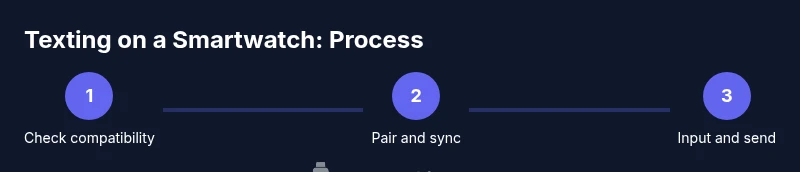
Setting up texting usually starts on your phone or within the watch’s companion app. Ensure your watch is paired via Bluetooth (and connected to Wi‑Fi when available) and that messaging permissions are granted. Install or enable the messaging apps you intend to use, then customize notification settings so you know when a new message arrives. If you rely on cross-platform apps, check that the app on your phone is configured to mirror messages to the watch. Finally, test sending a real message to confirm delivery and readability on both devices. The setup experience varies by OS, but the general steps remain consistent across Apple, Google, and Samsung ecosystems.
Limitations and best practices
Texting on a smartwatch is convenient, but small screens and variable input quality can slow you down. Expect slightly slower response times and occasional misinterpretations from voice input, especially in noisy environments. To speed things up, use dictation for longer messages, keep replies short, and pre-load frequently used phrases. Keep your watch charged for uninterrupted use, and limit notifications to essential apps to reduce distraction while texting. Regularly update apps and OS to ensure the smoothest experience.
Privacy and security when texting from a smartwatch
Smartwatches can reveal sensitive information if left unattended. Always use a passcode or biometric lock on your watch, enable screen wake on tap only, and review app permissions regularly. Be mindful of who can view your watch screen and messages in public or crowded spaces. If your device supports it, enable two-factor authentication for messaging apps and consider turning off messaging when the watch is not in use or when sharing with others.
Real-world use cases and scenarios
Imagine a quick message from your car to a colleague or a note to remind yourself of an appointment while you’re running. On many watches you can reply with a single tap, a short voice note, or a pinned reminder, depending on the app and OS. This on-wrist texting capability shines during workouts, commuting, or when your phone is tucked away. By understanding input options and platform-specific quirks, you can tailor your texting workflow to fit your daily routine.
Tools & Materials
- Smartwatch with messaging capability(Ensure your model supports SMS or messaging apps and has messaging features enabled)
- Paired smartphone (iPhone or Android)(Must be within Bluetooth range during setup and use)
- Stable Bluetooth connection(Keep devices in proximity during texting sessions)
- Watch charger(Charge before testing messaging features to avoid interruptions)
- Optional: Bluetooth keyboard or stylus for input(Helps with longer messages on some watches)
Steps
Estimated time: about 20-30 minutes
- 1
Verify device compatibility
Check that your smartwatch OS (watchOS, Wear OS, or Galaxy/other) supports texting and has the messaging apps you plan to use. Review app permissions and ensure SMS or chat apps are installable on the watch. This step prevents feature gaps after setup.
Tip: Consult the user guide for your exact model to confirm supported apps. - 2
Pair your devices and sync messages
Ensure your watch is paired with your phone via Bluetooth and that the watch can access messages from the phone. If you use Wi‑Fi or cellular on the watch, enable those options for message delivery when the phone is out of range.
Tip: Keep both devices up-to-date to minimize sync issues. - 3
Open the messaging input on your watch
Navigate to the messaging app or input area on your watch. Familiarize yourself with available input methods (dictation, handwriting, on-screen keyboard, or quick replies).
Tip: Practice switching input methods to find your fastest option. - 4
Compose a message using dictation
Tap the microphone or voice input icon and speak clearly. Review the transcription for accuracy and edit if needed before sending.
Tip: Speak in short phrases to improve accuracy. - 5
Respond with quick replies or a keyboard
If you prefer, use preconfigured quick replies or tap an on-screen keyboard for longer text. Keep replies concise for readability on a small screen.
Tip: Create a few personalized quick replies you use often. - 6
Send the message and verify reception
Send the message and check the recipient’s phone to confirm delivery. If needed, resend or edit the message from your watch.
Tip: If delivery fails, check connectivity and retry. - 7
Manage notifications and privacy
Adjust notification settings to notify you only for important messages. Consider enabling watch locking and privacy features to protect sensitive conversations when not in use.
Tip: Review app permissions monthly to maintain security.
People Also Ask
Can I text on any smartwatch?
Most modern smartwatches support texting in some form, but features vary by OS and app availability. Native messaging is typically more reliable than third-party options.
Most smartwatches let you text, though features depend on theOS and installed apps.
Do I need my phone nearby to text from my watch?
In most cases, yes—the watch mirrors messages from your phone via Bluetooth or Wi‑Fi. Some models can function independently for certain apps.
Usually yes; your watch syncs with your phone, though some watches support some standalone features.
Which input method is fastest for smartwatch texting?
Dictation is typically fastest for long texts, while quick replies are great for brief messages. Keyboard input works, but can be slower on small screens.
Dictation is usually fastest, with quick replies as good backups.
Is texting on a smartwatch secure?
Security depends on your OS and app. Use a lock on the watch, keep apps updated, and avoid sharing sensitive information in public.
Security depends on the platform; lock the watch and update apps to stay safe.
Can I reply to messages from apps like WhatsApp or Telegram on my watch?
Many watches support replies from popular apps, but availability varies by OS and app version. Check the app’s watch compatibility.
Many watches support WhatsApp or Telegram replies, but it depends on the OS and app version.
Watch Video
Key Points
- Texting on smartwatches is feasible across major OSes.
- Use dictation or quick replies to optimize small screens.
- Ensure proper pairing and permissions for reliable delivery.
- Protect privacy with locks and app permissions.