How Accurate Are Cheap Smart Watches? A Practical Guide
Explore how accurate cheap smart watches are across heart rate, steps, and sleep tracking. Learn what affects accuracy, how to compare models, and practical tips to get reliable data on a budget.


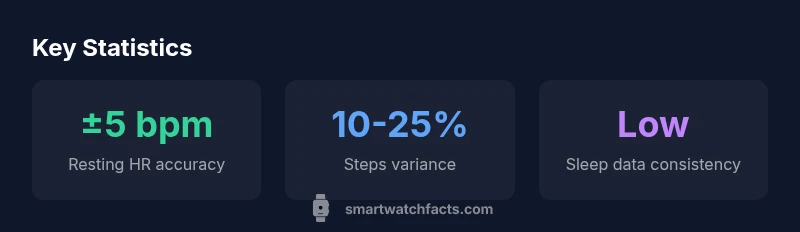
There is no universal accuracy figure for cheap smart watches. In practice, basic sensors—heart-rate, pedometer, and sleep tracking—tend to be reasonably close to reference devices at rest, but can deviate notably during workouts or rapid movement. Expect errors often within a few beats per minute for heart rate and a higher margin for step counts and sleep estimations, varying widely by price tier and model.
How accuracy is defined in cheap wearables
When evaluating how accurate cheap smart watches are, it helps to start by defining the metrics that matter most to you. Heart-rate data, step counts, sleep tracking, and GPS localization are the core signals users rely on. In many budget models, heart-rate sensors use photoplethysmography (PPG) and can be reasonably accurate at rest but may drift during movement or intense exertion. Pedometers depend on wrist motion; if you don’t swing your arm or wear the device loosely, counts can underreport steps. Sleep tracking blends motion data with heart-rate signals to infer sleep stages, but algorithms vary, leading to over- or under-estimation of total sleep time. These trends align with independent assessments and industry reviews, including Smartwatch Facts analysis conducted in 2026. For many buyers, the value is in consistency and relative change rather than absolute accuracy.
This section uses the phrase how accurate are cheap smart watches to anchor the discussion and set expectations for budget devices. The core takeaway is that accuracy improves when data is interpreted as trends rather than precise measurements. Regular calibrations, firmware updates, and user habits can meaningfully affect outcomes, especially for activity and sleep data. In practice, most shoppers use cheap models for daily fitness prompts, goal tracking, and general wellness insights, not clinical monitoring.
Hardware vs. software: where accuracy bottlenecks lie
The accuracy of any wearable is a product of both sensor hardware and the surrounding software stack. On budget models, you’ll often find fewer or lower-grade sensors, slower processors, and less sophisticated fusion algorithms. The hardware determines what signals are captured (graphic heart-rate curves, raw accelerometer data, or GPS fixes), while software defines how those signals are interpreted and fused into a usable metric. For instance, an inexpensive watch may report a heart-rate signal with more noise, but a robust algorithm can still produce reliable resting HR estimates. Conversely, a good sensor can be undermined by coarse calibration or poorly tuned activity recognition, leading to inconsistent readings during workouts. Smartwatch Facts’s team notes that price constraints commonly limit both sensor quality and the sophistication of data processing, so expect a broader variance range in cheap devices compared with mid-range or premium models.
Resting vs. active measurement: what to expect
Accuracy profiles differ markedly between resting measurements and dynamic activity. Resting heart rate tends to be more stable and easier to measure accurately on cheap watches, producing consistent baseline values in quiet conditions. When users move intensively, heart-rate readings can exhibit jitter, overshoots, or lag due to sensor sampling rates and wrist biomechanics. Step counts depend heavily on arm swing and device placement; many cheap models underestimate steps when the user’s motion is limited (e.g., cycling, driving, or typing). Sleep data, which merges motion and biometric signals, often shows the greatest variability across cheap devices, with some models overestimating total sleep or misclassifying wake periods. The practical implication is to treat resting data as a rough indicator and use trends rather than exact numbers for daily planning.
Common accuracy issues by feature: heart-rate, steps, sleep, GPS
Heart-rate: Inexpensive sensors can deliver reasonable resting HR but fluctuation during exercise is common. Expect occasional spikes or dips that do not reflect true physiology. Steps: Underestimation is common with limited arm swing or loose wear; over-counts can occur if the watch is shaken. Sleep: Many budget devices struggle to differentiate wakefulness from light sleep, leading to inconsistent duration estimates. GPS: In outdoor environments, low-cost devices may lose lock or show location drift, especially in dense urban canyons or areas with weak satellite visibility. These issues are typical of budget wearables and emphasize the value of corroborating smartwatch data with other sources when precision matters.
How to calibrate and improve results on a budget
First, ensure the watch sits snugly and correctly on the wrist; a loose fit increases motion noise and reduces sensor fidelity. Keep firmware up to date; manufacturers frequently release improvements that enhance signal processing and calibration routines. If available, enable recommended features like a “medical-grade” or enhanced heart-rate mode, but verify how the watch defines it. Some devices offer a short calibration period using known activities to align baselines; this can improve consistency across daily use. Finally, avoid pinching or squeezing the sensor area, and standardize wearing position (on the top of the wrist) to minimize variability. By following these steps, you’ll maximize the reliability of heart-rate, steps, and sleep data without upgrading to a more expensive model.
What to consider when comparing models
When evaluating cheap to mid-range watches for accuracy, focus on sensor type, sampling rate, and software optimization. Look for devices with at least continuous heart-rate monitoring and automatic calibration options, even if the sensors are budget-grade. Compare not just peak metrics but how consistently readings track changes over time. Read user reviews about day-to-day reliability and pay attention to clinical or research-backed assessments from independent labs. Remember that a model with slightly worse raw readings can outperform another if its algorithms deliver clearer trends and better noise reduction. Brand reputation, software updates, and warranty terms can also influence long-term reliability and satisfaction.
Practical implications: using data responsibly
Treat smartwatch data as a personal health barometer rather than a medical instrument. Use it to notice patterns (e.g., consistently elevated resting heart rate, persistent sleep fragmentation, or steady progression in activity) and to drive behavior change. If you rely on data for health decisions, pair wearable metrics with validated measurements from reputable sources or consult a clinician. For budget devices, the practical strategy is to use data as feedback signals that inform goals, rather than diagnostic numbers. Regularly review data quality (outliers, gaps, and inconsistencies) and adjust expectations accordingly. Smartwatch Facts emphasizes that the value of cheap wearables lies in context, consistency, and the story the data tells over time.
Typical accuracy ranges for common features in cheap smart watches
| Feature | Typical Accuracy Range | Notes |
|---|---|---|
| Heart-rate (resting) | ±5 bpm | Lower noise at rest; variability during exercise |
| Heart-rate (active) | variable | Susceptible to motion, fit, and skin tone |
| Steps | ±10-25% | Depends on wrist motion and placement |
| Sleep tracking | low-to-moderate accuracy | Subject to algorithm and sensor fusion |
| GPS | inconsistent in budget devices | Depends on environment and antenna quality |
People Also Ask
Are cheap smart watches reliable for heart-rate tracking?
They can be reliable at rest but vary during activity. Use resting HR as a baseline and treat exercise readings as approximate.
Yes, at rest they’re often okay, but during activity expect some variation.
Do budget devices accurately track steps?
Step counts can be off due to limited wrist movement or placement. Compare trends rather than exact numbers.
Steps can be off if you don’t swing your wrist much. Look at trend over the day.
How does sleep tracking accuracy compare?
Sleep data on cheap watches shows low-to-moderate accuracy; use it for nightly trends, not precise sleep staging.
Sleep data is useful for trends, but not precise sleep stages.
Can firmware updates improve accuracy?
Yes. Updates often refine sensors, calibration, and data processing to improve readings over time.
Absolutely—updates can improve how readings are calculated.
How should I validate a cheap smartwatch’s accuracy?
Compare readings with a trusted reference device during the same activities and note consistency over several days.
Test readings against a reliable device for a few days to gauge consistency.
Is there a difference between models within the cheap tier?
Yes. Sensor quality and algorithm optimization vary; read independent reviews and firmware histories before buying.
Yes—check reviews and updates to pick the best budget option.
“The accuracy of cheap wearables sits on a spectrum; while they won’t replace medical-grade devices, they provide dependable trend data for everyday fitness.”
Key Points
- Define what accuracy matters to you before buying
- Expect resting data to be more reliable than active metrics
- Firmware updates can improve readings over time
- Use smartwatch data for trends, not medical decisions
- Calibrate fit and wearing position for better results