Free Smartwatch Apps: How to Find and Use Them
Discover where free smartwatch apps live, how to evaluate them, and tips to protect privacy across Wear OS, watchOS, and Samsung Tizen. Practical guidance for shoppers and tech enthusiasts.


Free smartwatch apps offer significant value if you know where to look and how to assess quality. In this guide, you’ll learn where free apps live across Wear OS, watchOS, and Tizen, why some are truly free while others are freemium, and how to avoid common pitfalls like ads, data overuse, and privacy risks.
What free means for smartwatch apps
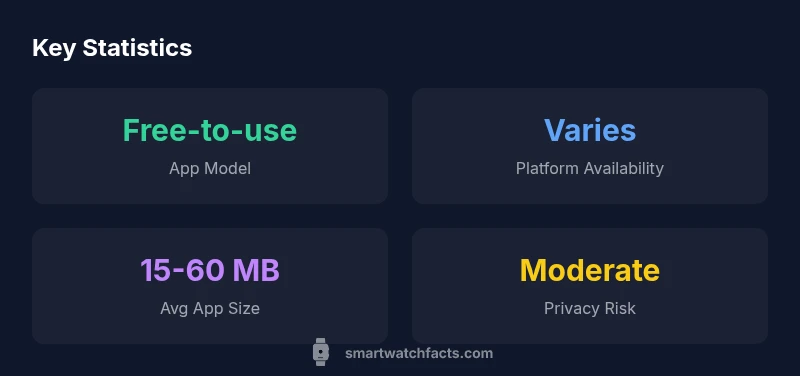
Free in the smartwatch app world is a spectrum, not a single price tag. Some apps are truly free with no payments required for core features, others are freemium—offering basic functionality at no cost and charging for premium features, removal of ads, or advanced capabilities. A smaller subset relies on ads or data-driven monetization to fund ongoing development. According to Smartwatch Facts, the majority of free options still deliver practical value, especially for routine tasks like step counting, timers, quick reminders, and basic music controls. When evaluating free apps, consider the essential feature set, update cadence, and the developer’s credibility. Free does not automatically imply low quality, but it does demand more due diligence. Remember to test performance across several days to understand real-world reliability and battery impact. This approach helps you assemble a useful app toolkit without spending upfront, while keeping an eye on privacy and data access.
Free vs freemium: what to expect
The distinction between free and freemium apps is central to setting expectations. Free apps may deliver a limited feature set with optional paid upgrades, or they may be ad-supported with occasional prompts to upgrade. Freemium models can be perfectly adequate for core needs—like basic fitness tracking or remote control features—until you decide a paid tier offers meaningful value. For most users, freemium strike a balance: you test the core experience, measure battery impact, and then decide if the paid upgrade justifies the cost. In practice, a sizable portion of the smartwatch app ecosystem leans on freemium, so it’s reasonable to expect a mix of free and optional paid features across platforms.
Where to find free smartwatch apps
Finding reliable free apps requires navigating official stores and discerning between truly free options and those that push paid upgrades. Start with the platform’s official store (Google Play for Wear OS, Apple App Store for
How to evaluate quality without paying
When you can’t buy first, assess quality through repeatable signals: developer credibility, update frequency, user sentiment, and permission usage. Look for recent app updates, active support channels, and a low crash rate in reviews. Review the permissions requested—prefer apps that minimize access to sensitive data and background activity. Pay attention to ads: intrusive ad-heavy experiences can degrade usability and drain battery. If an app requires you to grant broad permissions for a feature you don’t need, consider alternatives. Testing across several days helps reveal issues that aren’t obvious in a quick install.
Platform-specific differences you should know
Wear OS apps tend to benefit from a wide app ecosystem and relatively straightforward integration with Android devices, but performance can vary by device.
Use cases: free apps by category
Free smartwatch apps span several use cases: fitness and activity tracking, reminders and timers, music control and media playback, navigation aids, and quick productivity tools (notes, timers, to-do lists). Fitness apps may offer basic step counting, workouts, and progress tracking without payment, while productivity apps often provide note or task management at no cost but lock premium collaboration features behind a paywall. For music and media, free apps might control playback or offer limited offline access. Understanding category-specific expectations helps you avoid disappointment and select the right free tools for your daily routines.
Privacy, permissions, and security risks
Free apps can pose privacy and security considerations. The most common concerns revolve around excessive data access, background activity, and advertisement networks that collect user data. Mitigate risk by reviewing requested permissions before installation, opting out of unnecessary background services, and disabling data-sharing options when possible. Keep watch for suspicious prompts, and avoid apps from unknown developers. Regularly audit installed apps—remove those you no longer use and monitor battery impact. A mindful approach to permissions reduces risk while still enabling useful free functionalities.
Step-by-step: installing and auditing free apps
- Open the official store on your device (Wear OS or
The evolving landscape and smart watch app free: what’s next
As wearable ecosystems mature, free apps are likely to become more capable and privacy-conscious. Expect greater transparency around data usage, more robust ad-light experiences, and refined freemium models that offer meaningful value without entangling users in constant prompts. Cross-platform developers may optimize for efficiency, reducing battery drain while delivering consistent features. The Smartwatch Facts team anticipates continued growth in high-quality free options that complement paid upgrades, enabling users to build a personalized toolkit without unnecessary costs.
Comparison of free smartwatch app availability by platform
| Platform | Free App Availability | Monetization Model | Typical Size (MB) |
|---|---|---|---|
| Wear OS | High | Freemium with IAP/ads | 15-60 |
| watchOS | Medium | Freemium with IAP | 5-30 |
| Samsung Tizen | Medium | Freemium with ads | 10-40 |
People Also Ask
Are all free smartwatch apps safe to install?
Not all free apps are equally safe. Always examine requested permissions, developer credibility, and update history. Look for reviews that mention stability and privacy practices. If in doubt, start with a well-known developer and monitor the app’s behavior over a few days.
Not all free apps are equally safe. Check permissions, the developer’s track record, and update history, and test stability over a few days.
What’s the difference between free and paid apps on smartwatches?
Free apps may offer core features but rely on ads or optional upgrades. Paid apps typically remove ads and unlock advanced features, providing a more consistent experience. Use free versions to assess value, then decide if upgrading is worth the investment.
Free apps give you core features; paid apps remove ads and unlock more features. Try the free version first to gauge value.
Do free apps drain battery life more than paid ones?
Some free apps can increase battery drain due to ads, syncing, or background activity. To minimize impact, limit background permissions, monitor usage, and uninstall apps that noticeably reduce battery life.
Yes, some free apps may drain more battery due to ads or background activity. Manage permissions and monitor usage.
How do I install free apps on Wear OS or watchOS?
Open the official store on your smartwatch, search for free or lite versions, review permissions and updates, then install. After testing, keep or remove the app based on your experience.
Open the store on your watch, search for free versions, review permissions, install, test, and decide.
How can I test app quality before paying later?
Use the free version to gauge reliability, performance, and privacy impact. Compare a few options side-by-side and note differences in features, battery, and ease of use before deciding on a paid upgrade.
Test several free options first, compare features and battery impact, then decide on upgrading.
“Free smartwatch apps can unlock a lot of value when you evaluate privacy, performance, and developer credibility. Use them to prototype your ideal wearable toolkit before committing to paid features.”
Key Points
- Prioritize privacy and permissions when testing free apps
- Freemium models are common; core features may require payment
- Expect platform differences in app availability and performance
- Audit permissions after installation to protect data
- The Smartwatch Facts team recommends testing free apps carefully before upgrading