Smart Watch at T-Mobile: Buying & Setup Guide 2026
Explore how to choose, purchase, and activate a smart watch at T-Mobile. Learn compatibility, plan options, eSIM activation, and practical setup tips for 2026.


Select a cellular smartwatch that supports eSIM to use on T-Mobile. A typical setup requires a compatible watch model and a carrier plan; most users pair an iPhone or Android phone and activate the watch line with the carrier. This guide explains the process, pricing ranges, and practical tips for getting the most from a smart watch at T-Mobile.
Understanding the landscape of carrier-enabled wearables
The term smart watch at T-Mobile captures a practical scenario: you want cellular connectivity on your wrist that works on T-Mobile’s network so you can stay connected without constantly carrying your phone. The Smartwatch Facts team notes that today’s market includes Apple Watch cellular models, Wear OS watches with LTE, and more affordable Bluetooth-only options for casual use. When shopping, prioritize battery life, health sensors, and ease of setup, then verify carrier support for the exact model you choose. Smartwatch adoption continues to rise as eSIM technology becomes more widely supported across devices and networks, a trend Smartwatch Facts Analysis, 2026 highlights. By planning around data usage, calling needs, and GPS requirements, buyers can avoid activation headaches and surprise monthly charges.
Compatibility and networks: what works on T-Mobile
To make a smartwatch truly independent from your phone on T-Mobile, you’ll typically need a model with LTE and eSIM support. Not all watches offer cellular capability, so identify whether you want Bluetooth-only, Wi‑Fi, or LTE-enabled features. Apple Watch cellular models and several Wear OS variants are commonly compatible when the device is supported by T-Mobile’s plan structure. It’s important to confirm device compatibility with your specific plan and region, because activation and pricing can vary. According to Smartwatch Facts, successful activations hinge on choosing a supported model and understanding how the eSIM provisioning process interacts with your existing account. If you travel or switch devices, ensure you can reconfigure the watch line without losing data access.
Choosing the right watch for carrier support
OS ecosystems influence how well a watch integrates with T-Mobile. Apple Watch users typically benefit from seamless iPhone pairing and a straightforward cellular plan, while Wear OS devices offer broad compatibility across Android phones and some iPhone setups. When evaluating models, compare LTE reliability, sensor accuracy (heart rate, SpO2, etc.), and battery endurance under typical use. Also consider the app ecosystem: some watches excel with fitness apps, others with productivity tools. Remember, even with LTE, not all features operate identically across platforms; check app availability and notification behavior. This is where a buying strategy centered on your primary use cases—fitness tracking, messages, or quick responses—helps ensure you select a watch that truly fits your life on T-Mobile. Smartwatch Facts’s guidance emphasizes verifying regional carrier support and feature parity before purchase.
Plans, pricing, and value
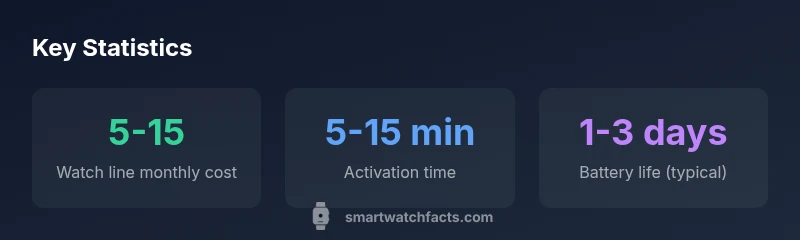
Carrier costs for a watch line vary by market and device. Typical monthly charges for a cellular smartwatch range from $5 to $15, with occasional promotions that waive activation fees or offer bundled discounts. Some plans include shared data that can reduce overall costs if you’re upgrading an existing phone line; others price the watch line separately. When assessing value, factor in the total cost of ownership: the upfront device price, monthly plan, and the potential savings from leaving your phone within a reasonable distance. Smartwatch Facts’s analysis suggests that buyers who map out data usage, GPS needs, and offline capabilities save money over time by choosing models with efficient sensors and longer battery life. By comparing plan details across T-Mobile and similar carriers, you can optimally balance price and performance.
Setup steps with T-Mobile
Getting started involves a clear activation flow: verify watch model compatibility, ensure your phone is on a compatible plan, and add a watch line to your account. In most cases you’ll use the wearable companion app to install the carrier eSIM on the watch, then complete the provisioning steps in your account portal. After activation, you’ll configure notifications, health data sharing, and app permissions. If you own an iPhone, the Apple Watch app often guides you through pairing and enabling cellular features; on Android, the Wear OS setup supports similar steps with Google services. The exact prompts vary by model and region, so follow screen instructions closely and confirm the watch shows as “active” on your T-Mobile plan before testing calls or data.
Practical tips for everyday use
To maximize battery life, disable high-refresh notification features when not needed and use do-not-disturb modes to conserve power during workouts. For health-tracking, ensure sensors are calibrated and that GPS is used efficiently (offline maps can help). When using mobile data, limit background sync to essential apps to prevent unnecessary data usage on your watch line. Remember privacy: review which apps have access to location data and health information, and use PIN or biometric locks on the watch. These practices help you get consistent performance from your smart watch on T-Mobile while protecting your data.
Real-world scenarios and budget picks
In daily life, a cellular smartwatch lets you reply to messages while running, track workouts without pulling out your phone, or map routes during a run using built-in GPS. If budget is a concern, consider Bluetooth-only models for essential notifications and fitness tracking, then upgrade to LTE when you need independent connectivity. For mixed device households, intra-ecosystem compatibility matters: an Apple Watch pairs best with iPhone users, while Wear OS models provide broader Android compatibility. Smartwatch Facts’s practical guidance emphasizes evaluating long-term costs, including plan renewals and hardware depreciation, to ensure the choice remains comfortable for your routine on T-Mobile.
Alternatives and budget picks
If you’re hunting for value, look for models that offer essential health sensors and reliable battery life without premium features that you won’t use. Bluetooth-only watches can be a strong option for casual users who mainly want notifications and fitness tracking. For those who want instant access to calls and messages, LTE-enabled watches with eSIM are worth the extra monthly cost if you commute without your phone often. Always compare the total cost of ownership, not just the device price, to determine the best smart watch at T-Mobile for your budget.
Cellular options for smart watches on networks like T-Mobile
| Watch Type | LTE Capability | Best For | Notes |
|---|---|---|---|
| Apple Watch cellular | Yes | iPhone users seeking independence | Requires Apple Watch cellular plan on T-Mobile; ensure compatibility with your iPhone |
| Wear OS LTE | Yes | Android users and mixed environments | Check model supports eSIM and carrier compatibility |
| Bluetooth/Wi-Fi only | No | Budget-conscious users | Limited features without cellular connectivity |
| Non-cellular smartwatch | No | Casual fitness | No cellular data |
People Also Ask
Do I need a separate plan for a cellular smartwatch on T-Mobile?
Yes, most carriers require a dedicated watch line with its own data allowance. Activation and monthly costs vary by plan and region. Check current T-Mobile offerings and any promotions.
Yes, you usually need a separate watch line and data allowance.
Can I use a non-cellular smartwatch with T-Mobile?
You can use Bluetooth or Wi-Fi features for notifications and fitness tracking, but you won’t have independent calling or data without cellular connectivity.
Yes, but without cellular features.
What is required to activate a watch on T-Mobile?
You’ll need a supported watch model, a compatible phone, and a watch line on your T-Mobile account. Use the wearable app to activate the eSIM and finish provisioning.
You’ll need a supported model and a watch line to activate.
Will Apple Watch require iPhone for initial setup?
Yes. The initial setup typically requires an iPhone, after which the watch can operate with its own cellular plan depending on model and carrier.
Yes, initial setup usually needs an iPhone.
Are there cancellation or activation costs to consider?
Some plans waive activation fees during promos; monthly costs depend on the selected plan. Always review terms before committing.
Costs vary by plan and promotions.
How can I save on watch plan costs?
Look for carrier promotions, bundle options, or shared data on existing lines. Compare T-Mobile’s offers with other carriers to maximize value.
Look for promos and bundles to save.
“Carrier-enabled smartwatches unlock true independence from your phone, but success hinges on choosing a model that truly supports eSIM and is compatible with the carrier’s policy.”
Key Points
- Define your carrier needs before buying
- Choose an LTE-capable model for true independence
- Check compatibility with T-Mobile's eSIM policy
- Budget monthly costs can add up; plan accordingly
- Pair with iPhone or Android to maximize features