LTE vs WiFi Smartwatch: Decoding Connectivity, Costs, and Use Cases
Compare LTE-enabled and Wi‑Fi smartwatches to decide if you need true standalone connectivity or a budget-friendly, phone-tethered experience. This guide covers connectivity, battery life, plans, and use cases for smart watch lte vs wifi.


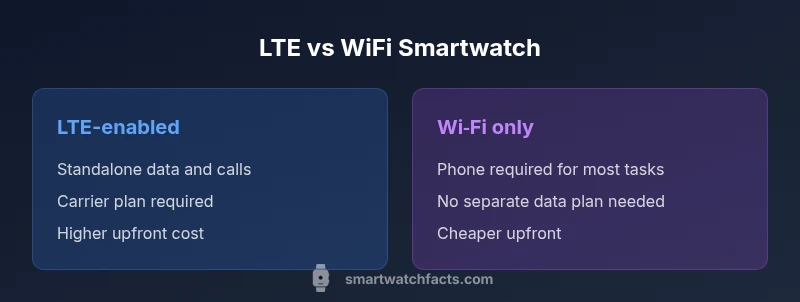
LTE-enabled smartwatches offer independent cellular connectivity, while Wi‑Fi models rely on your phone or nearby networks. For most users, LTE is best when you need true standalone use, travel often, or run without a phone. If you mainly track health and notifications at home or work, a Wi‑Fi or Bluetooth model can save money and simplify setup. See our detailed comparison chart.
Understanding the core difference between LTE and Wi‑Fi on smartwatches
When people compare smart watch lte vs wifi, they are weighing two distinct approaches to staying connected. LTE-enabled watches include a built‑in cellular modem and an eSIM or a physical SIM slot, allowing data and calls without a paired phone. Wi‑Fi watches rely on Bluetooth or a companion phone to access the internet, or connect directly to nearby Wi‑Fi networks. The practical implication is simple: LTE delivers independence; Wi‑Fi emphasizes simplicity and lower cost. In this section we lay out the fundamental architecture and what it means for day-to-day usage, including app access, messaging, and emergency features. We also note how carrier plans and regional networks shape what you can do with each model. Throughout this guide we reference the real-world trade‑offs of smart watch lte vs wifi to help you decide.
How cellular connectivity works in wearable devices
Cellular connectivity in smartwatches uses a compact radio, SIM or eSIM, and a modem that can maintain data sessions and voice calls over a mobile network. The implication for consumers is transparency: you gain independence, but you also assume responsibility for a data plan, coverage, and roaming costs. In the context of smart watch lte vs wifi, you’ll see LTE models behave more like a standalone phone for casual tasks, whereas Wi‑Fi watches tether to your phone or local networks. The key is understanding signal strength, network bands, and carrier support, which all influence practical performance.
Wi‑Fi connectivity in smartwatches and its limits
Wi‑Fi models connect when a known network is available or when paired with a phone that has internet access. This path is typically cheaper and lighter on power, since you avoid cellular radios when you’re at home, at work, or in trusted places. The trade‑off is that you cannot make calls or access the internet unless you’re near a network or have your phone nearby. For many users, especially those who mostly wear their watch as a companion device, Wi‑Fi is enough and avoids the ongoing costs of data plans.
When LTE adds value: use‑case scenarios you should consider
LTE truly shines in several common situations:
- You exercise or travel without your phone and still want streaming music, navigation, or quick messages.
- You are often away from reliable phone coverage, such as commuting on public transport or in remote areas.
- You want emergency access to calls or texts when your phone isn’t handy.
- You live in a region with strong cellular coverage and compatible eSIM offerings. In these cases, smart watch lte vs wifi becomes a decision about independence versus convenience and cost.
Battery life and data plans: balancing cost and performance
Introducing cellular radios in a smartwatch can impact battery life, though advances continue to close the gap. If you rely on LTE, plan for more frequent charging compared with Wi‑Fi watches. Data plans add ongoing costs, and roaming or international usage can complicate budgeting. When weighing smart watch lte vs wifi, think about how often you need hands‑free connectivity and whether the convenience justifies the extra expense. In many regions, you can choose devices with eSIMs that allow flexible data options without a long-term contract.
Compatibility considerations: carriers, OS, and ecosystem
LTE watches require compatibility with a carrier plan and often support eSIM profiles specific to the watch. Some carriers restrict eligible devices or require device pairing for activation. OS ecosystems—whether Wear OS, watchOS, or others—also influence available apps and services when the watch is used with LTE or Wi‑Fi. If you’re an iPhone user, ensure the LTE variant supports your carrier and iOS features. If you’re on Android, confirm the watch’s eSIM and cellular bands align with local networks. This section helps illuminate how smart watch lte vs wifi choices can depend on OS compatibility and carrier ecosystems.
Hardware design and price implications across networks
LTE models tend to be physically similar to Wi‑Fi models, but the cellular modem, SIM/ eSIM hardware, and more capable antennas can push up upfront cost. Even if the price difference seems small on the store shelf, the recurring data plan adds to the total cost of ownership over time. For many buyers, a Wi‑Fi model offers better value if you can rely on your phone or trusted networks for internet access. In summary, the decision often comes down to how much you value standalone connectivity versus ongoing costs and maintenance.
Everyday scenarios: commuting, travel, and emergencies
In daily life, the choice between smart watch lte vs wifi often boils down to routine. If you commute long distances without your phone, LTE can be a real convenience. While traveling abroad, LTE models may help you stay connected if you don’t have easy access to your phone’s roaming setup, though international data costs can mount quickly. In emergencies, LTE watches can place calls or texts when your phone is out of reach. These scenarios illustrate why some users prefer LTE, while others find Wi‑Fi models meet their needs at a lower price point.
Privacy, security, and data considerations
Cellular connectivity introduces additional data paths that can raise privacy considerations. LTE watches may send data to carrier networks and cloud services, so you should review app permissions and security settings. Wi‑Fi watches also face network risks, but the data paths often involve fewer carrier touchpoints. Understanding the data flow in smart watch lte vs wifi helps you configure app access, enable encryption, and manage location sharing effectively. Always keep watchOS or Wear OS updates current to benefit from the latest security enhancements.
Setup steps: getting from box to connected
Setting up LTE or Wi‑Fi variants follows similar onboarding with a few key differences:
- Charge the watch and install the companion app on your phone.
- For LTE models, activate the eSIM through your carrier or follow on‑screen prompts to add a plan.
- For Wi‑Fi models, connect to a familiar Wi‑Fi network or pair with your phone for internet access.
- Configure notifications, health tracking, and apps according to your preferences.
- Test the watch with a few tasks (texts, calls, maps) to validate the chosen connectivity path. This practical approach clarifies the differences in smart watch lte vs wifi.
Which should you choose? A practical decision framework
Ask yourself: Do you frequently need standalone internet and calls away from your phone? Is your region well served by carriers with reasonable data plans? If the answer is yes, an LTE model makes sense. If you primarily wear the watch as a companion device and want to minimize ongoing costs, a Wi‑Fi option is typically the better fit. Use the checklist below to compare models side‑by‑side and align your choice with your daily routine, budget, and risk tolerance. The decision hinges on real-world usage, not just specs on a box.
Future-proofing and updates: where the trend is headed
Manufacturers are steadily expanding LTE support and improving battery efficiency while broadening protection via software updates. Expect more flexible eSIM management, better integration with mobile carriers, and smarter offline features that reduce reliance on constant connectivity. For buyers, this means that the distinction between smart watch lte vs wifi may blur a bit over the next few years, with devices offering hybrid modes and smarter power management to balance performance and cost.
Comparison
| Feature | LTE-enabled smartwatch | Wi-Fi smartwatch |
|---|---|---|
| Connectivity | Cellular data, calls, and texts via eSIM or SIM | Wi‑Fi + Bluetooth, relies on phone or networks |
| Independent use | Yes — can operate standalone | No — depends on phone/network proximity |
| Carrier plans | Requires data plan with carrier | No separate plan required (often cheaper) |
| Battery life impact | Moderate decrease due to cellular radio | Lower impact; depends on usage |
| Phone dependency | Minimal dependence on phone for basic tasks | Strongly dependent for most features |
| Typical upfront cost | Higher upfront due to modem and eSIM | Lower upfront; generally cheaper overall |
| App ecosystem | Broad app support with carrier integrations | Strong app support; more reliant on phone apps |
Strengths
- Standalone connectivity reduces phone dependence
- Convenient in areas with poor phone signal
- Emergency access without a phone nearby
- Better for travel and workouts without a purse-pleasant carry
- Future-proofing with carrier-backed models
Weaknesses
- Higher upfront cost and ongoing data plan fees
- Battery life can be shorter with cellular radios
- Carrier availability varies by region
- More complex setup and potential compatibility issues
LTE watches are best for truly independent connectivity; WiFi models are best for budget-conscious users who don’t need standalone calls
If you need stand-alone use frequently, pick LTE. Otherwise, Wi‑Fi is sufficient and cheaper. Consider your typical environment, carrier coverage, and budget when deciding between smart watch lte vs wifi.
People Also Ask
What is the difference between LTE and WiFi smartwatches?
LTE watches include a cellular radio and data plan, enabling calls and internet without your phone. WiFi watches rely on Bluetooth and nearby networks or a connected phone. The choice affects independence, cost, and coverage.
LTE watches have cellular service for independent connectivity, while WiFi watches rely on your phone or nearby networks. Your choice changes cost and independence.
Do LTE smartwatches require a cellular plan?
Yes, most LTE watches require a data plan with a carrier to access cellular services. Some regions offer prepaid or flexible eSIM options. Always confirm plan availability before purchase.
Yes, you typically need a data plan for LTE watches; check local carrier options before buying.
Can I use a WiFi smartwatch without a phone?
WiFi watches can access the internet when connected to a known WiFi network or paired with a phone. They cannot place independent calls or run fully offline apps the way LTE models can.
WiFi watches usually need a nearby network or a paired phone; they don’t work totally standalone for calls.
Which is better for iPhone users?
iPhone users often benefit from LTE models when they want independence, but compatibility varies by model and carrier. Verify watchOS compatibility and carrier support for cellular features before buying.
For iPhone, LTE can offer independence if supported by your carrier; check compatibility before choosing.
How does battery life differ between LTE and WiFi models?
LTE use typically reduces battery life compared to WiFi models due to constant radio activity. If you wear your watch all day without phone access, expect shorter cycles and plan charging accordingly.
Cellular activity can drain battery faster; WiFi models may last longer with lighter connectivity.
Are there privacy risks with cellular smartwatches?
Any networked device carries privacy considerations. LTE watches route data through carrier networks, while WiFi models rely on local networks or paired phones. Review app permissions and enable encryption and device updates regularly.
Cellular data paths add carrier involvement; review permissions and keep software up to date.
Key Points
- Assess your daily phone usage before buying
- LTE adds independence but requires data plans
- Wi‑Fi models save money and simplify setup
- Check carrier compatibility and regional coverage
- Plan for future needs and potential roaming costs