Smartwatch Buying Guide for Kids: Find a Smart Watch Near You
Find kid-friendly smart watches near you with safety features, parental controls, and durable designs. Expert guidance from Smartwatch Facts on buying, setup, and use.


Finding a suitable kid-friendly smartwatch near you begins with evaluating safety, privacy, and durability. Prioritize age-appropriate designs, strong parental controls, reliable call or messaging options, and a robust app ecosystem. Compare models by battery life, GPS safety features, water resistance, screen size, and offline functionality to limit screen time while staying connected with your child.
Safety, Privacy, and Age-Appropriate Design
Kids’ smartwatches sit at the intersection of connectivity and personal safety. The most important factors are how data is collected, stored, and shared, and whether the device supports clear boundaries for screen time and location sharing. Look for models that offer strict permissions by default, easy-to-use parental controls, and clear, age-appropriate interfaces. In practice, this means a simplified contact list, limited third-party app access, and straightforward geofencing options that you can enable or disable without complex setup. The Smartwatch Facts team emphasizes choosing devices with local-only data processing when possible, and with strong data privacy settings that can be reviewed and adjusted by parents. When evaluating safety, also consider physical materials, strap durability, and resistance to common playground hazards. The goal is to minimize risk while maintaining a helpful connection to your child.
According to Smartwatch Facts, models that provide transparent privacy notices and accessible controls tend to deliver higher parental confidence. For families who want extra assurance, examine whether the watch supports offline functions and local-only communication so your child can stay in touch without constant cloud access. Beyond features, assess how easy it is to reset a device if a child misplaces it or attempts to modify settings. A well‑designed kid‑safe smartwatch combines protective controls with a calm user experience that reduces temptation to bypass safeguards.
Essential Features for Kids' Smartwatches
A kid-friendly smartwatch should balance practical communication with safety and fun. Key features include a dependable SOS or emergency button, two-way calling or messaging limited to approved contacts, and a kid-friendly user interface that makes it easy for children to understand and use. A robust companion app for parents is equally important, allowing you to review contacts, geofence zones, battery status, and message history. Look for durable builds with reinforced screens, splash resistance, and adjustable bands that can withstand active play. Battery life should be long enough to cover school days and after-school activities, ideally with a quick recharge option. Some watches also offer school mode or silent hours, which can be crucial for minimizing distraction during class.
In practice, you’ll want models that offer age-appropriate learning games or reminders that reinforce healthy routines—like physical activity prompts or reminders to drink water. A proven approach is to shortlist devices that support common safety features and a simple parental control dashboard, then compare real-world usage reports from other families. When a watch has an easy setup flow and clear privacy settings, parents are more likely to use and trust it.
Smartwatch Facts notes that a strong app ecosystem matters too. If the device relies on a mobile app to manage safety features, ensure the app has transparent permissions and clear data-sharing practices. Finally, verify compatibility with your family’s devices and your carrier or Wi-Fi plan so you won’t encounter unnecessary connection hurdles.
Durability, Battery Life, and Charging Tips
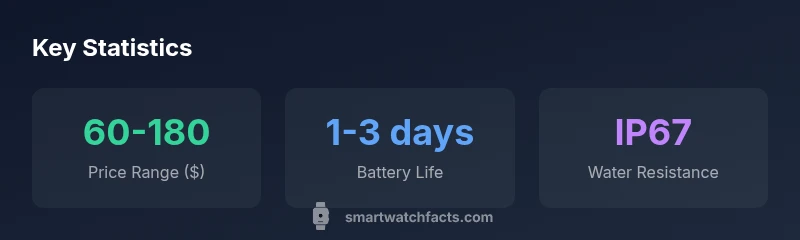
Durability matters as much as features when a watch is worn by an active child. Look for durable casings, shock-absorbent bumpers, and flexible bands that won’t irritate sensitive skin. Water resistance is useful for accidental splashes and playground puddles, with IP67 or better commonly found in kid models. Battery life matters because short battery cycles lead to missed calls or lost locations. In general, expect 1-3 days of typical use with smart features turned on, though real-world life will vary with GPS, camera usage, and app activity. When possible, choose models with an easy charging dock or magnetic charger that kids can handle themselves.
Practical tips: set daily charging windows (e.g., after dinner), enable battery saver modes during school hours, and keep extra cables in a backpack or classroom bag. If a watch supports replaceable bands, pick a hypoallergenic material to reduce skin irritation. Finally, test the device’s resilience by simulating typical kid activities—running, jumping, and everyday wear—to confirm the build stands up to rough play.
GPS, Safety Zones, and Location Sharing
Geofencing and real-time location sharing are powerful safety features, but they come with privacy considerations. Many models offer geofencing, which can alert you if a child leaves a designated area, and some support live location sharing with consent. When choosing a watch, confirm how location data is stored and who can access it, along with how long history is kept. Prefer devices that provide location data only to trusted guardians and allow opt-out options that are simple to manage. Be mindful of the legal implications in your region, and ensure you discuss location-sharing boundaries with your child to foster trust and transparency.
For families who prefer additional privacy, consider watches that provide offline maps or non-location-based safety features, such as SOS alerts that do not require continuous GPS tracking. In all cases, maintain a clear boundary: location data should be shared only with authorized contacts and only when the child is comfortable with it.
Parental Controls and Privacy Best Practices
Parental controls are the backbone of responsible use. Begin by enabling password protection for the watch and the parent app, restricting purchases, and reviewing app permissions. Create a family privacy plan that covers screen time limits, allowed contacts, geofence rules, and how often you review activity logs. Regularly update the device’s firmware and consult vendor privacy notices for any changes in data handling. Teach your child about digital safety in simple terms—what information is private, why sharing location matters, and how to report suspicious activity. A thoughtful balance of guidance and autonomy helps kids learn responsible device use while you maintain essential oversight.
When shopping, verify how easy it is to customize these controls for different ages or stages, and confirm whether settings can be configured remotely by a guardian without needing the child’s device nearby. A user-friendly parental dashboard that provides actionable insights will increase the likelihood of sustained, safe use.
Buying Near You: Availability, Brands, and Price Ranges
Locating a kid-friendly smartwatch near you involves weighing local availability against price and feature sets. Start by identifying trusted brands known for kid-focused safety features and durable hardware. Compare in-store demo availability, return policies, and warranty terms to reduce post-purchase hassles. Price ranges can vary significantly depending on features like GPS, cellular connectivity, and camera quality. In general, expect a broad spectrum from basic models with essential safety features to premium options with advanced parental controls and richer app ecosystems. If you’re shopping online, look for retailer filter options that help you narrow by age range, water resistance, and battery life—then cross-check against in-store availability to minimize back-and-forth trips. Finally, consider after-purchase costs such as carrier plans for cellular models or subscription fees for premium apps, and factor those into total ownership cost. By evaluating local options and balancing safety, durability, and price, you can find a kid-friendly smartwatch that fits your family’s needs.
How to Test a Kid's Smartwatch in Store
In-store testing can reveal practical fit and usability that specs alone can’t convey. When you visit a store, have the child try on multiple bands to ensure comfort and skin friendliness. Check the screen for daytime readability, button placement for small hands, and ease of navigation when switching between features. Test the charging cradle or dock for convenience and verify that the parental controls are intuitive to configure on the spot. If possible, simulate basic tasks such as sending a message to a guardian, triggering an SOS alert, and enabling a geofence before leaving the store. Finally, ask for a hands-on tutorial from staff or request access to a demo account to explore the app experience from the parent’s perspective. A careful in-store test helps ensure the device will be enjoyable and safe for your child in everyday life.
Common specifications for kid-friendly smartwatches
| Feature | Typical Range | Notes |
|---|---|---|
| Battery life | 1-3 days | Depends on GPS and usage |
| Display size | 1.3-1.6 inches | Smaller screens can aid battery life |
| Water resistance | IP67 | Protects against splashes and brief immersion |
| GPS availability | Common | Location features require consent |
People Also Ask
Are kid smartwatches safe for continuous wear?
Moderate, with proper battery management and sleep mode. Choose models with certified materials and parental controls; avoid unnecessary always-on features.
Yes, with proper safety settings and good battery management.
Do GPS features invade my child's privacy?
GPS can be optional; check privacy settings and consent requirements, and use geofencing with transparent policies.
GPS is optional and should be used with clear consent and privacy controls.
What age is best for a smartwatch?
There isn’t a universal age. Consider maturity, responsibility, and parental approval; start with a basic, non-cellular model.
Age guidance depends on maturity and parental readiness.
Can kids make calls or messages without a phone?
Many models offer limited calls/messages via cellular or a parent's account; ensure a suitable plan if cellular.
Some watches allow calls/messages via cellular or parental accounts.
Are there risks with in-app purchases for kids?
Yes. Enable parental controls and set spending limits; review app permissions before enabling purchases.
Be sure to enable parental controls to limit in-app purchases.
What should I test when shopping in-store?
Test comfort, strap adjustability, screen readability, button layout, and pairing with parent apps; ask for a live demo.
Check comfort, readability, and how easy it is to pair with the parent app.
“Kid-friendly wearables must balance safety with independence. The right smartwatch empowers kids while giving parents clear, controllable boundaries.”
Key Points
- Prioritize safety features and parental controls.
- Check battery life and durability for kids.
- Assess GPS features and offline mode for privacy.
- Compare price ranges to fit your budget.
- Test in-store for fit and comfort.