Smart Watch Settings in Malayalam: A Practical Guide
Learn how to configure smart watch settings in Malayalam across popular devices. This step-by-step guide covers language, notifications, display, and privacy for Malayalam-speaking users.


You will learn how to adjust smart watch settings in Malayalam across major platforms. This quick guide highlights language selection, display preferences, notifications, and privacy basics so Malayalam-speaking users can customize their wearable with confidence. Expect practical, stepwise tips, real-world examples, and quick checks to ensure all text and alerts appear in Malayalam the moment you wear your device.
Understanding why smart watch settings in Malayalam matter for daily use
For many users in Kerala and Malayalam-speaking communities, having device menus, prompts, and notifications in Malayalam reduces confusion and speeds up everyday tasks. This is especially true on watches, where small screens and brief alerts demand clear, localized wording. According to Smartwatch Facts, language localization is not just about translation—it's about making interactions intuitive, reducing errors, and helping you access critical health and safety reminders without fumbling for words. In this section, we explore how Malayalam-language support shapes accessibility, app navigation, and the overall user experience across popular smartwatch ecosystems. We'll cover what to look for in firmware updates, how regional language packs are delivered, and how to verify that your own device truly displays settings, prompts, and time formats in Malayalam. The goal is to empower you to customize your wearable with confidence, regardless of your tech background, and to minimize any frustration during setup or everyday use. This guide is designed for the Smartwatch Facts audience: informed shoppers, tech enthusiasts, and casual users who want practical, step-by-step guidance in Malayalam-friendly language. By the end, you’ll know where to find Malayalam settings, how to test them, and how to keep them consistent across devices.
Language support and regional availability across popular OS
Language availability varies by OS and region. Wear OS, watchOS, and Samsung’s Tizen-based platforms each handle Malayalam differently, and some models may ship with limited regional packs. The Smartwatch Facts team notes that updates from manufacturers can expand language options or improve script rendering, which directly affects readability, pronunciation prompts, and on-screen keyboards. When choosing a smartwatch, check the official language list in the product page and in the companion app store for your country. If Malayalam isn’t listed initially, look for firmware updates or regional packs that enable Malayalam for menus, notifications, and time formats. Practical testing—typing a Malayalam sentence in a reply, reading a notification, and adjusting font size—will help confirm whether your device truly supports Malayalam across core areas like calendar, alarms, and health prompts.
The big picture: Malayalam language as default or preferred option
Deciding whether to set Malayalam as the default language depends on how often you interact with your watch. If you frequently switch between languages, consider creating a responsive layout where essential prompts remain in Malayalam while secondary content remains bilingual. This approach helps avoid misinterpretations in health alerts or goal reminders. The Malayalam language setting should propagate through system menus, apps, and notification banners, ensuring consistency when you receive calls, messages, or fitness prompts. Remember that some apps might not reflect the language change immediately if they rely on the phone’s language or on isolated app settings. In those cases, you may need to adjust the in-app language or disable auto-sync for language to preserve Malayalam text across screens.
Notifications, readability, and input methods in Malayalam
Malayalam text on small screens can be challenging if font sizes are too small or if line wrapping creates awkward breaks. Increase font size, enable bold text for essential alerts, and choose watch faces with clear glyphs. Some watches offer transliteration modes or Malayalam keyboard layouts for quick replies; explore these in the keyboard settings or accessibility options. If voice input exists, test how Malayalam speech-to-text performs in notifications or quick replies. The key is to balance readability with energy efficiency and ensure that critical prompts—such as workout goals or heart-rate warnings—are legible at a glance.
Display settings, brightness, and watch faces for Malayalam readability
Display optimizations significantly impact your Malayalam readability. Calibrate brightness for different lighting environments, enable automatic brightness when outdoors, and select fonts that render Malayalam smoothly. Opt for high-contrast watch faces and avoid complex backgrounds behind text. When choosing a watch face, look for those with larger numerals and straightforward punctuation to reduce misreads during workouts or quick checks. Remember that changing faces can affect battery life, so rotate faces according to activity and context.
Privacy controls and permissions while using Malayalam language mode
Localization should not compromise privacy. Review app permissions related to notifications, health data, and microphone usage when Malayalam is active. Turn off any nonessential data sharing and enable device-level privacy settings such as passcodes, biometric unlock, and secure startup. If your watch offers cloud sync, ensure your account has strong authentication and consider enabling two-factor authentication. Finally, keep your watch’s firmware up to date to mitigate known privacy vulnerabilities that could affect localized text rendering or input methods.
Troubleshooting common issues during Malayalam setup on watches
If Malayalam prompts pop up in limited areas only, verify that the language pack is fully installed and that the regional setting matches your country. Rebooting the device or performing a factory reset (as a last resort) can restore full Malayalam support; back up data before doing so. For issues where Malayalam appears garbled or broken, check font rendering options and install any available font packs. If translations seem inconsistent, consult the official support portal for your watch family to see if a known issue has a patch.
Cross-device syncing: keeping Malayalam settings consistent with your phone
To ensure Malayalam settings travel with you, enable automatic syncing between your watch and phone, and select Malayalam as the preferred language on the phone’s companion app as well. Some ecosystems require you to align language in both the watch app and the phone’s system language. Regularly check for updates to both operating systems and apps, and review notification templates to ensure they display correctly in Malayalam across devices. Regular validation—opening each major feature and confirming language settings—prevents drift over time.
Tools & Materials
- Smartwatch(Any model that supports system language changes and Malayalam fonts.)
- Compatible smartphone(Android or iOS with the latest OS and the official companion app installed.)
- Bluetooth connection(Keep Bluetooth enabled during setup and testing.)
- Charging cable(Have it handy in case you need to refresh during long steps.)
- Companion app installed(Ensure the app is up to date for locale options.)
- User manual/online support(Great for model-specific steps that differ by brand.)
Steps
Estimated time: 30-45 minutes
- 1
Gather devices and prepare
Collect your smartwatch and smartphone. Ensure both devices have battery and are connected to Wi‑Fi or mobile data. This prepares you to access language settings and sync options without interruptions.
Tip: Charge both devices to at least 50% before starting to avoid mid-step shutdowns. - 2
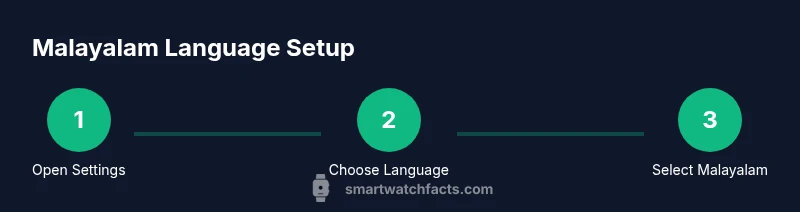
Open watch settings and locate language
On your smartwatch, navigate to Settings, then System or General, and look for Language or Language & Input. If you cannot find it, check the companion app’s device settings. Some models place language in Accessibility.
Tip: If you see two language menus (watch vs app), use the watch menu first to avoid app-level biases. - 3
Select Malayalam as the language
Choose Malayalam from the list. Confirm the change and allow the watch to refresh, which may require a brief restart. This makes menus, prompts, and time formats display in Malayalam.
Tip: If Malayalam isn’t listed, check for firmware updates or regional packs in the official support page. - 4
Adjust display for readability
Increase font size, enable bold text for critical alerts, and select a high-contrast watch face. Test a notification to ensure Malayalam text is legible at a glance.
Tip: Avoid overly decorative fonts that may distort Malayalam script. - 5
Configure notifications and input methods
Set up notification summaries, quick replies, and any Malayalam keyboard or voice input options. Ensure prompts appear in Malayalam and that you can respond comfortably.
Tip: Test typing Malayalam with the on-device keyboard to confirm accuracy. - 6
Synchronize with the phone
Open the companion app on your phone, ensure Malayalam is selected there too, and enable auto-sync. This helps maintain consistent language and prompts across devices.
Tip: If language changes don’t propagate, reconnect the watch to the phone or reinstall the app. - 7
Check for updates and finalize
Check for firmware and app updates, then reboot once more to apply changes. Verify that calendar, alarms, and health alerts use Malayalam.
Tip: Keep a note of the current firmware version for future reference.
People Also Ask
Does Malayalam language support appear on all smartwatch platforms?
Malayalam support varies by platform and model. Check the official language list and firmware updates for Wear OS, watchOS, and Samsung’s Tizen-based watches. If your model lacks Malayalam, you may need a regional pack or an OS update to unlock it.
Malayalam support differs by platform; check updates and language lists for your model.
Can I change the watch language without using my phone?
In most watches you can change language directly from the watch settings. Some models require you to confirm changes via the connected phone app. If you don’t see Malayalam, try updating the device firmware or using the companion app’s language option.
Usually yes, directly on watch, but some models need the phone app for confirmation.
What should I do if Malayalam text looks garbled?
This usually indicates font rendering issues. Update your firmware, switch to a different Malayalam font, or reset display settings. If the problem persists, check for known issues in the official support portal.
If text is garbled, update firmware or switch fonts, and consult support if needed.
Will Malayalam impact battery life?
Language settings themselves have a minimal impact on battery life. If you enable additional languages or fonts, you may see a slight increase in rendering work. Monitor your battery after the change.
Language changes don’t usually drain much battery, but new fonts can affect rendering time.
How often should I update language packs?
Check for updates quarterly or when your watch prompts you. Manufacturers release language and font improvements periodically, especially after OS updates.
Update language packs when prompted or during standard OS updates.
What if my watch doesn’t offer Malayalam but supports regional scripts?
If Malayalam isn’t listed but a regional script is, you can try transliteration or enable bilingual prompts. Otherwise, monitor for future updates or consider a device that explicitly supports Malayalam.
If Malayalam isn’t listed, look for updates or bilingual options, or consider a different device.
Watch Video
Key Points
- Set Malayalam as the primary language on watch and phone for consistency
- Adjust font size and contrast for comfortable Malayalam reading
- Test notifications and quick replies in Malayalam to ensure usability
- Keep firmware and apps updated to maintain full Malayalam support