Smartwatch with Calling and WhatsApp: What to Know Before You Buy
Learn how to choose a smartwatch that supports on-wrist calling and WhatsApp, compare platform compatibility, battery life, and setup tips for Android and iPhone users.


A smart watch with calling and WhatsApp lets you place calls and send WhatsApp messages from your wrist, without pulling out your phone. Look for LTE/cellular options, solid app support, and cross‑platform compatibility (Android and iPhone). The best picks balance call quality, latency, and battery life for real‑world use. Expect reliable mic and speaker performance, smooth WhatsApp integration, and quick reply options.
Why on-wrist calling matters
For many users, the ability to place a call from a smartwatch is more than a convenience—it's a safety and efficiency feature. In everyday life, you may want to answer a quick call while driving, during a workout, or when your phone is tucked away. Modern smartwatches with calling capabilities rely on either a cellular plan (LTE/eSIM) or a strong Bluetooth connection to a paired phone. LTE models can function independently, which is a meaningful benefit for runners, commuters, and travelers who value uninterrupted connectivity. Bluetooth-only watches still offer reliable call routing and speaker/mic performance when the phone is nearby, but you won't have true independence. The hardware matters, but the software is equally important: you need stable call handling, clear audio, and intuitive controls. In practice, the strongest devices combine a well‑tuned microphone with on‑watch software that naturally routes calls, shows contact names, and provides quick access to call controls. This balance between hardware and software design is what separates decent experiences from excellent ones.
WhatsApp on your wrist: reality and caveats
WhatsApp on a smartwatch typically allows you to view messages, reply via canned responses or voice dictation, and in some cases send voice messages; full two‑way messaging and media sharing vary widely by OS and vendor. On Android watches (Wear OS) you frequently get closer to full WhatsApp functionality, while on iOS (Apple Watch) the integration is more limited and user experience depends on iPhone pairing and app availability. The key caveat is that WhatsApp's own app is not universally ported to all watches; some features require notifications only, while others allow replies. Performance depends on the watch's chipset, RAM, and network connectivity. Users should be aware of latency: replies may take a moment to appear on the phone if the watch uses Bluetooth, whereas LTE models can operate more independently. Overall, if WhatsApp is a primary use case, test the app's availability on your intended OS before committing to a model.
OS-specific realities: Android vs iPhone
Across platforms, Wear OS watches tend to offer broader WhatsApp functionality and smoother calling experiences, largely because of tighter integration with Android services and Google's app ecosystem. Apple Watch users often encounter more limitations, with the strongest experiences tied to iPhone pairing and supported apps. When evaluating devices, check which WhatsApp features are officially supported on your target OS version and hardware. Be mindful that even within a single OS family, feature parity can vary by model and software updates. The bottom line: if WhatsApp is essential, prioritize watches with confirmed app support for your phone's OS and ensure the software is actively maintained.
Connectivity options: LTE vs Bluetooth
Two core connection modes shape user experience. LTE-enabled watches can place calls and send messages without your phone nearby, offering genuine independence but requiring an additional data plan and stronger battery demands. Bluetooth-only watches rely on a paired phone, so you gain convenience but lose standalone capability. Some users prefer LTE for outdoor activities or commuting, while others are comfortable tethering to their phone for longer battery life. Always review how a watch handles call routing (VoIP vs cellular) and how WhatsApp messages are synced when the phone is in its pocket. In practice, the best options clearly indicate both connectivity choices and provide a reliable audio path for calls.
Battery life and charging realities
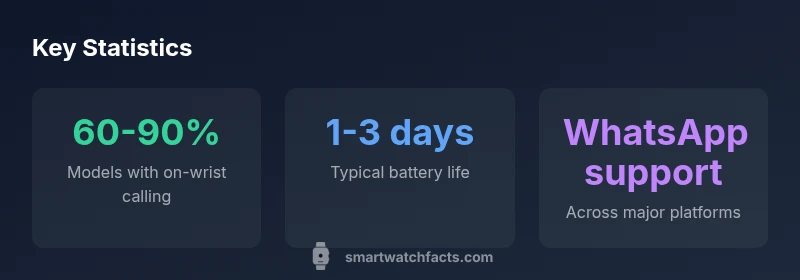
Calling and WhatsApp activity significantly impact battery life. Most watches capable of on‑wrist calls last about 1–3 days under mixed use, with heavy calling and messaging pulling that number down. Fast charging can help recover a daily use cycle, but charging speed varies by model. If you regularly rely on on‑wrist calls, consider models with larger batteries or more efficient chipsets, and plan charging around your daily routine. Remember that wireless charging efficiency and available SOC (state of charge) indicators can influence perceived battery life as you navigate through notifications, calls, and replies throughout the day.
Setup steps and practical tips
Start by confirming OS compatibility with your phone. Install WhatsApp on your phone and verify that notification mirroring is enabled for the smartwatch app. Pair your watch and ensure the correct permissions (microphone, contacts, notifications) are granted. Configure quick replies and voice dictation options for faster responses, and test call quality using a short real-world scenario. Update to the latest firmware and app versions to maximize stability. Finally, run a battery health check and monitor usage for a week to determine whether your daily schedule aligns with the watch’s capabilities.
Real-world usage scenarios and best practices
In practice, many users find on-wrist calling most useful during workouts, commuting, and multitasking at work. WhatsApp gaze meets expectation when messages arrive in real time and quick replies are usable without phone access. To maximize reliability, keep your phone nearby during initial setup, ensure your watch has a clear line of sight for microphones, and avoid heavy notification storms (which can drain audio resources and battery). For travel, prefer LTE-enabled models so you can stay connected in remote areas. By testing with your typical routines, you’ll identify whether your chosen watch maintains performance under load and whether battery life meets your daily needs.
On-wrist calling and WhatsApp: capability overview
| Feature | On-Wrist Capability | Notes |
|---|---|---|
| Calling | Yes on LTE/cellular watches | Requires cellular plan; Bluetooth calling available when paired |
| WhatsApp support | Varies by OS | Android Wear OS often has broader functionality; iOS support is model-dependent |
| Notifications | Yes | Mirroring quality varies by OS and device |
| Battery impact | Medium to high | Voice calls and messaging drain battery faster |
People Also Ask
Do all smartwatches support calling and WhatsApp?
No. Support varies by model, OS, and app availability; some watches offer calling only with LTE, others provide limited WhatsApp messaging.
Not all watches support calling or WhatsApp; check OS and app availability.
Is calling on a smartwatch as clear as on a phone?
Audio quality depends on mic/speaker hardware and network; LTE models usually offer better independence.
The mic and speaker quality can be good, especially on LTE models.
Which platform offers the best WhatsApp integration?
Android (Wear OS) generally has broader WhatsApp functionality; iOS support is more limited and model-dependent.
Android watches often have better WhatsApp features.
How much battery life should I plan for?
Expect 1-3 days with light use; continuous calling or heavy messaging reduces endurance.
Battery life can drop to about a day with heavy use.
What should I look for when buying?
Prioritize OS compatibility, app ecosystem, microphone quality, and display visibility in daylight.
Focus on OS compatibility and audio quality.
Can I use WhatsApp voice messages on my watch?
Some watches support voice dictation and replies; full support is inconsistent across platforms.
Voice messages depend on the platform.
“Real-world use demonstrates that strong on-wrist calling and WhatsApp access depend on software polish and ecosystem as much as hardware.”
Key Points
- Prioritize LTE for standalone calling if you don’t want to carry your phone
- Verify WhatsApp support on your OS before buying
- Expect higher battery drain with active calling and messaging
- Test latency and audio quality with real-world calls
- Ensure OS compatibility and app ecosystem alignment