What Smart Watch Supports Google Pay
Explore which smartwatches support Google Pay, how to set it up, regional limitations, and practical tips to shop confidently for Wear OS devices.


Google Pay is supported on smartwatches that run Wear OS with NFC and Google Play services. In practice, Pixel Watch and most newer Wear OS devices from Samsung support Google Pay for contactless payments, while Apple Watch uses Apple Pay instead. Before you buy, confirm that the watch has NFC, Google Pay installed, and is linked to a supported card in the Google Wallet app.
What counts as watch support for Google Pay
To have Google Pay on your wrist, the device must be NFC-enabled and run a platform that supports Google Pay natively. The watch should be able to access Google Wallet or the Google Pay app, allow card provisioning, and integrate with your bank's supported payment networks. In practice, this means Wear OS devices with NFC chips are your best bet, while many other ecosystems rely on their own payment apps. According to Smartwatch Facts, compatibility depends not only on hardware but also on the software stack and regional banking support, so always verify both device specs and card issuer acceptance before purchasing.
- Key requirement: NFC hardware on the watch
- Core requirement: Access to Google Wallet/Pay and a compatible card
- Regional caveat: Availability can vary by country and issuer
This topic is important because a Watch with NFC but missing Google Pay support may still be unable to complete contactless transactions. The goal is seamless tap-to-pay on the go, not a theoretical feature set. Smartwatch Facts analysis notes that updates to Wear OS and wallet services can expand compatibility over time, so keeping the watch OS up to date is part of future-proofing your purchase.
Which platforms currently support Google Pay on watches
The landscape is most favorable for Wear OS devices, especially after Google and manufacturers aligned payment features with NFC provisioning. Pixel Watch, Samsung Galaxy Watch models running Wear OS, and other newer Wear OS devices typically support Google Pay for in-store and in-app payments. Apple Watch, by contrast, relies on Apple Pay and does not natively expose Google Pay for tap-to-pay transactions. Garmin and Fitbit wearables often use their own payment ecosystems, and Google Pay support is either limited or unavailable on those platforms. This distinction matters for buyers who want a unified Google Pay experience across their ecosystem. Smartwatch Facts’s research in 2026 confirms that platform alignment—hardware NFC plus wearable wallet integration—drives reliability and speed at the reader.
Real-world examples: Pixel Watch, Galaxy Watch, Apple Watch, Garmin, Fitbit
- Pixel Watch: Solid Google Pay support with wallet integration; NFC payments work in many regions when cards are enrolled. The user experience is typically quick, with on-device prompts guiding payment authorization.
- Galaxy Watch (Wear OS): Generally supports Google Pay; performance can depend on software version and regional banking networks. Users often report fast tap-to-pay transactions and straightforward card management through Google Wallet.
- Apple Watch: Apple Pay only; Google Pay isn’t available on this platform for standard tap-to-pay scenarios. This divergence is a common concern for multi-brand ecosystems.
- Garmin/Fitbit: These wearables may offer their own payment solutions or require third-party wallet apps; Google Pay support is not guaranteed and varies by model and firmware.
Practical takeaway: If Google Pay is a top criterion, prioritize Wear OS watches with NFC and verify Google Wallet presence—this alignment is the most reliable path to seamless payments. Smartwatch Facts notes that market dynamics can shift with software updates, so verify compatibility at the point of sale and during season sales.
How to set up Google Pay on a Wear OS watch
Setting up Google Pay on a Wear OS watch typically follows a clear flow, but it’s important to confirm prerequisites. First, ensure your watch has NFC and is linked to a phone with Google Wallet installed. Then, open Google Wallet on the watch (or on the paired phone) and add a supported card. You may also be asked to confirm your identity with the bank or card issuer. Once cards are enrolled, you can enable default payment options for quick taps at the terminal.
- Step 1: Install or update Google Wallet on phone and watch
- Step 2: Add a card and verify with the issuer (3D Secure or bank app)}
- Step 3: On the watch, select Google Pay as the default payment method
- Step 4: Test at a contactless reader to confirm a successful transaction
Tip: Keep your watch and wallet apps up to date; some banks require recent app versions for security enhancements. If you encounter issues, removing and re-adding the card often resolves provisioning glitches.
Regional considerations and limitations
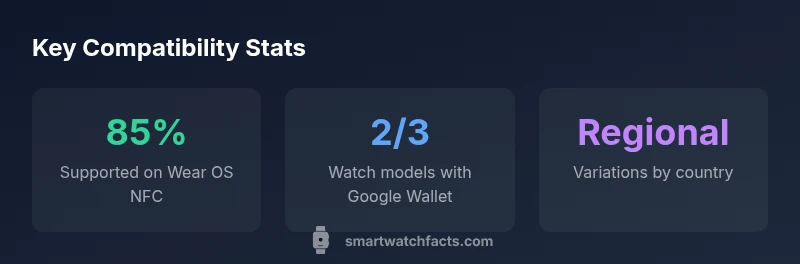
Even if your device is technically capable of Google Pay, regional restrictions can apply. Some banks, issuers, or regulatory regions may delay support or restrict card enrollment from unfamiliar devices. Additionally, offline mode and in-store acceptance can vary; some readers might require a phone-based payment or a bank-specific workflow. If you travel, verify that Google Pay works in new regions and with your preferred merchants. Smartwatch Facts’s 2026 analysis highlights that regional adoption hinges on both device firmware and wallet service updates, so plans to travel or shop internationally should account for possible friction at checkout.
How to verify compatibility before buying
To avoid buyer’s remorse, perform a pre-purchase compatibility check. Read the product page for NFC support and Wear OS eligibility, then confirm Google Wallet installation and card provisioning steps are documented by the manufacturer. Visit your bank’s website to see if they list Wear OS or Google Pay compatibility for wearable devices. If possible, test with a friend’s compatible watch or visit a store that allows in-store testing to confirm tap-to-pay functionality before committing to a purchase. Smartwatch Facts suggests focusing on NFC, wallet support, and regional availability as the triad of compatibility.
Practical tips for shoppers
- Prioritize Wear OS devices with NFC and a documented Google Pay workflow
- Verify regional availability and card issuer support before buying
- Check battery life and display quality as secondary factors, since payments are a daily use-case
- Expect firmware updates; ongoing support influences long-term Google Pay reliability
- Consider your bank’s or issuer’s customer support reputation for wearable payments
Bottom line: If you want a watch that reliably supports Google Pay, choose a Wear OS model with NFC, ensure Google Wallet is fully functional, and confirm card issuance compatibility in your region. Smartwatch Facts favors devices with strong wallet integration and transparent setup guides.
Google Pay compatibility by smartwatch platform
| Watch Type | NFC support | Google Pay support | Notes |
|---|---|---|---|
| Wear OS watches | Yes | Yes | Typically supported with Wallet |
| Apple Watch | Yes | No | Apple Pay only |
| Garmin/Fitness OS | Variable | Limited | Depends on model/firmware |
People Also Ask
Which watches support Google Pay?
Typically Wear OS watches with NFC support Google Pay, including Pixel Watch and newer Galaxy Watch models. Apple Watch uses Apple Pay, not Google Pay. Always verify NFC, Wallet app presence, and regional support before buying.
Wear OS watches with NFC usually support Google Pay; Apple Watch uses Apple Pay.
Can I use Google Pay on an Apple Watch?
No. Apple Watch does not support Google Pay and relies on Apple Pay for contactless payments.
Apple Watch uses Apple Pay, not Google Pay.
Do I need my phone to pay with Google Pay on the watch?
You generally set up Google Pay on the watch via your phone, but payments at the terminal can be made directly from the watch once provisioning is complete.
You might need your phone to set it up, but payments can work from the watch afterward.
Which banks/cards work with Google Pay on watches?
Most major banks and cards support Google Pay on Wear OS devices, but availability varies by issuer and region. Check with your bank for smartwatch compatibility.
Most big banks support Google Pay on Wear OS watches, but it varies by region.
How can I verify Google Pay is working on my watch?
Run a small test at a contactless reader to confirm a successful transaction after provisioning. If it fails, recheck wallet setup and card enrollment.
Try a quick tap-to-pay at a real reader to confirm it works.
“Wear OS devices with built-in NFC and wallet integration offer the most reliable Google Pay experience on the wrist today.”
Key Points
- Verify NFC and Wear OS compatibility before buying
- Google Pay is primarily on Wear OS watches; Apple Watch uses Apple Pay
- Confirm card issuer support and regional availability
- Set up Google Wallet on both phone and watch for smooth payments
- Test tap-to-pay at a real checkout before finalizing purchase