Which Smartwatch Supports eSIM: A Practical Buying Guide
Learn which smartwatches support eSIM, how it works, carrier considerations, and practical tips for choosing an eSIM-enabled wearable. A data-driven guide by Smartwatch Facts.


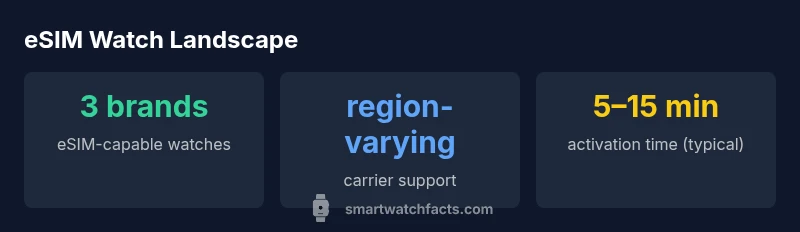
eSIM support is offered by Apple Watch cellular models, Samsung Galaxy Watch LTE versions, and Google Pixel Watch LTE. Carrier provisioning and regional availability vary; verify compatibility with your carrier and the exact watch model before purchasing. This ensures you can make calls, stream, and use data without your phone nearby.
Which watches currently support eSIM and why it matters
If you’re asking which smart watch support e sim, the short answer is that only a few vendors provide built-in eSIM capability on watch-sized devices. Apple’s cellular watches use their own eSIM provisioning, Samsung’s LTE models support eSIM, and Google’s Pixel Watch LTE edition follows the same pattern. In practice, this matters for users who want phone-free connectivity for calls, messages, or streaming when they are away from their phone. The choice often hinges on your mobile ecosystem and regional carrier support. According to Smartwatch Facts, eSIM-enabled watches are increasingly common in major markets, but availability isn’t universal. Before you buy, confirm that your country and carrier support the watch you intend to use and that the model you pick has eSIM capability in your region.
For many buyers, the key question is whether their everyday setup will work out of the box. If you rely on an iPhone, the Apple Watch Cellular line is typically the most seamless option. If you use Android, Samsung Galaxy Watch LTE variants and Google Pixel Watch LTE are the most straightforward paths to true stand-alone connectivity. The Smartwatch Facts team notes that while the core concept is the same (an embedded SIM profile that can be provisioned by a carrier), the exact steps and requirements vary by brand, model, and region, so a quick carrier check is essential.
How eSIM works on a smartwatch: architecture and provisioning
eSIM on a smartwatch is not a separate card you insert; it’s an embedded SIM chip that holds a carrier profile. When you activate the watch, a carrier profile is downloaded to the watch via an activation code or QR code, sometimes through a companion phone app. This profile can be stored alongside a primary profile, enabling the watch to connect to cellular networks independently of the phone. You can usually switch carriers by removing or adding profiles, though some carriers restrict watch activations to specific plans. In most cases, activation requires the watch to be paired with your phone initially, after which the carrier provisioning can be completed on the watch or through the carrier’s online tools. Real-world setup is often a mix of on-device prompts and QR-based provisioning.
Key considerations include: (1) whether your carrier supports eSIM for watches in your country, (2) whether the watch model is listed as compatible for eSIM with that carrier, and (3) any fees associated with adding a wearables line. The process is designed to be user-friendly, but regional variations can introduce friction, so a quick pre-purchase check saves time later.
Carrier and regional considerations
Carrier support for eSIM-enabled watches is not universal. Some carriers support watch eSIM in limited regions, while others require an additional line or separate data plan. Before buying, verify: (1) that your carrier offers eSIM for watches in your country, (2) whether the smartwatch model you want is supported, and (3) what the monthly line fee or activation fees look like. In some cases, you’ll need to activate the watch through the carrier’s app or a web portal, and you may have to pair a plan with a default phone line. Roaming and international use should also be considered; some carriers bill differently for watch data, and not all regions support roaming on wearable eSIMs. Smartwatch Facts’ analysis shows a clear trend toward broader eSIM support, but regional disparities persist. Always confirm carrier terms before committing to a purchase.
Pros and cons of eSIM watches
Pros:
- Stand-alone connectivity lets you make calls, stream music, or use apps without your phone.
- Simplified travel as you don’t need to swap SIMs or rely on phone tethering.
- Potential for better battery management since data usage can happen independently from the phone.
Cons:
- Carrier support and activation processes can be complex, especially in certain regions.
- Additional plan costs may apply, with varying data caps and roaming rules.
- Not all apps or carriers behave identically on every eSIM-enabled watch, leading to occasional feature gaps.
Overall, if you travel frequently, exercise in areas with spotty phone coverage, or want to minimize phone dependence, an eSIM-enabled watch can be a strong fit. However, the extra cost and setup frictions in some regions mean you should confirm carrier compatibility and cost before buying.
Practical buying tips for eSIM watches
When shopping for an eSIM-enabled smartwatch, consider these practical tips:
- Confirm regional availability: Some models are sold with cellular variants only in certain markets.
- Check carrier support: Not all carriers provide eSIM for wearables in every country; verify activation flow and pricing.
- Compare data plans: Look for flexible plans that include watch data without forcing you to add a separate line on your primary plan.
- Inspect compatibility with your phone: Some ecosystems offer tighter integration (e.g., Apple Watch with iPhone). If you’re an Android user, ensure your chosen model plays nicely with your carrier and apps.
- Review battery and performance: Cellular watches can draw more power; ensure battery life meets your daily usage needs.
- Understand roaming rules: International use may involve higher charges or restrictions.
- Plan for future-proofing: If you move to another carrier, a model with broad eSIM support reduces migration friction.
Smartwatch Facts suggests making a short list of must-have features (calls, messages, apps) and a nice-to-have feature list (music streaming, GPS, health sensors) to guide model selection.
Setup and activation: step-by-step guide
- Confirm your carrier supports eSIM for wearables in your country and that the selected watch model is eligible.
- Ensure your phone is ready and paired with the watch as required by the brand’s setup flow.
- Request an eSIM activation or add-on plan for the watch from your carrier, either through the carrier app, website, or store visit.
- On the smartwatch, open the cellular or network settings and select the option to add a mobile plan or carrier profile; scan the QR code if provided or follow on-screen prompts.
- Complete activation and test by placing a call or using cellular data away from your phone. If issues arise, contact your carrier or consult the brand’s support resources.
Activation steps can vary by brand; Apple, Samsung, and Google provide brand-specific guides, but core concepts remain consistent: carrier provisioning, profile download, and successful network registration.
Common myths and clarifications
- Myth: All smartwatches can use any carrier with eSIM. Truth: Carrier support is brand-, region-, and plan-specific.
- Myth: eSIM watches replace the need for your phone entirely. Truth: While stand-alone, some functions may still rely on the phone for initial setup or certain apps.
- Myth: Activation is always instant. Truth: provisioning can take several minutes and may require carrier assistance in some cases.
- Myth: eSIM means the device can replace your SIM permanently. Truth: You can switch plans or carriers, but some carriers limit watch activations or require new profiles.
Understanding these points helps set realistic expectations and reduces frustration during setup.
A quick pre-purchase checklist
- Confirm the exact model’s eSIM capability for your region.
- Verify carrier compatibility and any required add-on plans.
- Consider your typical usage (calls, messages, streaming) and battery expectations.
- Review the ecosystem alignment with your phone (iPhone vs Android).
- Check the watch’s app ecosystem and health-tracking features that matter to you.
- Read user reviews about activation experiences in your country.
- Plan for future-proofing, including potential carrier changes.
Future trends in smartwatch eSIM and roaming
Industry signals indicate broader eSIM coverage will continue to expand across brands and regions. Expect more carriers to offer turnkey wearable plans and streamlined activation flows. Roaming support is likely to improve, with more affordable data options for travelers. As manufacturers optimize power efficiency around cellular connectivity, eSIM-enabled wearables may see longer battery life and richer app experiences. Smartwatch Facts will monitor regulatory changes and carrier policies to keep guidance up to date.
Overview of eSIM-enabled smartwatch options by brand
| Brand | eSIM support | Notes |
|---|---|---|
| Apple | Yes (cellular models) | Classic integration with iPhone ecosystem |
| Samsung | Yes (LTE variants) | Broad regional support in multiple markets |
| Yes (LTE Pixel Watch) | Google ecosystem with Android and iOS compatibility |
People Also Ask
Do all cellular smartwatches support eSIM?
No. Only certain models from major brands offer eSIM on the watch, and availability depends on region and carrier. Apple, Samsung, and Google have prominent eSIM-enabled lines, but verification is essential before purchase.
Not all cellular smartwatches have eSIM; check your region and carrier support for the exact model before buying.
Can I use eSIM on a smartwatch with any carrier?
Carrier support varies by country and network. Some carriers provide dedicated watch data plans, while others may require adding a separate line or device profile. Always confirm activation steps and pricing with your carrier.
Carrier support varies; confirm activation steps and pricing with your carrier before buying.
Is there an extra cost to enable eSIM on my watch?
Yes, many carriers charge a monthly fee for the wearable data plan. The price can vary by region and plan features, so compare options carefully.
Wearable data plans often have a monthly fee; compare regionally to find the best option.
Do I need to keep my phone nearby after activating eSIM on the watch?
No, one goal of eSIM-enabled watches is stand-alone functionality. You may still pair for setup or use some apps, but ongoing calls and data can work without the phone nearby.
You don’t need your phone nearby for basic eSIM use, though setup may require pairing.
What should I check before buying an eSIM smartwatch?
Check regional compatibility, confirm carrier support for wearables, compare data plan costs, and review the ecosystem alignment with your phone. Also verify battery life under cellular use.
Check carrier support, plan costs, and ecosystem compatibility before buying.
Will roaming be supported on an eSIM smartwatch?
Roaming support varies by carrier and region. Some plans include roaming, others don’t. Review terms before traveling.
Roaming depends on carrier terms; check coverage and fees before traveling.
“"eSIM-enabled wearables are redefining how we stay connected on the go. The practical decision hinges on regional carrier support and vendor ecosystem alignment."”
Key Points
- Identify the ecosystem you use (iPhone, Android) to narrow options
- Verify regional carrier support before purchasing
- Expect additional line charges for watch data in some markets
- Prepare for a carrier activation flow that may vary by brand
- Choose an eSIM watch if you value phone-free connectivity and travel convenience