How Smart Watches Track Steps
Discover how smart watches count steps using motion sensors, algorithms, and calibration tips. Learn how accelerometers, stride length, and wearing position affect accuracy and how to improve daily activity tracking.


Smart watches count your steps by interpreting wrist motion with motion sensors such as accelerometers and gyroscopes. They convert repetitive movements into step events and then apply stride length and calibration data to estimate distance traveled. Accuracy depends on wear position, activity type, and how well you calibrate the device.
How Step Tracking Works on Smartwatches
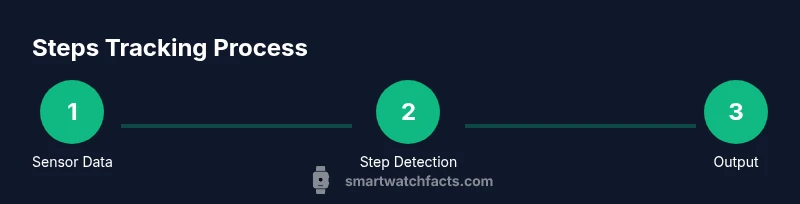
Step tracking on modern smart watches relies on motion sensors that detect wrist movement and translate it into discrete steps. The core sensors are accelerometers, which measure linear acceleration across multiple axes, and gyroscopes, which track rotational motion. By combining readings from these sensors (sensor fusion), the watch can identify the rhythmic, repetitive motions associated with walking or running. The result is a stream of potential step events, which the watch then aggregates into a daily step count. Over time, the software uses calibration data and user inputs to convert these events into meaningful distance estimates. According to Smartwatch Facts, the reliability of this process improves when the device stays snug on the wrist and sensors are kept active and up to date. This explains why a worn position shift or a firmware change can noticeably alter step totals.
Key Sensors Behind Step Counting
Most watches rely primarily on accelerometers to detect movement, with gyroscopes adding orientation context to distinguish walking from other wrist motions. Some devices also incorporate barometric sensors to infer elevation changes, which can help separate climbing from level walking, though this is less common for pure step counting. The sensors feed a data stream into algorithms that continuously classify motion patterns as steps or non-steps. The presence of high-quality, well-calibrated sensors across the device family explains why some models outperform others when counting steps, especially in lower-impact activities like slow strolls or light hand movements.
How Algorithms Convert Motion Into Steps
Sensor data alone isn’t steps yet. Algorithms analyze the frequency, amplitude, and rhythm of detected motions to determine when a step occurs. They apply a virtual stride length—often personalized from height or user input—to translate steps into distance. Some watches adjust stride length automatically based on detected pace or activity context, while others require manual input. The end result is a daily step count, with distance estimates that help you gauge activity levels. Remember that software updates can alter these algorithms, so calibration after updates is a good practice. Smartwatch Facts notes that ongoing software refinement is common as devices learn from real-world usage.
Activity Recognition vs Step Counting
Not every wrist movement should count as a step. Activity recognition features help separate walking from other activities like typing, cooking, or commuting. In practice, an effective watch counts steps only when a walking pattern is detected with sufficient confidence. This distinction is important for users who perform many repetitive arm motions during the day, as some devices may overcount if motion is mistaken for walking. The best-fit approach is to use both the step count and an activity log to understand overall movement and daily energy expenditure.
Factors Affecting Step Accuracy
Several factors influence how accurately a smartwatch counts steps: wearing position (loose vs snug), dominant vs non-dominant wrist, wrist gestures during daily tasks, and the type of activity (walking on a treadmill vs outdoor walking). Arm swing intensity and gait can also affect detection. Environmental factors, such as heat or humidity, have minimal impact in most cases but can influence sensor readings if the device isn’t properly maintained. Battery level and sensor calibration status can subtly shift step counts over time, which is why regular checks and occasional recalibration are advised.
Practical Setup for Better Accuracy
To maximize step-tracking accuracy, ensure the watch sits snugly on your wrist, not loose enough to slip during movement. Calibrate stride length if your device asks for it, especially after growth spurts, fitness changes, or if you switch to a different activity level. Keep the watch firmware updated to benefit from algorithm improvements and sensor refinements. When testing, perform controlled walks at a comfortable pace and compare readings against a known count to gauge accuracy. A consistent wearing pattern—same wrist, same position—helps the watch learn your gait over time.
Common Pitfalls and How to Spot Them
Watch out for overcounting when wrist movements resemble walking (e.g., vigorous typing, sweeping, or window cleaning). Under-counting can occur if the watch is too tight or if the stride calibration is far from your actual gait. If your device recently updated and counts look off, re-check the sensor permissions and calibration settings. Inconsistent results across days may point to differences in wearing position or activity type; use the same setup during tests to get reliable comparisons.
Privacy, Data, and Sharing
Step data is typically stored locally on the watch and synced to your phone or cloud account, enabling long-term trend tracking. Review app permissions and data-sharing settings to control what information is uploaded and who can access it. If you’re concerned about privacy, use local-only data storage when available and periodically review what apps have access to movement data. Smartwatch Facts emphasizes balancing utility with privacy by enabling user control over data exports and sharing.
Additional Metrics and How They Complement Step Count
Besides steps, many watches provide calories burned, activity duration, and active minutes. These metrics offer a more nuanced view of daily movement and energy expenditure. Use step counts in conjunction with heart-rate data or GPS-based pace, when available, to assess overall activity quality. Understanding the synergy between these metrics helps you set realistic goals and interpret your progress more accurately.
Tools & Materials
- Smartwatch with built-in accelerometer and gyroscope(Ensure motion sensors are enabled and the latest firmware is installed.)
- Smartphone paired with the smartwatch(Needed to adjust stride length, sync data, and review activity history.)
- Calibrated stride length data(If your device supports manual stride input, provide your typical gait length.)
- Charger or power bank(Keep the watch charged during calibration/testing sessions.)
- Notebook or notes app(Record test walks and perceived stride to compare with device readings.)
Steps
Estimated time: 25-40 minutes
- 1
Prepare your device
Charge the watch, update firmware, and confirm motion sensors are enabled in the fitness/app settings. This ensures the device can collect clean sensor data before you begin calibration.
Tip: Check privacy and sensor permissions; disable background restrictions that could pause data collection. - 2
Measure or input stride length
Enter your typical gait length in the watch’s health settings if prompted. If not available, estimate using a comfortable walk and compare step counts against your actual steps.
Tip: Do multiple trials to average out minor variations in stride length. - 3
Wear and position the watch correctly
Wear the watch snugly on your non-dominant wrist. A loose fit can misread arm motions, while a too-tight strap can restrict sensor movement.
Tip: Avoid wearing on the same arm for inconsistent results if you normally switch sides. - 4
Test with a known step count
Walk a measured number of steps (e.g., 60-100 steps) in a controlled environment and compare with the watch’s tally. Use a hallway or short path for accuracy.
Tip: Record counts for several trials to account for natural gait variations. - 5
Review and adjust calibration
If results diverge significantly, revisit stride length and activity recognition settings. Some watches adjust stride length automatically with pace; others require manual input.
Tip: Enable calibration prompts if available and perform another short test after adjustments. - 6
Consider treadmill vs outdoor testing
Calibrate for both contexts if your device supports it. Treadmills can provide a consistent pace, while outdoor walking introduces variable stride patterns.
Tip: Use environment-appropriate stride settings to maintain accuracy across activities.
People Also Ask
Do all smartwatches count steps the same way?
Most watches use accelerometers and sometimes gyroscopes to count steps, but algorithms and calibration approaches vary by brand and model, which can lead to differences in counts between devices.
Most watches count steps similarly, but differences in algorithms and calibration can lead to varying results across brands.
How can I improve step accuracy on my smartwatch?
Ensure sensors are enabled, calibrate stride length if available, wear the watch snugly, and perform a few controlled tests to verify readings align with actual steps.
Calibrate stride length, wear it snug, and test against real steps to improve accuracy.
Does wearing on the dominant wrist affect counts?
Wearing on the dominant wrist can introduce extra arm motions that some watches misinterpret as steps. Using the non-dominant wrist helps reduce noise in counts.
Wearing on the non-dominant wrist generally reduces extra wrist movements that might skew the count.
Is there a difference between treadmill and outdoor step counting?
Yes. Stride length and arm swing differ on treadmills versus outdoor walking; some watches offer separate calibration options for each context to improve accuracy.
Treadmill and outdoor walking can yield different readings; calibrate for both if your device supports it.
Should I calibrate my watch for better results?
Calibration helps tailor step detection to your gait. Use any built-in calibration prompts and test with known-step walks to confirm improvements.
Calibrating improves accuracy; follow the device prompts and re-test with known steps.
What about privacy of step data?
Step data is usually stored locally or synced to a cloud account. Review app permissions and control what is shared with apps or services.
Step data is typically stored on-device or synced to the cloud; manage permissions to protect privacy.
Key Points
- Understand sensors and algorithms driving step counts
- Calibrate stride length for personalized accuracy
- Wear the watch consistently for stable results
- Test readings against known steps to verify accuracy
- Review privacy and data-sharing settings