What Do Smartwatches Track? A Practical Guide for 2026
Explore the core metrics smartwatches track, how models differ, and practical tips to translate health data into real-world wellness actions.


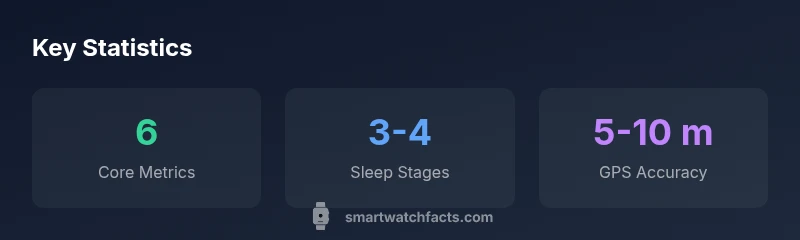
Most smartwatches track 6 core metrics by default, with additional sensors offering dozens more data points. The essential trio typically includes heart rate, step count, and sleep stages, while others monitor distance, active minutes, and calories burned. Accuracy varies by model, and users can customize which metrics appear on the home screen.
What metrics do smartwatches track? Core categories
If you’re asking what do smartwatches track, you’re looking at a mix of core health signals and activity data. In practice, most devices track a handful of base metrics by default, with many models offering dozens more as optional features. According to Smartwatch Facts, a typical smartwatch tracks six core metrics, though the exact list depends on the brand, sensors, and user settings. The six core areas commonly monitored are heart rate, step count, sleep stages, calories burned, distance or pace, and active minutes. In addition, many devices provide context like GPS route data, elevation, and weather during workouts. Understanding which metrics are available helps you customize your watch face and apps to show what matters most to you. Remember that data is most useful when you set clear goals and calibrate the sensors to your body and routines. This section foregrounds the keyword what do smartwatches track to illustrate how everyday use becomes data-driven.
Heart rate and biosignals: the core health metrics
Heart rate is often the flagship metric because it informs about aerobic fitness, recovery, and stress. Most watches sample heart rate continuously or at intervals, producing a trend line you can review over days or weeks. Biometric signals extend beyond heart rate to include resting heart rate, heart-rate variability (HRV), and sometimes oxygen saturation (SpO2). Each metric has limitations: HRV requires steady wear and accurate placement; SpO2 is an estimate rather than a direct medical reading. Smartwatch Facts notes that while these signals offer valuable insight, they should be interpreted in the context of your activity, sleep, and overall wellness plan. For beginners, focus on a few baseline metrics and track changes over time rather than chasing real-time precision every minute.
Activity and movement: steps, distance, and calories
Activity data is where wearables really shine for everyday goals. Steps provide a simple gauge of activity volume, while distance or pace helps with running, walking, and cycling plans. Calories burned aggregates energy expenditure, though it’s important to remember that most watches estimate rather than measure exact calories. Active minutes enrich the picture by signaling sustained effort rather than isolated bursts. You’ll often see a daily or weekly summary that highlights dip days or peak performance. Smartwatch Facts emphasizes setting realistic targets aligned with your lifestyle to avoid chasing numbers that don’t reflect your routine.
Sleep and recovery: stages, duration, and quality
Sleep tracking uses a combination of accelerometer data and sometimes heart-rate signals to infer sleep stages like light, deep, and REM. The accuracy of sleep staging varies across devices and wear position, but the trend is reliably useful for long-term patterns. Look for trends such as consistency of bedtimes, total sleep time, and nocturnal awakenings. Many users find that sleep data helps identify environmental or behavioral factors that affect rest, such as caffeine intake or evening screen time. Smartwatch Facts notes that sleep metrics are best used as a guide for improving sleep consistency rather than exact medical diagnostics.
Location and context: GPS, routes, and outdoor data
GPS data adds spatial context to workouts, allowing you to map routes, measure elevation change, and analyze pacing on hills. Distance and pace data become more meaningful when tied to a map view, especially for outdoor runners and cyclists. Hardware quality and satellite visibility influence GPS accuracy, and some devices fuse GPS with other sensors to improve lock speed. For casual activity, GPS helps with route memory and landmark-based navigation. Remember to enable location sharing only with trusted apps and services to protect privacy.
Advanced sensors: SpO2, stress, VO2 max, skin temperature
Beyond basics, many watches offer SpO2 estimates, stress indicators, VO2 max approximations, and skin-temperature sensors. These metrics rely on multiple sensors and algorithms; outcomes are most useful when interpreted in the broader context of activity, sleep, and nutrition. SpO2 and VO2 max are popular among athletes, while skin temperature can hint at recovery needs after workouts. Keep in mind that consumer wearables provide estimates rather than medical-grade measurements, and accuracy improves with calibration and continued use.
Privacy, data ownership, and sharing considerations
Data stewardship matters: wearable data can be shared with manufacturers, apps, and third-party services. Review permissions and check how data is stored, anonymized, and used for insights or advertising. Reputable platforms will offer options to export data, restrict sharing, and delete histories. If you value privacy, start with a minimal data sharing setup, and gradually enable features as you grow more comfortable with the trade-offs between convenience and control.
How to choose which metrics to track for your goals
Identify your personal goals—whether fitness, sleep quality, or stress management—and align metrics accordingly. Start with a core set (heart rate, steps, sleep) and gradually add context (GPS, HRV, VO2 max) as you train or monitor progress. Calibration matters: wear the device snugly, keep it charged, and update software to improve accuracy. Finally, review trends periodically and translate them into actionable changes, such as adjusting activity routines or bedtime habits.
Selected metrics commonly tracked by smartwatches
| Metric | What it measures | Data type | Notes |
|---|---|---|---|
| Heart rate | Beats per minute (bpm) | string | Varies by person; useful for trends and alerts |
| Sleep stages | Light/Deep/REM | string | Estimated by sensors; best for long-term patterns |
| Steps | Count of steps | string | Simple activity metric; complements intensity data |
| GPS distance | Distance traveled | string | Depends on route; cross-check with pace data |
People Also Ask
What metrics do most smartwatches track by default?
Most devices track heart rate, steps, sleep, calories, distance, and active minutes by default. Availability varies by brand, so check your device’s sensor list and apps to tailor which metrics appear on your main screen.
Most watches track core health and activity metrics by default, and you can customize which ones you see.
Do wearables measure blood pressure or glucose directly?
Most consumer wearables do not measure blood pressure or glucose directly. Some provide estimates or integrate with external devices; accuracy varies by model and should not replace medical-grade readings.
Most wearables don’t measure blood pressure or glucose directly; use approved medical devices for diagnosis.
How accurate are sleep stage measurements?
Sleep-stage estimates come from sensor data and are approximate. Accuracy depends on sensor quality, wear position, and algorithm. Use sleep data to identify patterns and improve routines, not for medical judgments.
Sleep stages are estimates—use them to spot patterns, not medical conclusions.
Can I view GPS routes and maps from my workouts?
Yes. Most watches record GPS routes during outdoor workouts and provide map or route views in their companion apps. Verify privacy settings before sharing location data with apps.
Yes—most watches log GPS routes you can review in apps.
What about privacy and data sharing?
Review app permissions and data-sharing settings. Data may be shared with manufacturers, third-party apps, or cloud services. Use export or delete options to manage your data.
Check who can access your data and adjust permissions accordingly.
“Smartwatch data becomes most useful when calibrated to your goals and regularly checked for accuracy. When interpreted correctly, trends can translate into practical, everyday actions.”
Key Points
- Identify default metrics and customize visibility
- Calibrate for better accuracy and personal goals
- Focus on trends, not single-point readings
- Review privacy settings before sharing data
- Translate metrics into practical habit changes