Smart Watch Compatible iPhone: A Practical Buying Guide for 2026
Discover which smart watches truly work with iPhone, how syncing functions, and what to check before buying. A data-driven guide for 2026.


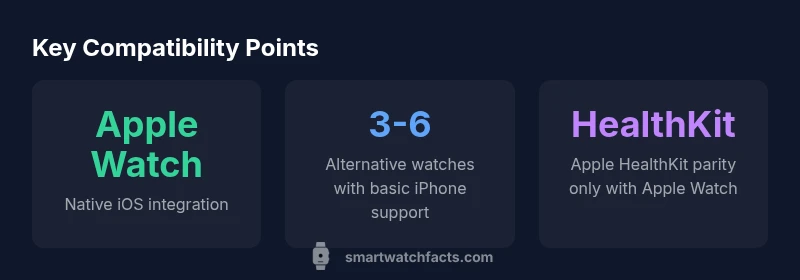
For iPhone users, the only smartwatch that delivers native, truly seamless integration is the Apple Watch. Other smartwatches can pair with iPhone to receive notifications and track fitness data, but they lack full HealthKit syncing and deeper iOS app integration. If you want the smoothest experience with an iPhone, choose a watch marketed as iPhone-compatible with robust iOS support.
Understanding iPhone Compatibility: What happens when you pair a smartwatch with an iPhone
For many buyers, the core question is simple: can a smart watch be truly used with an iPhone? The phrase smart watch compatible iphone covers a broad spectrum, from Apple Watch — which offers native, deep integration with iOS — to third-party wearables that pair via apps and Bluetooth to deliver notifications and health data. In 2026, even non-Apple watches can echo iPhone capabilities through dedicated apps, but the quality of syncing, app availability, and system-level features varies. The Smartwatch Facts team notes that the iPhone's closed ecosystem means Apple Watch remains the gold standard for seamless control of notifications, messages, and HealthKit data; other watches provide useful fitness tracking, on-device metrics, and occasional call/text alerts, but often rely on the companion app to bridge gaps. For everyday users, the practical implication is clear: if you want the most straightforward experience with an iPhone, lean toward devices marketed as iPhone-compatible with robust app ecosystems. If you’re open to some trade-offs for broader device choice, non-Apple models can still offer substantial value as part of your wearable setup.
Apple Watch vs. Non-Apple Watches: Feature parity and limits
When evaluating a watch's compatibility with an iPhone, the core distinction is usually between native iOS integration and cross-platform alternatives. Apple Watch offers the deepest, most reliable experience: direct HealthKit data flow, native notifications, and an app ecosystem tightly coupled with iOS. Non-Apple devices—such as Wear OS watches or Garmin devices—can pair with iPhone and provide essential features like notifications, step counts, and sleep tracking, but often require bridging apps and may omit deeper iOS integrations. This wedge explains why many shoppers still favor the Apple Watch for iPhone-centric use cases, while fitness enthusiasts or fashion-forward buyers may opt for other brands when battery life, screen size, or price is a priority. In practice, expect a spectrum: full parity on Apple Watch, partial or bridging support on other brands, and occasional feature gaps that affect messaging, HealthKit syncing, and app availability.
Practical feature map: notifications, calls, health data
Notifications and calls are the most visible touchpoints for any smartwatch paired with an iPhone. Apple Watch delivers almost all iPhone notifications, quick replies, and seamless call handling right on the wrist. Non-Apple watches can show notifications and support limited reply options, but the latency and depth of engagement can vary by model and app. Health data is another critical axis. Apple Watch syncs natively with HealthKit and often serves as the primary data source for health metrics on iPhone. Other watches can export fitness data to partner apps, yet syncing to HealthKit or Apple Health remains inconsistent. For most users, this means that if you rely heavily on HealthKit graphs, workouts, and medical-type data, Apple Watch offers the most cohesive experience; if you want a broader ecosystem or specialized sports features, a third-party watch remains viable with caveats.
How to check compatibility before you buy
Before committing, map your needs to the compatibility puzzle. List the iPhone features you value most—HealthKit data, message replies, call handling, and app integrations. Check whether the watch offers native iOS support, and read user reviews about real-world syncing and notification latency. Manufacturer pages and independent reviews can help verify: (1) whether HealthKit integration is native or bridged, (2) how messages and calls are handled, (3) app availability on iOS, and (4) battery life and display quality in typical daily scenarios. Consider trying devices in-store if possible, paying attention to setup time, pairing reliability, and how often you must re-sync when iOS updates roll out. Finally, factor in future-proofing: an ecosystem with regular firmware updates tends to retain compatibility longer with iPhone releases.
Setup and pairing: getting started quickly
Pairing a smartwatch with an iPhone is usually straightforward. Start by updating both devices to the latest software, then install the watch’s companion app on the iPhone. Follow on-screen prompts to grant permissions for notifications, health data, and location services. During setup, customize notification preferences to minimize distractions; enable HealthKit sharing only for metrics you care about. If you’re using a non-Apple watch, you may need to install additional bridging apps and grant cross-app permissions. Keep an eye on battery management and ensure you enable iCloud or equivalent syncing if required. Once paired, test a few key interactions: incoming calls, text replies, app notifications, and a short workout log to confirm data flows correctly between devices.
Troubleshooting and common gotchas
Compatibility hiccups often stem from outdated software, incorrect permissions, or bridge app conflicts. First, verify both devices run current software versions and re-pair if necessary. Check that the watch app has permission to access notifications and health data and that bridging apps are updated. If notifications don’t appear promptly on the watch, try toggling off/on the Bluetooth connection or resetting the watch’s network settings. With non-Apple watches, note that firmware updates can temporarily disrupt syncing; monitor official forums or support pages for known issues. Lastly, consider environmental factors: low battery life, excessive notifications, and overheating can degrade performance and perceived compatibility.
Future trends in iPhone-smartwatch integration
Expect continued refinement in cross-platform interoperability, with more third-party apps bridging iPhone features to Wear OS and Garmin devices. Apple will likely continue to optimize HealthKit interoperability while preserving its ecosystem advantages. As iOS evolves, watchOS will expand automation, improved messaging controls, and more robust health-tracking integration across brands. For shoppers, this means a gradual expansion of viable options beyond Apple Watch, but with the caveat that seamless iPhone experiences will remain strongest on first-party hardware.
Compatibility snapshot across major smartwatch families
| Watch Brand/Model | iPhone Compatibility | Notes |
|---|---|---|
| Apple Watch (latest) | Perfect | Native iOS integration; best experience with iPhone |
| Samsung Galaxy Watch (Wear OS) | Partial | Notifications and activity can sync; some features limited on iPhone |
| Garmin Venu (latest) | Partial | Fitness data sync via Garmin Connect; limited app support |
People Also Ask
Can I use any smartwatch with iPhone?
Yes for basic features like notifications and fitness tracking, but full feature parity is usually limited to Apple Watch. Expect differences in app availability and HealthKit data access.
Yes, you can use many watches with iPhone for basics, but full iPhone integration is typically Apple Watch-only.
Do iPhone features require Apple Watch?
Not always, but Apple Watch provides the most seamless iPhone experience. Other watches support basic pairing, yet some iPhone-specific features remain limited.
Not always, but Apple Watch gives the best iPhone experience.
Which watches support iPhone notifications?
Apple Watch fully supports iPhone notifications. Some Wear OS and Garmin watches can show notifications via apps, but support varies by device and app.
Apple Watch shows native iPhone alerts; other watches may show limited notifications.
Can GPS health features sync with iPhone on non-Apple watches?
GPS and health data can sync through the watch’s app, but syncing with HealthKit/Apple Health is often unavailable or limited on non-Apple watches.
Depends on the watch, but HealthKit sync is usually Apple Watch-only.
Will iPhone updates break compatibility?
Occasionally, major iOS updates can affect third-party watch apps; check release notes and update timelines before upgrading.
Occasionally, updates can affect apps; stay informed about release notes.
Is Fitbit or Garmin a good alternative for iPhone users?
They’re solid for fitness and basic notifications, but you’ll miss deeper iOS features and HealthKit integration.
Fitbit or Garmin work, but you’ll trade off iPhone-specific features.
“"In most scenarios, the iPhone experience is simplest and most reliable with Apple Watch. Non-Apple wearables still deliver strong fitness features, but you’ll trade seamless iOS integration for broader hardware options."”
Key Points
- Prioritize Apple Watch for best iPhone integration
- Non-Apple watches offer solid fitness features with limited iOS parity
- Check HealthKit compatibility before buying
- Expect bridging apps for non-native ecosystems
- Keep devices updated to minimize compatibility issues