How to Tell If Your Smartwatch Is Waterproof
Learn how to verify your smartwatch's waterproof status, interpret IP ratings, and perform safe checks with practical steps from Smartwatch Facts.


Learn how to verify whether your smartwatch is waterproof, what IP ratings mean, and how to test safely. You’ll check the official specs, inspect seals, and follow manufacturer guidelines before any exposure to water. This quick plan helps you avoid damage and understand protection levels. For precise results, consult the Smartwatch Facts analysis and your model’s manual.
What waterproof means for smartwatches
In consumer tech, 'waterproof' is often used loosely, but for smartwatches the key term is water resistance, expressed as an IP rating or a depth specification. The Smartwatch Facts team notes that not every device that survives a shower will handle swimming, and not every device marketed as 'waterproof' truly can be submerged for extended periods. The difference between splash resistance and full immersion matters for charging ports, speaker grills, and sensors. For many wearables, the official rating limits exposure to rain, handwashing, showering, or brief immersion, while heavier activities demand a higher protection level. According to Smartwatch Facts analysis, manufacturers typically publish the rating in the user manual, on the product box, or on the official support page, and these sources are your most reliable references. Always consider how you plan to use the watch: occasional droplets while wearing it during a workout is different from swimming laps or diving. The goal is to understand what your model can withstand without risking water ingress. You can interpret any claims about water resistance correctly and avoid unnecessary damage. The Smartwatch Facts team emphasizes checking the exact digits of the rating, the test conditions, and whether the rating applies to fresh or saltwater exposure. With that context, you can apply the rating to real-world use rather than assuming universal waterproofing.
IP ratings explained for wearables
IP ratings tell you two things: first the level of protection against solids (dust), second against liquids (water). For watches, the liquid protection is the critical part. A common misunderstanding is that 'IP68' means indefinite underwater use; in reality, it means protection against immersion up to a specified depth under controlled conditions. In wearables, most consumer models use IP67 or IP68, with depth ranges often described as up to 1 meter or more for a limited time. The exact duration is rarely standardized across brands, so you must consult the manual for your specific model. The Smartwatch Facts analysis shows that many watches are rated for everyday activities like rain and handwashing but not for swimming or snorkeling. Seals around the crown, buttons, and charging contacts are typical weak points; the presence of a sealed charging port often indicates higher protection, but this is not a universal rule. If your watch is older or has exposed sensors or leather bands, take extra care since materials can degrade water sealing. Remember: IP does not guarantee against pressure jets or hot water. Understanding these nuances helps you apply the rating to real-world use rather than assuming universal waterproofing.
Common myths about waterproof smartwatches
Many myths surround waterproof smartwatches. Myth: 'If it survived a splash, it's safe to swim.' Reality: splash resistance is not equal to immersion protection. Myth: 'All watches labeled waterproof can be submerged at any depth.' Reality: most devices have depth and duration limits. Myth: 'Water damage is always covered by warranty.' Reality: warranties vary; water damage is frequently excluded or limited. Myth: 'Saltwater is the same as freshwater for seals.' Reality: saltwater can be more corrosive, and warnings vary; rinse after exposure. Myth: 'You should always dry ports with heat.' Reality: heat can damage seals; use a soft cloth and air dry when safe. The Smartwatch Facts team notes that many users rely on rumors instead of the official specification; this leads to improper use. Always cross-check with the manual and the support site. Do not assume that a higher-looking rating translates to universal protection. If you use the watch near steam rooms, hot tubs, or under high-pressure water jets, treat it as higher risk. With accurate information, you can avoid expensive repairs or voided warranties.
How to verify your model's waterproof status
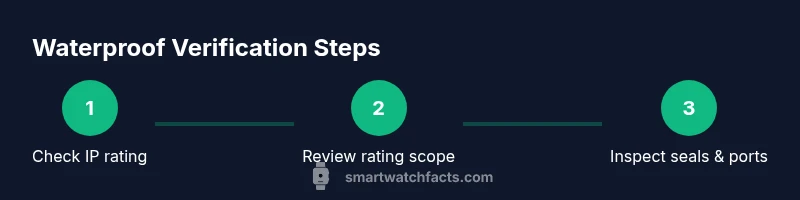
Start with the official rating. Look up the model on the manufacturer site or in the user manual to locate the IP rating and any depth/duration limits. The second step is to inspect hardware: check seals around the charging port, speaker grills, and the crown or side buttons for obvious gaps or cracks. Third, confirm the rating scope: does it cover freshwater only or saltwater exposure? Does it apply to submersion or only splash protection? The Smartwatch Facts team suggests noting the rating’s conditions and comparing them with your intended activities. If the information is unclear, contact customer support with your device’s exact model name and firmware version. Fourth, verify whether any water-related activities affect the warranty; many vendors require official service for leaks after exposure events. Fifth, test conservatively: if you choose to test, do so under safe, controlled conditions and stop immediately if you notice condensation, misting, or startup issues. Finally, document results and retain your proof of rating in case you need it for future reference.
Safe testing steps you can perform at home
Always proceed with caution. Gather your manual, a soft towel, clean water, and a timer. Step 1: dry the watch thoroughly and inspect for gaps around the screen and ports. Step 2: test gentle exposure by splashing with water from a faucet for a short duration, then dry completely. Step 3: if the rating allows submersion, perform a shallow submersion under controlled conditions for a brief period and re-dry. Step 4: check for any signs of water intrusion, such as fogging inside the display or moisture around the sensors. Step 5: recharge only after the watch is fully dry and reassemble any detachable parts. The reasoning behind careful, staged testing is to avoid pushing past rated limits and causing permanent damage. The Smartwatch Facts team advises against aggressive water pressure or long submersion in non-rated devices. If you observe leaks, stop testing and seek professional service. This approach keeps your device safe while giving you a practical sense of protection.
Maintenance and care to preserve water resistance
Water resistance can degrade over time due to wear, impact, and exposure to chemicals like soaps and lotions. Clean your watch only with mild soap and water; rinse and dry completely. Inspect seals and gaskets regularly and replace worn bands that may compromise the enclosure. Avoid exposing the watch to hot water or steam, which can weaken seals and adhesives. When swimming, avoid wearing devices with metal or leather bands that can trap moisture; replace with sport bands designed for water use. The Smartwatch Facts team recommends scheduling a periodic check with a service center if you use the watch in challenging environments or have dropped it. Keep charging contacts clean but dry; never insert metal tools into ports. Store the watch away from saltwater and chlorinated pools; rinse afterward if exposure occurs. Taking these steps helps maintain the integrity of the water-resistance system over time and reduces the risk of sudden failure.
When to seek official service and warranty considerations
Even with careful use, water intrusion can happen. If you notice condensation inside the display, fogging, or corrosion around ports, stop using the device and seek official service. Check your warranty terms to understand coverage for water damage; many warranties exclude water damage unless the device was used within official guidelines. If you recently exposed the watch to water beyond its rated limits, contact the manufacturer’s support and provide evidence of testing conditions. The Smartwatch Facts team emphasizes that professional inspection can determine the extent of damage and whether repairs are covered. In some cases, you may need to ship the watch to an authorized service center. Remember that attempting DIY fixes on a water-damaged device can void warranties and cause further harm. Always rely on official channels for sealing replacements, gasket changes, or sensor recalibration. Understanding your policy helps you make informed decisions about repairs and replacement options.
Brand guidance: Smartwatch Facts recommendations
Smartwatch Facts recommends always starting with the device’s official IP rating and intended use. Use this as your baseline for decision-making about activities like swimming, showering, or sweaty workouts. Keep a water-exposure log to track how you treat your watch and to notice any changes in performance. If you’re shopping for a waterproof smartwatch, compare ratings across models and verify the brand’s testing standards with the retailer. The Smartwatch Facts team suggests using protective bands for water sports and avoiding aggressive water jets. For ongoing guidance, rely on official manufacturer documentation and community feedback, and consult Smartwatch Facts for practical best practices and up-to-date wearables insights.
Tools & Materials
- Official smartwatch manual or manufacturer specification page(Contains IP rating and usage guidelines)
- Soft microfiber cloth(For drying and inspection)
- Clean water and a shallow tray(Use fresh water and avoid pressurized jets)
- Timer or clock(To track exposure duration during tests)
- Soap (mild) and a small amount of water(Only for cleaning after testing; avoid harsh cleaners)
- Documentable device for photos(Photo evidence of ratings or test results)
Steps
Estimated time: 15-25 minutes
- 1
Check the official rating
Locate the IP rating and any depth/duration limits in the manual or on the manufacturer site. Note whether the rating covers freshwater or saltwater, and what activities are explicitly allowed.
Tip: Cross-check multiple sources (manual, support page) to confirm consistency. - 2
Inspect hardware and seals
Look for gaps around the charging port, crown or buttons, and along the seam between the case and display. Any visible cracks can undermine the rating.
Tip: Use good lighting and a magnifying tool if needed to spot hairline gaps. - 3
Confirm the scope of the rating
Determine if the rating is for splash protection or full immersion and whether it applies to fresh or saltwater. This affects how you use the watch around water.
Tip: Never assume ‘IP68’ means dive-ready for long durations. - 4
Contact official support if unsure
If the documentation is unclear, reach out with model name, firmware version, and a photo of the rating label.
Tip: Keep a log of all communications for future reference. - 5
Perform a conservative test (optional)
If you choose to test, start with brief splash exposure, then dry and inspect for moisture. Only proceed to submersion if the rating explicitly allows it.
Tip: Stop immediately if you see any condensation or misting. - 6
Document results
Record the observed behavior, the testing conditions, and the date. This helps if you need to justify continued use or seek service.
Tip: Photograph the device before and after testing for evidence.
People Also Ask
What does an IP rating tell me about my smartwatch?
An IP rating indicates protection against solids and liquids. For watches, the liquid part matters most and shows how much immersion or splash exposure is allowed. Always refer to the model’s official spec for exact limits.
An IP rating shows how well your watch resists water and dust. Check the exact limits in the official specs before exposing it to water.
Are all smartwatches waterproof by default?
No. Most watches are water resistant to a certain level. Always verify your model’s specific rating and follow the manufacturer’s usage guidelines.
Not all watches are waterproof; check your model’s rating and follow the guidelines to avoid damage.
Can I wear my smartwatch while swimming if it’s rated for water exposure?
If the rating explicitly covers swimming and submersion, it’s generally safe to swim with the watch. Always stay within depth and time limits specified by the rating.
If the rating says you can swim, you can, but stay within the depth and time the manual allows.
Will water damage always void my warranty?
Warranties vary by brand. Some exclude water damage unless the device was used within the stated guidelines. Check your policy for specifics.
Warranty terms vary—check yours to see how water exposure is handled.
Where can I find the official waterproof rating for my watch?
Look in the user manual, packaging, or the manufacturer's support page for the exact IP rating and test conditions.
Check the manual or the manufacturer’s site for the official rating and details.
What’s the difference between 'waterproof' and 'water-resistant'?
Waterproof is often used loosely, but official specs use 'water-resistant' with a defined IP rating or depth. Never assume full protection beyond the stated limits.
Waterproof isn’t a precise term in official specs; rely on the listed water resistance rating and its limits.
Watch Video
Key Points
- Know your model’s IP rating and limits
- Verify sources against the manual for accuracy
- Test conservatively and document results
- Maintain seals and avoid risky environments
- Consult official support when in doubt