Samsung Galaxy Watch vs Fitbit: A 2026 Side-by-Side Comparison
A data-driven comparison of Samsung Galaxy Watch and Fitbit, covering design, health tracking, battery life, apps, and value to help you choose in 2026.


For the samsung smart watch vs fitbit comparison, Samsung Galaxy Watch models tend to offer deeper device ecosystems and broader smartwatch features, especially for Android users. Fitbit devices shine in health tracking and battery life, with a streamlined app experience. The Smartwatch Facts team finds the best choice depends on your phone ecosystem, health goals, and app expectations.
Market context and what matters in 2026
In the samsung smart watch vs fitbit comparison, the wearable market has matured into two dominant paths: feature-rich smartwatch platforms built around Android and Samsung's ecosystem, and health-first wearables centered on Fitbit OS with robust health-tracking capabilities. According to Smartwatch Facts, the decision frequently boils down to how you intend to use the device day-to-day: app availability, notification cadence, battery life, and how deeply you want to integrate with your phone. This guide emphasizes practical evaluation over a sheer specs shootout, focusing on real-world performance, durability, and long-term value. We aim to help you decide if the samsung smart watch vs fitbit choice suits your lifestyle, not just a marketing chart.
Design, OS, and ecosystem: what's under the hood matters
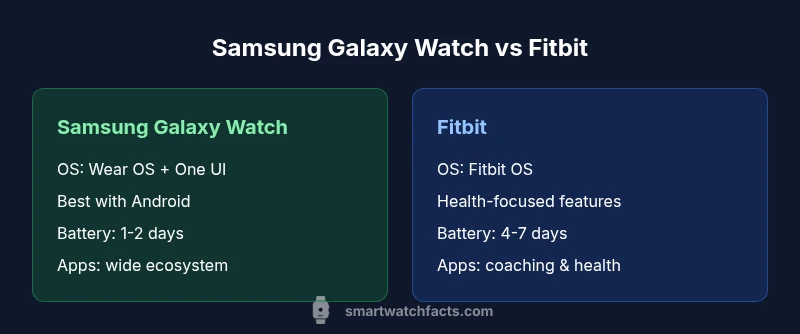
Design and operating systems drive the day-to-day experience far more than raw hardware numbers. Samsung Galaxy Watch devices run Wear OS with Samsung’s One UI layer, delivering strong Android integration and broad compatibility with Google services and Samsung apps. Fitbit OS favors a health-first approach with a streamlined app ecosystem and simpler navigation. For users tied to Android phones, Samsung often delivers the most seamless notifications, app sync, and device control. iPhone users, meanwhile, will notice Fitbit’s cross-platform strengths but may encounter feature gaps on Samsung devices. The Smartwatch Facts team notes that choosing between these two paths should align with your phone ecosystem, preferred apps, and how you value on-watch customization versus a focused health experience.
Health tracking, sensors, and accuracy
Health metrics sit at the core of this comparison. Samsung’s Galaxy Watch line includes a broad sensor suite, with features like heart-rate tracking, SpO2, and ECG on select models, plus detailed activity metrics and GPS-based workout tracking. Fitbit emphasizes heart rate, sleep stages, daily readiness, and long-standing sleep coaching, often delivering consistent health insights over longer battery life. In practice, Fitbit may feel more straightforward for health-oriented users who want hands-off tracking, while Samsung can offer richer, customizable metrics for power users who want advanced analytics on-device. Smartwatch Facts analyses across 2026 show both platforms delivering solid baseline accuracy, with model-specific nuances.
Battery life and charging patterns
Battery endurance is a frequent decision factor. In general, Fitbit devices tend to last longer between charges due to lighter feature sets and a more constrained app footprint, commonly offering multiple days of use under typical activity. Samsung Galaxy Watch variants usually require more frequent charging, often within a 1-2 day window depending on display brightness, GPS usage, and Always-On Display settings. Real-world usage will vary, but if you prioritize long intervals between charges for travel or busy days, Fitbit provides a tangible advantage. Smartwatch Facts’s 2026 review notes that charging cadence can influence how and when you wear the device, especially for sleep tracking and all-day activity monitoring.
Display quality, durability, and comfort
Display is where the user first interacts with the watch. Samsung Galaxy Watch models generally feature bright, high-resolution AMOLED displays with Always-On options and tactile bezel controls for navigation. Fitbit products emphasize readability and comfort with a lighter design and slimmer profiles, appealing to all-day wearers. Durability metrics—such as water resistance and ruggedized cases—vary by model, with both brands offering waterproof ratings suitable for swimming. Comfort depends on case size, strap material, and wrist shape; trying both in store helps you gauge fit and feel over a full day of wear.
Apps, notifications, and smart features
Apps and notification reliability influence everyday use. Samsung’s ecosystem provides a broad set of apps and third-party integrations, plus robust notifications and quick actions from the watch face. Fitbit maintains a more focused app store with coaching, health insights, and several partner integrations, enough for most health-minded users yet lighter on general-purpose productivity apps. For music on the go, offline maps, or extensive smartwatch automation, Samsung often wins on versatility, whereas Fitbit may win for a streamlined, dependable daily health experience. Smartwatch Facts emphasizes aligning app expectations with your daily routines.
Price, value, and ownership costs
Pricing is highly model-dependent. Samsung Galaxy Watch devices generally carry higher upfront costs, reflecting premium displays, sensors, and a broad feature set, with ranges typically spanning mid to high hundreds of dollars. Fitbit products usually start at lower price points and extend into mid-range options, offering strong value for health tracking and long battery life. Over the device lifetime, consider charging accessories, replacement bands, and potential OS updates. The Smartwatch Facts team notes that value is not just sticker price; it’s total cost of ownership, including ongoing app subscriptions or premium health features if you rely on enhanced coaching.
Real-world usage scenarios: Android-first vs cross-platform
If you primarily use Android (especially Samsung), the Galaxy Watch provides the most cohesive experience: faster app loading, richer control over notifications, and deeper integration with Samsung devices. If you value health metrics above all else and need longer battery life with a simpler interface, Fitbit shines, particularly for casual wearers or multi-platform households. Cross-platform users can expect solid performance from both but should weigh app ecosystems, data portability, and how each platform syncs with popular health and fitness apps. Smartwatch Facts’s conclusions emphasize matching your phone family with the watch’s strengths to maximize satisfaction.
Authority sources and data behind the comparison
This comparison leverages internal synthesis from the Smartwatch Facts Analysis, 2026, combined with widely reported device characteristics and user feedback. For broader context, we reference reputable external sources to corroborate health metrics and device capabilities from established research and publications. See the following sources for additional depth: NIH (https://www.nih.gov) and NIST (https://www.nist.gov) for health-tech standards, and IEEE Spectrum (https://spectrum.ieee.org) for wearable technology coverage.
How to read the comparison and next steps
This guide presents a balanced, criteria-based view rather than a purely feature-first listing. Use the quick comparison table to orient yourself, then dive into the in-depth sections to understand how design, health features, battery life, and price align with your priorities. If you’re still undecided, start with a budget and decide whether Android integration or health coaching matters more. Finally, test both options in real-world scenarios—especially around sleep tracking, workout routines, and notification workflows—to confirm your choice before purchase.
Comparison
| Feature | Samsung Galaxy Watch | Fitbit (Sense/Versa) |
|---|---|---|
| OS & Ecosystem | Wear OS with Samsung enhancements, strong Android integration | Fitbit OS with health-centric app ecosystem |
| Display & Design | Vivid AMOLED with Always-On; bezel/navigation options | Slim, comfortable design with clear display |
| Health & Sensors | Heart rate, SpO2, ECG on select models; robust activity metrics | Heart rate, sleep stages, SpO2; health coaching features |
| Battery Life | Typically 1-2 days depending on usage | Typically 4-7 days with standard usage |
| Phone Compatibility | Best with Android; strong iOS support, some features limited | Cross-platform with strong iOS/Android support; health-focused |
| App Availability | Large third-party app ecosystem and integrations | App ecosystem focused on health apps and coaching |
| Water Resistance | Up to 5 ATM or more (model dependent) | General 5 ATM or more across devices |
| Price Range | $299-399 (varies by model) | $149-299 (depends on model and promotions) |
| Best For | Android power users seeking customization and ecosystem depth | Health-focused users who value battery life and simplicity |
Strengths
- Strong Android integration and customization options
- Broad app ecosystem and extensive hardware features
- High display quality and premium materials
- Wide range of model choices and price points
Weaknesses
- Higher ongoing charging cadence on some Galaxy Watch models
- Feature gaps on iPhone compared to Android devices
- Fitbit OS may feel limited for non-health tasks
- Samsung models can be more expensive upfront
Samsung Galaxy Watch generally suits Android-heavy users; Fitbit excels for health-focused, cross-platform wearers
Choose Samsung if you want richer app integration and Android synergy. Choose Fitbit if you prioritize battery life and health features with broad iOS compatibility.
People Also Ask
Which watch has better battery life in daily use?
Fitbit devices typically offer longer battery life under normal health-tracking use, while Samsung Galaxy Watch models may require more frequent charging with GPS and Always-On Display enabled. Your mileage depends on display settings and what you run on the watch.
In daily use, Fitbit generally lasts longer between charges, but if you enable Always-On Display and GPS often, Samsung may need more frequent charging.
Is Samsung Galaxy Watch better for Android users?
Yes. Samsung Galaxy Watch devices integrate deeply with Android and Samsung services, offering smoother notifications, quicker app access, and broader device control for Android users.
If you use Android, Samsung Watches usually feel more natural and responsive with better integration.
Can Fitbit work fully with iPhone, or is it limited?
Fitbit works well on iPhone, with most core health features supported. Some advanced notifications or third-party app integrations may be more limited compared to Android.
Fitbit works nicely with iPhone, though some advanced features may be more limited than on Android.
Do both watches have ECG sensors?
ECG is available on select Samsung Galaxy Watch models and on certain Fitbit devices. Availability depends on the model and region, so check current specs before buying.
ECG is available on some models from both brands, but it depends on the exact model and market.
Will apps drain battery faster on either watch?
Yes. Installing many apps or using GPS-intensive features can increase power consumption on either platform. Samsung’s wider app ecosystem may lead to higher drain in some scenarios, while Fitbit’s leaner app footprint can help battery life stay longer.
More apps and GPS use means faster battery drain on either watch; Samsung may drain more quickly in some cases.
Which watch is easier for beginners to use?
Fitbit typically offers a simpler, more intuitive experience for new wearers, especially for health tracking. Samsung provides more features and customization, which can be exciting but slightly steeper to learn.
If you’re new to wearables, Fitbit is usually easier to pick up, while Samsung is richer in features once you settle in.
Key Points
- Compare ecosystem compatibility before buying
- Prioritize health tracking if health features drive the purchase
- Expect longer charging intervals with Fitbit
- Opt for Galaxy Watch for app variety and Android polish