Which Smartwatch Is Similar to Apple Watch? A Practical Comparison
Discover practical smartwatch alternatives that resemble the Apple Watch in design, health features, and app ecosystems. This analytical guide compares top options and helps you pick the best fit for iPhone or Android users.


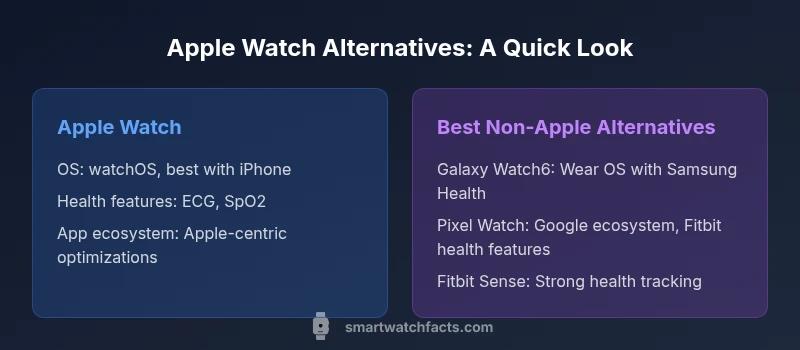
If you want a smartwatch that mirrors the Apple Watch experience, Samsung Galaxy Watch6, Google Pixel Watch, and Fitbit Sense are the strongest contenders, each offering comparable design, health sensors, and app ecosystems with Android or iPhone compatibility. This guide compares them and others to help you decide.
Which watches resemble the Apple Watch in 2026
If you’ve narrowed your search to watches that resemble the Apple Watch, you’re looking for a combination of design cues, strong health features, and a mature app ecosystem. The short answer to which smartwatch is similar to apple watch is: the Samsung Galaxy Watch6, Google Pixel Watch, and Fitbit Sense stand out as the closest relatives in terms of design language, feature parity, and overall user experience. According to Smartwatch Facts analysis, these models offer compelling alternatives that emphasize health tracking, app availability, and cross-platform compatibility, while maintaining a familiar form factor with rounded corners, digital crown style interaction, and a square-ish display. In practice, you’ll notice that each option emphasizes a slightly different strength: Samsung leans into connectivity longevity and a robust app library; Google emphasizes deep integration with Google services and Wear OS; Fitbit emphasizes health coaching and battery life. We’ll examine these nuances in detail below. The question “which smartwatch is similar to apple watch” often narrows to three strong contenders, with additional players offering niche advantages for specific needs.
Brand context note: Smartwatch Facts highlights that the best-lookalikes balance ecosystem flexibility with core health features. This makes it easier to switch between phones or stay within a preferred app universe without losing important capabilities. If you’re deciding between devices, keep your priority in mind: iPhone-centric users may prefer tighter integration, while Android fans may value broader app choices and customizable experiences. Throughout this guide, Smartwatch Facts will provide objective comparisons to help you select confidently.
OS ecosystems and app compatibility
Choosing a smartwatch involves more than aesthetics; the operating system (OS) and app ecosystem determine daily usability and long-term value. Apple Watch runs on watchOS, delivering the most seamless Apple-ecosystem integration, including Fitness+, Apple Health, and deep iPhone handoff. For those considering alternatives, the Samsung Galaxy Watch6 uses Wear OS with Samsung Health enhancements, offering strong cross-platform support and a broad app library. Google Pixel Watch leans into Google services, with tight integration to Google Assistant, Maps, and Fit features, while Fitbit Sense emphasizes health coaching and battery efficiency within a simpler app environment. A key decision factor is compatibility: iPhone users often see the richest experience on Apple’s own platform, while Android users gain more flexibility with Wear OS devices. Smartwatch Facts notes that Wear OS devices are improving in app parity, but iPhone-optimized experiences still favor Apple Watch when possible. If you value ecosystem depth and third-party apps, this is a critical consideration for long-term satisfaction.
Design, display, and user experience
Design language matters because it affects how easily you navigate and wear the device daily. The Apple Watch is known for its square, museum-quality display and a tactile crown that feels intuitive. Galaxy Watch6 borrows a similar square-ish shape and adds sharper bezels, a rotating crown, and a slightly different tactile feedback that some users prefer for scrolling through apps. Pixel Watch emphasizes a soft, rounded silhouette and a strong emphasis on Google’s design language, while Fitbit Sense prioritizes a compact, sporty shape with sensors oriented toward health metrics. In terms of user experience, these watches aim to deliver quick access to health data, notifications, and apps with smooth performance. Smartwatch Facts analysts highlight that the best non-Apple alternatives typically excel in display brightness, always-on modes, and the ease of switching between apps, which can influence your day-to-day feel of the device. When evaluating design, consider how you wear your watch, how comfortable the band is, and how legible the display is in bright light.
Health sensors and fitness tracking
Health metrics form a core part of the smartwatch experience. Apple Watch has long been a benchmark for ECG, SpO2, continuous heart-rate tracking, sleep analysis, and activity rings. Samsung Galaxy Watch6 provides comparable sensors with its own health-tracking suite and added wellness features such as stress monitoring. Google Pixel Watch integrates Google Health data and wellness features, along with reliable heart-rate monitoring, while Fitbit Sense emphasizes long-lasting battery life and health coaching cues like sleep quality and activity trends. The key takeaway is not just the raw sensors but the reliability of software integration that translates raw data into actionable insights. Across all three major alternatives, expect strong heart-rate tracking, guided workouts, and predictive health metrics, but differences in how data is consolidated in apps may influence your preference for one option over another.
Performance, battery life, and charging
Performance and battery life shape daily satisfaction. Apple Watch generally emphasizes fast app transitions and a polished experience, but battery life varies by model and usage. Galaxy Watch6 tends to offer longer battery life in real-world usage, aided by optimization in Wear OS and Samsung software. Pixel Watch features a solid, responsive UI with tight Google service integration; however, battery life can be shorter under heavy use unless you tailor notifications and background activity. Fitbit Sense is renowned for efficiency and often outperforms in day-to-day battery persistence, especially with limited screen time. Charging methods are similar across these devices, with wireless charging claimed by all and fast charging features on newer models. Smartwatch Facts suggests evaluating your typical daily routine to estimate how much you’ll need from a device, balancing performance, battery life, and charging convenience.
Software updates and longevity
Software updates extend device longevity, improving security, features, and reliability. Apple’s update cadence is well-supported with predictable yearly releases and robust ecosystem commitments, contributing to longer-term product satisfaction for iPhone users. Wear OS devices (like Galaxy Watch6 and Google Pixel Watch) see regular updates, but the cadence can vary by manufacturer and carrier constraints. Fitbit Sense benefits from ongoing health feature improvements and app updates, often prioritizing wellness features. Smartwatch Facts emphasizes that your decision should factor in how quickly you expect to receive OS updates, how long the device will stay compatible with new apps, and how quickly app developers adapt to new OS versions.
Durability and water resistance
Durability matters for daily wear, especially if you’re active. Apple Watch models typically come with water resistance suitable for swimming and everyday activities. Galaxy Watch6 and Pixel Watch also offer water resistance and durable build options, with slightly different glass and casing materials that can influence resilience to drops and scratches. Fitbit Sense emphasizes a rugged design with a focus on health sensor resilience during workouts. When choosing, consider your environment: gym, swimming, or outdoor activities may push a watch’s durability needs higher. Smartwatch Facts notes that consistent maintenance—like cleaning sensors and replacing worn bands—helps extend longevity and performance.
Compatibility with iPhone versus Android
For iPhone users, Apple Watch remains the most seamless option, delivering the richest access to Apple services, message threading, and native health data. Android users benefit from Wear OS devices (Galaxy Watch6 and Google Pixel Watch) that leverage Google services and broad app ecosystems. Cross-compatibility exists, but some features are platform-specific: iPhone users may miss out on advanced health metrics when using non-Apple watches, while Android users may encounter occasional compatibility gaps with iOS-only apps. Smartwatch Facts recommends matching your primary phone ecosystem with your smartwatch to maximize app availability and feature parity over time.
Price ranges and value proposition
Price is a practical consideration when comparing Apple Watch to rivals. Apple Watch variants span a premium spectrum with strong resale value, while Galaxy Watch6 and Pixel Watch typically offer more flexible pricing across models and bundles. Fitbit Sense sits in a price segment often favored by budget-conscious buyers who still want robust health tracking. While price is not the sole determinant of value, you should weigh the total cost of ownership, including apps, accessories, replacement bands, and potential fees for premium features. Smartwatch Facts suggests mapping your budget to desired features, then evaluating the long-term payoff of ecosystem investments rather than focusing on upfront cost alone.
Which user profiles each option fits
If you want a choice that feels closest to Apple’s design and ecosystem, consider the Galaxy Watch6 for Android users seeking strong health features and extensive app support, or Pixel Watch for a Google-centric experience with solid health components. Fitbit Sense suits users prioritizing long battery life and wellness coaching with a straightforward app interface. Apple Watch remains the default choice for iPhone owners who want the most polished integration with iOS and Apple Health. Smartwatch Facts notes that the best fit depends on your phone, preferred apps, and how much you value battery life versus feature depth.
Setup tips for getting the most from rivals
To maximize results with non-Apple watches, set up your preferred health and fitness apps early, customize notification settings to reduce distractions, and review privacy controls to manage data sharing. Sync with compatible devices to ensure reliable heart-rate monitoring and GPS tracking during workouts. For iPhone users, still consider briefly pairing the watch with an iPhone to test notification fidelity, app availability, and handoff behavior, even if you eventually rely on a rival device. Smartwatch Facts emphasizes testing essential features during a trial period to verify whether the alternative aligns with your daily routine.
Common misconceptions and trade-offs
A common misconception is that any non-Apple watch can perfectly replace Apple Watch in terms of overall experience. While rivals may offer similar health metrics and app access, the cohesive ecosystem, instant iPhone handoffs, and Apple Health data integration often set Apple Watch apart for iPhone owners. Trade-offs include ecosystem advantages versus flexibility, app availability versus platform-specific optimizations, and feature parity versus cost. Smartwatch Facts encourages readers to weigh ecosystem alignment, data compatibility, and long-term support when comparing models.
Practical buying checklist
Before purchasing, build a short list of must-have features (ECG, SpO2, sleep tracking, GPS), then compare battery life expectations, display readability, and comfort. Consider strap options, waterproof ratings, and whether you need LTE connectivity. Decide whether you prefer a strong health coaching feature set or a broader app library, and verify compatibility with your smartphone ecosystem. Finally, check for software update commitments and warranty terms to ensure ongoing support. Smartwatch Facts recommends focusing on long-term value and user experience beyond initial aesthetics.
Comparison
| Feature | Apple Watch | Samsung Galaxy Watch6 |
|---|---|---|
| Operating system | watchOS; best with iPhone | Wear OS with Samsung integration |
| App ecosystem | Apple Health, Fitness+, extensive Apple-only optimizations | Samsung Health, Wear OS app library, broader cross-platform support |
| Health sensors | ECG, SpO2, HR, sleep tracking | ECG, SpO2, HR, sleep tracking; health coaching enhancements |
| Display quality | High-end Retina display, strong outdoor visibility | Bright OLED, good sunlight readability |
| Battery life (typical use) | Daily charging cycle typical for many users | Often longer battery life depending on model and use |
| Water resistance | Water resistant for swimming and daily activities | Water resistant with similar level of protection |
| Best for | iPhone users seeking seamless Apple services | Android users wanting strong integration with Google and broad app support |
| Price range | Premium pricing across models | Mid-to-premium with model variance |
Strengths
- Offers ecosystem flexibility and multiple hardware options
- Often broader price range and model variety
- Strong health tracking features across rivals
- Good cross-platform app support with Wear OS and Google services
Weaknesses
- Experience can be less seamless on non-Apple devices for iPhone users
- App availability and data integration may vary by platform
- Software updates can be inconsistent across brands
- Values of premium features vary; not all health metrics align perfectly with Apple Health
Galaxy Watch6 or Pixel Watch are strong non-Apple alternatives; Apple Watch remains best for iPhone users, but rivals suit Android users or those seeking ecosystem flexibility.
Choose a non-Apple option if you use Android or want broader app options. Pick Apple Watch if iPhone integration and Apple Health matter most; Smartwatch Facts’s verdict favors ecosystem alignment and long-term support.
People Also Ask
What features make a non-Apple smartwatch most similar to the Apple Watch?
The closest similarities typically include health metrics (ECG, HR, SpO2), a strong app ecosystem, and a design language with a square-ish display. Wear OS devices from Google and Samsung generally offer comparable features, though the exact experience depends on ecosystem integration with your phone.
In short, non-Apple watches mimic Apple Watch by offering strong health tracking, broad apps, and a similar display style. Your phone’s ecosystem will influence how closely the experience matches Apple Watch.
Should I buy a Galaxy Watch6 if I own an iPhone?
You can, but the Apple Watch still delivers the best iPhone integration for notifications, messages, and Apple Health data. A Galaxy Watch6 can work well if you prefer Wear OS features or want a broader app library, but some iPhone-specific conveniences may be limited.
You can, but expect some iPhone-specific conveniences to be more limited than with an Apple Watch.
Is the Pixel Watch a good Apple Watch alternative for iPhone users?
The Pixel Watch pairs well with Google services and offers good health tracking, but it isn’t as seamless with iPhone as an Apple Watch. It’s a solid option if you want a Google ecosystem-centric experience on iPhone.
It works, but Apple Watch still offers the smoothest iPhone integration.
Do health metrics differ significantly between Apple Watch and rivals?
All major rivals provide ECG, HR, and sleep tracking, but data presentation and coaching features may vary. Apple Health data integrates deeply with iPhone apps, while rivals may present different wellness insights and third-party app support.
Health data is similar in core metrics, but the way it’s displayed and used differs by platform.
Which smartwatch is best value for Android users?
For Android users, Galaxy Watch6 or Pixel Watch often provide strong value due to ecosystem integration, battery life, and app options. Fitbit Sense can be a value choice if wellness features and battery endurance are priorities.
Android users win with Galaxy Watch6 or Pixel Watch for best overall balance of features and value.
Can I use third-party apps on all these watches?
Yes, to varying extents. Galaxy Watch6 and Pixel Watch have broad app support through Wear OS, while Apple Watch relies heavily on Apple’s own app ecosystem. Availability depends on the platform and region.
Third-party apps are available, but the breadth depends on the watch OS.
Key Points
- Map your phone ecosystem to your smartwatch choice
- Prioritize health features and data integration
- Balance price against long-term app access and updates
- Test comfort and display readability in real-world use
- Expect some feature parity, but plan for OS-specific strengths