Difference Between Smart Watch and Apple Watch
Analyze the difference between smart watch and Apple Watch with an analytical buying guide. Compare compatibility, ecosystem, health features, price, and apps to determine the best wearable for your phone and budget.


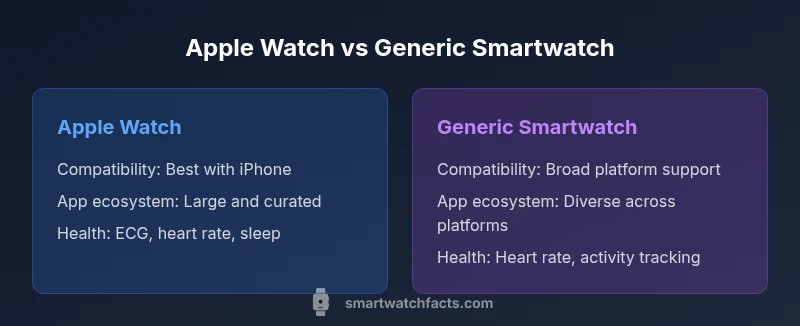
Apple Watch is best for iPhone users seeking seamless ecosystem integration, health features, and a curated app experience; generic smart watches offer broader compatibility, a wider price range, and more platform choices. The difference between smart watch and apple watch often boils down to ecosystem and budget: choose Apple Watch for tight iPhone integration, or pick a non-Apple smartwatch for flexibility and value.
What qualifies as a smartwatch, and why the difference between smart watch and apple watch matters
In practical terms, a smartwatch is a wearable computer with a display that can run apps, track activity, and deliver notifications from your phone. The phrase difference between smart watch and apple watch captures a market split: a tightly integrated, brand-driven experience (Apple Watch) versus a broad array of devices that run on Wear OS, Fitbit OS, Samsung's Tizen, and other platforms. For shoppers, the distinction matters because it shapes app availability, health-tracking depth, battery expectations, and how your data flows between devices. If you own an iPhone, the Apple Watch offers near-native features like quick replies, health app synchronization, and simple watch faces. If you use Android or want more price options, a different smartwatch may be more flexible, letting you mix-and-match with different bands, screens, and processors. In short, understanding the ecosystem and intended use helps you decide which path aligns with your daily routines, privacy preferences, and budget. According to Smartwatch Facts, the Smartwatch Facts team found that ecosystem alignment often drives data sharing and privacy controls more than hardware specs.
The Apple Watch: strengths and limitations
The Apple Watch remains the archetype of an integrated smartwatch experience. Its strength lies in deep iPhone integration—the watch can mirror notifications, answer calls, and run a curated suite of health features that rely on Apple's ecosystems (Health, Fitness+, and third-party apps). The hardware includes precise sensors, consistent software updates, and a polished user interface. This leads to reliable heart-rate monitoring, ECG functionality in supported models, sleep tracking, and activity insights that many users trust for daily wellness. Limitations exist: the device is largely tethered to the Apple ecosystem, which means Android users miss out on core capabilities. Price is typically higher than many generic watches, and repair or replacement costs can be a consideration. In addition, the Apple Watch's battery life is optimized for daily charging, so sustained long-term use during extended trips may require planning. Still, for iPhone owners, the Apple Watch frequently offers a best-in-class experience that blends hardware, software, and services.
The general smartwatch landscape: Wear OS, Samsung, Fitbit, and more
Beyond Apple, the smartwatch market is diverse. Wear OS-powered devices from Google partner brands offer broad compatibility with Android phones and several features that mirror fitness tracking and notifications. Samsung's Galaxy Watches, with their own OS lineage, emphasize battery life and performance within Android ecosystems. Fitbit and Garmin focus on fitness and endurance tracking, often with long battery life and a strong emphasis on health metrics. In this landscape, there isn't a single winner; rather, the best choice depends on your phone, your desired apps, and how you value things like battery life and display quality. The key takeaway is that the difference between smart watch and apple watch becomes most evident in the software experience, app availability, and cross-device data portability.
Compatibility and ecosystem implications
The ecosystem you choose drives most of the experience. An iPhone user pairing with an Apple Watch benefits from seamless pairing, unified notifications, and synchronized health data. Android users or those who own multiple devices may prefer Wear OS or other brands that offer cross-platform compatibility. However, cross-platform compatibility often comes with trade-offs, such as limited access to exclusive apps or health features supported only on a single platform. Data portability and privacy controls vary by ecosystem; consider whether you want to keep health data in a single growing repository or split across devices and apps. Your choice will affect software updates, third-party app availability, and even the look and feel of the watch faces.
Price ranges and value considerations
Pricing reflects the ecosystem, hardware quality, and software support. Apple Watch models carry a premium tied to the Apple ecosystem, while generic smartwatches span a broad price spectrum, from entry-level options to premium non-Apple devices. The value judgment depends on how much you rely on your phone’s ecosystem, how important health features are, and whether you prefer a device you can use with multiple phones. In practice, buyers should balance upfront cost with ongoing app access, service subscriptions, and potential replacement costs over time.
Health sensors and data depth
Health-focused watches compete on sensor quality, ECG capability, blood oxygen estimation, sleep tracking, and continuous heart-rate monitoring. Apple Watch models offer a tightly integrated health suite with Apple Health data portability, while third-party watches may excel in niche metrics or rugged use cases. If health tracking is a primary goal, compare which sensors are actually supported on your intended device, and verify how data syncs with your preferred health app ecosystem. Privacy controls and data sharing policies also vary by platform and manufacturer.
Apps and software experiences
Apps drive daily usefulness. Apple Watch benefits from a large, curated App Store with health and automation apps designed for tight iPhone integration. Generic smartwatches run on Wear OS, Samsung’s platform, or other ecosystems, offering broad app options but sometimes uneven app quality or faster OS fragmentation. Consider your preferred apps and how they sync with other devices (phones, tablets, and computers). Software updates, developer support, and compatibility with your other devices will shape long-term satisfaction.
Battery life and charging realities
Battery life is a practical constraint. Apple Watch models generally require daily charging under typical use, especially with health tracking and always-on displays. Many generic smartwatches emphasize longer life between charges, especially when features like always-on displays or high-refresh-rate screens are limited. If you travel frequently or rely on the watch for overnight health monitoring, consider how often you’ll need to recharge and whether fast charging or wireless charging is important to you.
Use-case scenarios: which path fits you best
If you own an iPhone and want the smoothest experience with health data, notifications, and a polished app store, the Apple Watch is often the strongest fit. If you own an Android phone or want more price and hardware options, a generic smartwatch can provide value without locking you into a single ecosystem. For mixed-device households or tech enthusiasts who enjoy customization, non-Apple watches offer flexibility and experimentation opportunities.
How to evaluate devices: a practical checklist
Create a short list of must-haves, then map each item to how the two main options perform: compatibility with your phone, critical health sensors, app availability, durability, battery life, and price. Use a simple scoring rubric to compare devices against your priorities, and don’t overlook software updates and data privacy. Finally, consider your long-term satisfaction beyond initial setup by testing the user interface, watch faces, and notification workflows.
Common myths and misconceptions about smartwatches
Many buyers assume Apple Watch is always superior, while others think all smartwatches offer the same app experience. In reality, the best choice depends on your phone, desired apps, and budget. Misconceptions about battery life, health data accuracy, and third-party app availability can mislead buying decisions, so verify claims against your actual use patterns and ecosystem commitments.
Practical buying steps: how to choose and buy
Start with your phone ecosystem, then compare models along the criteria you care about: sensors, apps, battery life, and price. Read user reviews that reflect your typical usage, and consider a trial period if available. Finally, decide whether you want a device that complements activities like fitness tracking or a watch that doubles as a companion for work and communication.
Comparison
| Feature | Apple Watch | Generic Smartwatch |
|---|---|---|
| Compatibility | Best with iPhone; seamless integration | Broad compatibility with Android and iPhone; some features limited |
| Operating System/Platform | watchOS (Apple) tied to Apple ecosystem | Wear OS or brand-specific OS with cross-platform support |
| App Ecosystem | Large curated App Store with health apps | Diverse app ecosystems; quality varies by platform |
| Health Sensors | Advanced health suite including ECG in supported models | Typical heart rate, activity, and sleep sensors; features vary by model |
| Price Range | Premium pricing aligned with Apple ecosystem | Wide range from budget to premium among brands |
| Battery Life (Qualitative) | Typically strong daily use with charging needed daily | Often longer battery life in some models depending on features |
| Connectivity | GPS only or GPS + cellular options on supported models | GPS and optional cellular on many brands |
| Water Resistance | Water-resistant for swimming on many models | Varies by model; most offer solid water resistance |
Strengths
- Excellent iPhone integration for notifications and health data
- Strong health and safety features on Apple Watch
- Broad option set and price variety with generic smartwatches
- Wide third-party app support and customization
- Clear pathways to data portability between devices
Weaknesses
- Higher upfront price for Apple Watch
- Limited compatibility with Android devices for full features
- App quality and ecosystem cohesion can vary across generic watches
Apple Watch is best for iPhone users seeking seamless ecosystem integration.
For iPhone owners, Apple Watch delivers the strongest overall experience with health features and a polished software stack. If you use Android or want broader hardware flexibility and lower upfront cost, a generic smartwatch offers significant value. The right choice depends on your phone, budget, and how deeply you want app and data ecosystems to sync.
People Also Ask
Is the Apple Watch compatible with Android phones?
The Apple Watch is designed for iPhone users. It does not pair with Android smartphones for full functionality, and some basic features may be limited if connected to an Android device. For best results, use it with an iPhone.
Apple Watch works best with iPhone; on Android, you won’t get full features or app support.
Do all smartwatches have the same apps as Apple Watch?
No. Apple Watch has access to the Apple App Store with specialized health and automation apps. Other platforms use their own app stores, which may have fewer health-focused options or inconsistent quality across apps.
Apps vary by platform; Apple’s store has more health-focused options, while others differ.
What should I consider about battery life when choosing?
Battery life varies by model and usage. Apple Watch typically requires daily charging under typical use, while some generic watches emphasize longer life depending on features and display settings.
Battery life depends on how you use the watch; Apple Watch usually needs daily charging, others may last longer.
Is the Apple Watch worth the premium price?
Value depends on ecosystem preference and health features. If you want seamless iPhone integration and a proven health suite, the premium can be justified; otherwise, a generic smartwatch may offer better upfront value.
If you’re in the Apple ecosystem, the value is typically higher.
How do I decide between Apple Watch and a generic smartwatch?
Start with your phone, then weigh compatibility, health sensors, app availability, battery life, and price. Use a simple scoring rubric to compare options across these criteria.
Think about your phone, the apps you use, and how often you’ll charge the watch.
Can I use a smartwatch without a smartphone?
Some watches offer standalone features with cellular models or built-in GPS, but most rely on a paired phone for full functionality and notifications.
Some watches can work without a phone, but many features rely on a paired device.
Key Points
- Prioritize your phone ecosystem when choosing between options
- Apple Watch excels in iPhone integration and health features
- Generic smartwatches offer broader platform choices and lower cost
- App ecosystems and software experiences differ significantly between platforms
- Assess battery life and charging needs in daily use