How Often to Replace a Smart Watch: A Practical Guide
Discover how often to replace smart watch, what factors influence timing, and practical tips to extend battery life, durability, and software support for smarter wearables.


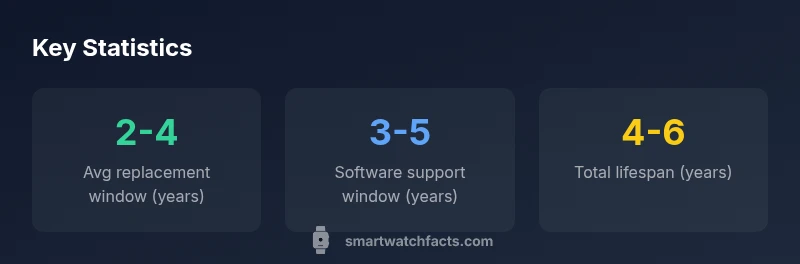
How often to replace smart watch? In practice, most users upgrade every 2-4 years, influenced by battery health, software support, and overall performance. If battery life drops significantly, or essential apps no longer receive updates, it may be time earlier. Heavier use accelerates wear; lighter usage can extend the window toward the upper end of this range. Use these signals to decide when to upgrade.
Why replacement timing matters
Understanding when to upgrade a smartwatch isn't just about trendiness—it's a balance of performance, reliability, and value. If you're wondering how often to replace smart watch, the answer depends on battery health, software updates, and how you use the device. In practice, most users find a practical window of about 2-4 years for a comfortable upgrade cycle, provided the watch still meets daily needs. This isn't a fixed deadline; it's a moving target that shifts with usage intensity, hardware quality, and how well the vendor supports the model. To make this decision clearer, track four signals: battery capacity remaining, the pace of OS updates, the presence of lag or app compatibility issues, and the device's physical condition. A strong battery that holds charge, ongoing software support, smooth performance, and intact build all point toward delaying a replacement. Conversely, rapid battery drain, frequent disconnects, or worries about sensor accuracy are red flags. By regularly evaluating these factors, you can time your upgrade to maximize value and minimize downtime.
Factors that influence replacement cadence
Several variables push you toward an earlier upgrade, while others push you toward delaying it. Battery health is the primary factor; as cells lose capacity, you’ll notice shorter intervals between charges and shorter screen-on time. Software support duration also matters: OS updates and security patches eventually stop, which can reduce compatibility with new apps or features. Hardware durability and water resistance influence longevity, especially if you expose the device to workouts, environmental stress, or rough handling. Price tier shapes expectations: premium models often retain adequate performance longer, but lower-cost watches might feel dated sooner due to slower CPUs or limited RAM. Finally, user expectations—like wanting always-on heart-rate tracking or advanced sleep metrics—can drive upgrades sooner or later.
Battery health and charging habits
Battery health is a practical proxy for total lifespan. Frequent fast charging, prolonged exposure to high temperatures, or letting the battery fully discharge regularly accelerates capacity loss. To monitor health, watch for noticeably slower charges, reduced on-device battery estimates, or the watch shutting down before 20% charge. A conservative approach is to plan replacements when battery life drops below 60-70% of original capacity, though this threshold varies by model. Tips to extend life include avoiding overnight charging, using original chargers, keeping the device within temperature range, and enabling battery saver modes when appropriate. For many users, these habits can push the 2-4 year window toward the upper end, while heavy users may hit the lower end sooner.
Software support and security updates
Software support is a core driver of replacement timing. As the operating system evolves, older watches may lose access to new features, bug fixes, and security patches. If critical apps or sensors no longer function well, you may decide to upgrade even if the hardware still works. Most manufacturers provide official support for around 3-5 years after a model launches, with some extending longer for premium devices. After support ends, you’ll miss new watch faces, health metrics, or compatibility with smartphone updates. So, when evaluating when to upgrade, factor in the OS support timeline and compatibility with your phone ecosystem.
Hardware durability and wear patterns
Durability matters, especially for active users. Scratches, screen degradation, and strap wear reduce aesthetics and could impact usability. A cracked screen or unreliable sensors undermines the user experience, fatiguing users to upgrade sooner. If you notice increased screen-to-body gaps, lag in sensors after workouts, or watches with loose bands that compromise water resistance, consider replacement or professional service. Protective cases and screen protectors help, but longevity heavily depends on build quality and how you treat the device.
How usage profile changes the timeline
Who you are shapes the replacement cadence. A runner logging 5-6 days a week and using GPS, heart-rate, and GPS-based workouts will stress the battery and sensors more than a casual user. People who rely on the watch for health monitoring—continuous heart rate, SpO2, or ECG features—may experience faster degradation due to constant data collection. Conversely, someone who uses it mainly for notifications and occasional workouts may not see a significant drop for longer. Consider your daily routines, charging habits, and the phone ecosystem when estimating when to upgrade.
Estimating replacement needs for different price tiers
Budget watches tend to deliver 2-4 years of service under typical use, but may struggle with software updates after year 3. Mid-range devices often strike a balance, offering 3-5 years of software support and more dependable battery life under normal use. Premium models can deliver longer lifespans if they maintain battery health and OS updates for 4-6 years, but the daily cost and repair options can differ. Use these ranges as a framework: your exact timeline may shift with battery health and OS support.
Practical steps to extend life before replacement
Prolonging a smartwatch's practical life involves both care and strategy. Keep your firmware up to date, manage apps to avoid bloat, and adjust sensors to conserve power. Optimize display brightness, enable power-saving modes during long activities, and use a charging routine that avoids heat. Keep spare bands and screen protectors, and consider a battery replacement option if available from the manufacturer before buying a new watch. These measures can push the replacement window toward the upper end of the typical range.
How to evaluate when it’s time to upgrade
Create a simple decision framework: battery health, software support, performance, and budget. If you experience rapid battery drain, recurring lag, or apps that refuse to install after OS updates, it’s time to consider an upgrade. Compare total cost of ownership: new watch price, regional deals, and potential repair options. Finally, align the upgrade with your personal needs—whether you require advanced health features or improved battery life. A structured evaluation helps justify a replacement within the 2-4 year window.
Replacement cadence by use case
| Use Case | Recommended Replacement Interval (years) | Notes |
|---|---|---|
| Everyday casual use | 2-4 | Battery life and software support dominate |
| Active athletes | 2-3 | Higher sensor usage and heat increase wear |
| Tech-savvy users who want latest features | 3-5 | OS updates longer but not indefinite |
People Also Ask
How often should I replace my smartwatch?
Most users upgrade every 2-4 years, depending on battery health, software support, and how they use the device.
Most people upgrade every 2-4 years, based on battery life and software support.
Does battery replacement extend the watch's life?
Some brands offer battery replacement; it can extend device life, but not all models support it. Check with the manufacturer.
Battery replacement can extend life if your model supports it.
Will software updates stop my watch from working?
Yes. When OS updates end, you may lose new features, security patches, and compatibility with newer phones.
OS updates ending can limit features; consider upgrading when that happens.
Are premium watches worth replacing more often?
Premium models often offer longer software support and better battery health, but the decision should reflect battery health and usage.
Premium watches may last longer, but evaluate battery health and updates.
What signs indicate it's time to upgrade?
Shortened battery life, lag, app compatibility drops, or frequent repairs signal upgrade timing.
If battery drains fast or apps stop updating, consider upgrading.
Can I extend my watch life with care tips?
Yes. Keep software updated, avoid heat, optimize charging, and use proper charging accessories.
Keep it cool, updated, and well-charged to extend life.
“Battery health and software support drive replacement timing more than age alone. Plan upgrades around the point where performance and security no longer meet daily needs.”
Key Points
- Track battery health and OS support to time upgrades
- Expect a 2-4 year cycle for many wearables
- Extend life with charging habits and firmware updates
- Weigh replacement vs repair based on costs
- Choose a device with longer software support if longevity matters