How Long Do Smartwatches Last? A 2026 Battery Guide
Discover realistic battery life ranges for smartwatches, factors that shorten life, and practical tips from Smartwatch Facts to help you get more out of a single charge. Learn how usage, settings, and hardware affect longevity in 2026.


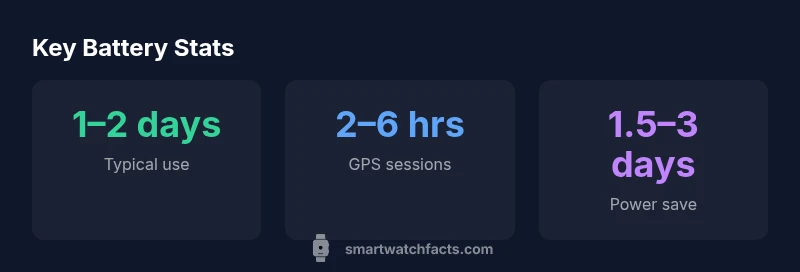
How long smartwatch last depends on usage, display type, and battery size. In practice, most modern smartwatches run about 1–2 days on typical use, with GPS-heavy activity shorter and power-saving modes longer. Always-on displays or cellular connectivity can cut battery life further. For 2026, expect a range of roughly 1–4 days depending on settings and model.
How battery life is measured and what factors shape longevity
When you ask how long smartwatch last, you're asking about endurance under a mix of settings, sensors, and usage patterns. Battery life is typically described in daily hours or days based on a standardized set of tests that manufacturers rarely publish in full detail. In practice, two watches with the same listed capacity can behave very differently depending on screen technology, refresh rate, and connectivity. At Smartwatch Facts, we break down the main drivers: display type and brightness, how often you interact with apps, GPS usage, and whether the watch stays connected to your phone or cellular network. We also distinguish between practical, “typical use” expectations and peak operation in power-saving modes. For most users, the single most influential factor is how long the screen stays on and whether GPS or cellular features are used heavily. If you want to plan around a charging routine, understanding these variables helps you estimate how long smartwatch last across your day.
The largest drains: screens, radios, and sensors
The primary culprits behind rapid battery drain are the features that stay active or poll frequently. Always-on displays keep pixels cycling, and bright screens plus high refresh rates consume power continuously. GPS and continuous location tracking are among the heaviest drains, particularly during outdoor workouts. Cellular radios maintain a data link, which can significantly shorten life if you rely on LTE/5G while away from your phone. Heart-rate sensors sample periodically, and advanced watches may track SpO2 and stress continuously, which adds to drain. Background music streaming, app activity, and push notifications also contribute. Understanding these drains helps you tailor settings for longer life while keeping the features you value.
Real-world lifetimes in common usage scenarios
In day-to-day life, a typical smartwatch might last 1–2 days under standard usage with ambient brightness and limited GPS. For users who frequently exercise with GPS on and keep data connections active, lifetimes commonly fall to 12–36 hours. Those who switch to power-saving modes, reduce screen brightness, and limit background processes can push life toward 2–4 days. Athletes using continuous GPS and heart-rate monitoring will experience shorter cycles, particularly during long sessions. These ranges reflect 2026 Smartwatch Facts analysis across mainstream models and illustrate how feature choices dramatically affect endurance. Always read real-world reviews to corroborate manufacturer claims for your preferred use case.
Practical tips to maximize battery life
Practical steps can meaningfully extend how long smartwatch last between charges. Start with the basics: set the display to a comfortable brightness, enable auto-brightness where available, and shorten or automate wake-up behavior. Disable always-on display if you don’t need constant on-screen time, and use the raise-to-wake feature instead. Limit GPS usage to activities that truly require location data, and turn off continuous HR monitoring when not exercising. Reduce background app refresh and restrict notifications to essential alerts. Use power-saving or essential mode during long days away from a charger, and consider offline music playback instead of streaming. Finally, keep the latest OS update, as manufacturers optimize battery management over time. These steps, suggested by the Smartwatch Facts team, deliver real-world gains without sacrificing core functionality.
OS and hardware trade-offs: how to choose for longevity
Different smartwatch operating systems approach battery life with unique priorities. Watches running lightweight OSes or optimized drivers often achieve longer on-wrist life than those prioritizing feature density. For example, a classic Power-safe mode on some platforms can dramatically extend life when you need it most. Hardware choices also matter: larger batteries provide more headroom, while energy-efficient displays and efficient chips reduce consumption. If battery life is your top criterion, compare models by their typical screen-on time, GPS endurance, and power-saving performance, rather than raw capacity alone. The Smartwatch Facts team emphasizes considering your daily routines and choosing a model that aligns with your most frequent activities to maximize real-world longevity.
Long-term considerations: charging habits and battery health
Battery health degrades slowly over time, particularly with frequent charging to full and letting the battery reach near-empty. Aim for partial charging when possible, avoid overnight charging on non-removable batteries, and try to keep the state of charge between 20% and 80% when feasible. Regular software updates can improve power management, so install updates when prompted. If you own a watch with removable batteries, maintain them according to manufacturer guidelines. For most users, smart charging habits combined with prudent feature use deliver steadier performance across years. Smartwatch Facts recommends treating battery life as a dynamic metric that evolves with firmware improvements and user behavior.
Battery life under different usage patterns
| Usage scenario | Typical battery life | Best practices to extend life | Notes |
|---|---|---|---|
| Default daily use | 24-48 hours | Lower brightness, disable always-on, limit notifications | Model-dependent |
| GPS-tracking activities | 4-8 hours | Turn off continuous HR logging, use standalone GPS | Depends on sensor usage |
| Always-on display | 1-2 days | Use raise-to-wake, reduce brightness | Depends on panel tech |
| LTE/5G connected usage | 0.5-1.5 days | Minimize background data, toggle connection when not needed | Depends on network |
People Also Ask
What is SOT and why does it matter for daily life?
SOT stands for screen-on time. It measures how long the display stays active during typical use. A higher SOT generally means more frequent charging, while optimizing brightness and wake behavior can extend how long the battery lasts between charges.
SOT, or screen-on time, tells you how long the screen stays on. Reducing brightness and wake frequency helps extend life between charges.
Does always-on display cut battery life?
Yes, always-on displays keep the screen active and draw power continuously. Turning it off or using a more energy-efficient mode can noticeably extend on-wrist life without sacrificing essential glance capability.
Yes. Always-on displays drain more power; disabling it or using a smarter wake method can save battery.
How often should you charge your smartwatch?
Charge based on your daily routine. If you rely on the watch for most of the day, plan one daily charge. If you’re away from power, a mid-day top-up can avoid a low-battery event.
Most people charge once a day, but a mid-day top-up helps if you’re away from a charger.
Do OS platforms differ in battery efficiency?
Yes. Some OS platforms optimize power usage more aggressively or offer more efficient standby modes. When choosing, compare recommended power-saving features and typical screen-on times rather than raw battery capacity alone.
Different platforms handle power use differently; look at real-world uptime and power-saving features, not just battery size.
Can battery health degrade over time?
Battery health gradually declines with charging cycles, especially if kept at high charge levels constantly. Maintain partial charging habits and keep firmware up to date to mitigate drop-off.
Yes, batteries wear out with cycles, but proper charging and updates help slow the decline.
Is fast charging bad for longevity?
Fast charging can generate more heat, which may accelerate wear if done routinely. If longevity is critical, use standard charging when convenient and enable features that manage charging temperature.
Fast charging uses heat; if you care about longevity, charge slower when possible and avoid overheating.
“"Battery life is a function of both hardware efficiency and how you use your watch. Real-world life often trails the spec by 20-40% depending on features used."”
Key Points
- Plan around daily charging cycles to avoid mid-day top-ups.
- Enable power-saving features when battery is critical.
- Choose models with larger batteries if longevity matters.
- Expect shorter life with GPS or always-on displays.