How Often to Charge a Smartwatch in 2026: Practical Guide
Discover realistic charging intervals for smartwatches in 2026. Learn how usage, display settings, and battery health affect daily charging and how to optimize routines for longer wear time.


Most smartwatches require charging roughly every day to every few days, depending on usage. GPS, workouts, and Always-On Display shorten cycles, while lighter use can stretch to 2–3 days. Battery health, screen brightness, and notification load also influence longevity. If you enable power-saving modes, you can extend intervals between charges. Manufacturers provide different estimates, so your actual cycle will depend on your routine.
how often does a smart watch need to be charged
In 2026, the most practical takeaway is that charging frequency hinges on how you use the device. The Smartwatch Facts team notes that while flagship models may push toward multi-day stamina, most real-world wearers will find a daily or near-daily top-up routine common. The exact cadence depends on your display settings, sensors, and how much you rely on GPS or LTE connectivity. Recognize that “how often” isn’t a fixed number; it’s a function of daily habits and preferred features.
Real-world battery life ranges you can expect
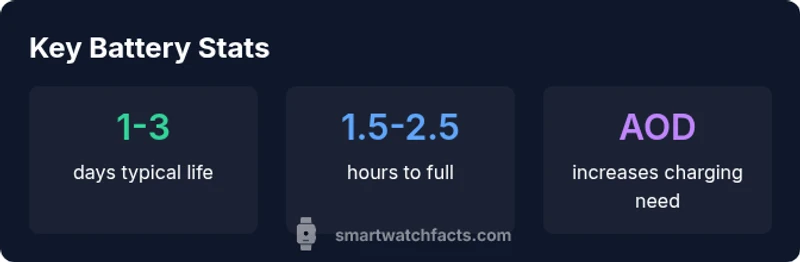
Battery life varies by model and config. Casual users who primarily receive notifications and track occasional steps often fall into a 1–3 day band between charges. For wearables with GPS tracking and continuous heart-rate monitoring, a single day is typical under heavy use. It’s also common for some lighter models to stretch toward 3–4 days with Always-On Display disabled and brightness tuned low. Always check manufacturer estimates, but temper expectations with real-world testing as firmware and watch faces can alter outcomes.
When comparing models, look for the manufacturer’s baseline and then examine reviews that reflect your own use-case mix. Remember that battery longevity will trend with software updates and how aggressively the device manages background tasks.
How usage patterns impact charge duration
Usage patterns are the biggest driver of battery drain. Key factors include:
- Always-On Display: Keeps the screen active, which dramatically increases power draw.
- GPS and workouts: Continuous location tracking and heart-rate monitoring push energy consumption higher, especially during outdoor activities.
- Notifications and apps: Frequent alerts wake the processor and screen, accelerating discharge.
- Screen brightness and watch faces: Brighter displays and animated watch faces use more energy.
- Connectivity: Independent LTE/4G bands and frequent syncing can shorten cycles. To optimize, tailor settings to your routine: disable unnecessary alerts, use a power-saving watch face, and consider shorter workout GPS sessions when battery is tight.
Charging times and what to expect from different modes
Charging times can vary by charger type and cable quality. Typical full charges range from 1.5 to 2.5 hours when charging from near-empty with a standard magnetic or wired puck. Quick top-ups of 15–30 minutes can add several hours of use, depending on the model. Wireless charging is convenient but can be slightly slower than wired charging on some devices. If you’re pressed for time, a short top-up before a workout can keep you going through a session without needing a full recharge.
Some models include optimized charging or adaptive battery features that slow charging after a certain percentage or during specific hours to extend battery health. Enabling these features can influence your overall daily cadence.
Tips to extend battery life and longevity
Sharpen your daily charging strategy with practical steps:
- Enable power-saving modes when you don’t need full performance (e.g., during sleep or long meetings).
- Turn down brightness or switch to auto-brightness, especially outdoors.
- Limit Always-On Display or switch to a dim watch face when not needed.
- Manage sensors: disable continuous HR tracking if you don’t need it, and reduce background app activity.
- Keep software up to date, as firmware often improves battery management.
- Store the watch in a cool, dry place and avoid extreme temperatures, which can degrade cells over time.
How to design a charging routine
A practical charging routine aligns with your day:
- Assess your typical day: when do you usually have a prolonged sit-down period? Can you plug in then?
- Choose a charging window: many people charge overnight, while others top up during commutes.
- Use official chargers: OEM accessories ensure correct voltage and current, protecting battery health.
- Track battery curves: keep a log of how long you wear the watch and how often you charge to forecast needs.
- Adapt seasonally: hiking or travel may demand more frequent top-ups; adjust accordingly. This approach helps normalize charging, protect longevity, and avoid rare dead-watch mornings.
Model differences and what to check when buying
When evaluating models, focus on how long the watch lasts in your typical pattern, not just the claimed maximum. Look for:
- Battery health features: diagnostics that estimate remaining life and cycles remaining.
- Display type and brightness controls: OLEDs with high refresh rates can drain faster than mid-brightness LCDs.
- Processor efficiency and sensor suite: newer processors may deliver longer endurance at similar battery capacities.
- Software optimizations: some platforms emphasize power management and adaptive charging.
- Charging ecosystem: availability of fast chargers and reliability of third-party accessories. Remember that advertised numbers are baselines; real-world life will depend on personal usage and settings.
Authority sources and ongoing research
For a grounded view on battery behavior and charging practices, consult authoritative sources.
- Authoritative sources provide objective context for battery science and device management. See the following for foundational information and ongoing research: NIST Battery Tech pages, Energy.gov battery basics, and coverage from major publications on consumer electronics longevity.
- Smartwatch Facts analysis emphasizes practical charging habits and how to tailor routines to your day, reflecting the real-world experience of users in 2026.
Battery life and charging time by typical usage
| Usage Scenario | Avg Battery Life (days) | Charging Time (hrs) | Notes |
|---|---|---|---|
| Light usage (notifications only) | 2-3 | 1.0-1.8 | AOD off, modest brightness |
| Moderate use (fitness, notifications) | 1-2 | 1.5-2.5 | GPS & HR active occasionally |
People Also Ask
How long does it take to fully charge a smartwatch?
Most watches take about 1.5 to 2.5 hours to reach full capacity from empty. Expect variation by model and charging method (wired vs wireless).
Most watches take about one and a half to two and a half hours to charge fully, depending on the model.
Is it safe to leave a smartwatch on the charger overnight?
Yes, modern watches are designed for overnight charging. However, prolonged high temperature or aggressive fast charging can affect long-term health; use optimized charging if available.
Yes, you can charge overnight, but use optimized charging if your watch supports it to protect longevity.
Does always-on display affect charging needs?
Yes. Always-On Display increases power drain. Turning it off or reducing brightness can meaningfully extend intervals between charges.
Yes—Always-On Display uses more power. Switching it off or dimming the display helps.
What settings save the most battery on a smartwatch?
Prioritize power-saving modes, lower screen brightness, limit continuous HR tracking, and reduce background app activity to maximize endurance.
Power-saving modes, lower brightness, and limiting background activity save the most battery.
How can I estimate my own charging schedule?
Track your daily usage for a week, note how often you charge, and tailor a routine that fits your routine. Firmware updates can alter life, so re-check periodically.
Track your usage for a week and tailor charging to fit your day.
Do all watches degrade at the same rate?
All lithium-ion cells experience gradual degradation with time and cycles. Battery health improves with careful charging practices and avoiding extreme temperatures.
Battery health worsens with time and use, but good charging habits help.
“Battery life is a moving target shaped by how you use your watch; practical charging habits and a mindful setup can keep you in a comfortable range longer.”
Key Points
- Plan nightly charging if you rely on GPS or Always-On Display
- Enable power-saving features to extend intervals
- Turn down brightness and reduce notifications to conserve juice
- Compare models with realistic, not just advertised, battery life