If Smart Watch Is Lost: What to Do
Practical, step-by-step actions to recover or protect data when your smartwatch goes missing, with security tips and disaster-prevention insights.


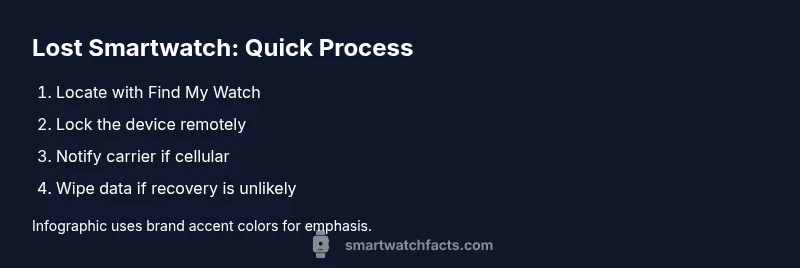
Within minutes of realizing your smartwatch is missing, act to protect data and boost recovery chances. This quick guide shows the essential steps: locate the device using built-in Find My features, lock or erase data remotely if possible, alert your carrier (if cellular), and report the loss to local authorities or the watch’s support team.
Why losing a smartwatch matters
Losing a smartwatch isn't just about a missing gadget; it risks your personal data, accounts, and even billing or authentication if a device can unlock your phone or payment apps. In the rush, people often forget that a watch can access health data, maps, and payments. According to Smartwatch Facts, losing a smartwatch can be stressful, but quick, decisive action dramatically improves outcomes. The Smartwatch Facts team found that devices with active security settings, such as Find My features and remote lock, have higher recovery rates and lower data exposure. This section explains why prompt, organized steps matter and why you should treat the incident as urgent but manageable. Even if you believe you know where it is, treat it as lost until you verify location. Start with your phone and cloud accounts to minimize risk while you search.
imageAltTextNeededForSEO():false?
Tools & Materials
- Smartphone with smartwatch companion app installed(Ensure you are logged into the same account used on the watch)
- Account credentials for smartwatch ecosystem(Email and password; enable two-factor authentication if available)
- Access to internet on phone or tablet(Wi‑Fi or mobile data to sync locations and manage security)
- Carrier contact details for cellular watch (if applicable)(Phone number, IMEI or eSIM info if available)
- Notepad or digital notes(Document last seen location, actions taken)
Steps
Estimated time: Estimated total time: 20-60 minutes
- 1
Pause and assess
Stop any frantic movement and take a calm moment to plan. Quickly retrace recent steps but avoid dangerous areas. Jot down the last known location and what you tried so far to prevent repeating actions.
Tip: Take a breath before acting; calm decisions reduce mistakes in high-stress moments. - 2
Open the companion app on your phone
Launch the smartwatch app you use to pair with the device. Sign in if needed and check for any alerts or status messages about the missing watch. If the app shows a last known location, note it and take screenshots for records.
Tip: If you’ve forgotten your password, use the official recovery flow rather than guessing. - 3
Check Find My or locate features
Use the built‑in locate tool to see if the watch is nearby. If you can trigger a sound or vibration, do so to reveal its position. Review any last ping time and distance estimates to guide your search.
Tip: A nearby audible alert can dramatically narrow the search area. - 4
Enable lost/secure mode
If available, activate lost mode or remote lock to prevent access to apps and data. Many watches display a recovery message and contact information. Locking first also reduces the risk of unauthorized payments or access.
Tip: Locking early prevents data exposure while you search. - 5
Protect data by signing out and restricting access
Sign out of banking apps, health data portals, and other sensitive accounts on linked devices. Consider temporarily disabling access to payment apps from the watch profile where possible.
Tip: Use two‑factor authentication on important services for extra protection. - 6
If the watch has cellular service, contact the carrier
Notify the carrier to suspend service or block the device id to prevent misuse and charges. Provide device identifiers if available and ask about temporary service transfers for a replacement device.
Tip: A quick call can stop unauthorized usage and charges. - 7
Check last-known location across paired devices
Look at linked phones, tablets, and cloud backups for any recent interactions with the watch. Cross‑device data can reveal a new clue to its location.
Tip: Review location history for any unexpected patterns. - 8
Report loss to the brand and local authorities
Contact the smartwatch manufacturer’s support or portal for guidance on lost devices. If you suspect theft, file a police report and share model, serial number, and last-known location.
Tip: Keep receipts and device identifiers handy for claims. - 9
Prepare for replacement or insurance options
If recovery is unlikely, explore replacement paths, warranty coverage, or insurance. Gather purchase details and model information to streamline claims.
Tip: Document all communications for faster processing. - 10
Follow up and monitor for suspicious activity
After taking initial steps, monitor accounts for unusual activity and update security settings as needed. Reassess your recovery chances after new information becomes available.
Tip: Set up alerts on key accounts for rapid notice of unauthorized use. - 11
Review and enhance security to prevent future losses
Update device passwords, enable two‑factor authentication, and ensure location sharing is active only on trusted devices. Keep firmware up to date.
Tip: Regular updates reduce vulnerability to theft or misuse. - 12
Finalize the incident with a clear plan
Create a final checklist with steps completed and pending actions, including replacement timing and insurance contact. Document everything for future reference.
Tip: A written plan helps you stay organized during a stressful event.
People Also Ask
What should I do first if my smartwatch is lost?
Start by locating the watch using the companion app and any last known location. If possible, enable lost mode to lock the device and display a recovery contact. Then secure your accounts by signing out on connected devices and changing passwords as needed.
First, use the watch’s app to try locating it, then lock it and secure your accounts to prevent misuse.
Can I track a lost smartwatch if it’s offline or turned off?
Offline devices may only show the last known location; you’ll get updates once the device reconnects. Maintain vigilance and keep the search active using shared location features and controlled sounds if the device becomes discoverable.
If it’s offline, you’ll only see the last location until it reconnects.
Should I wipe my smartwatch remotely, and when is it wise?
Remote wipe protects data but may hinder later recovery. Wipe only if you are certain you won’t recover the device or if you cannot ensure ownership and safety.
Wipe only if recovery seems unlikely and you can’t secure the device any other way.
What is the role of my carrier if the watch uses cellular?
Contact the carrier to suspend service or block the device ID to prevent misuse and charges. Provide any identifiers you have and ask about temporary options if you plan to replace the device.
Call your carrier to suspend service so someone else can’t use the watch.
When should I report the loss to police or a lost-and-found?
Report if you believe the device was stolen or you cannot locate it. Local authorities and lost‑and‑found offices can help with recovery and documentation for insurance.
If you think it was stolen, report it and submit any serial numbers.
How can I prevent future losses?
Enable Find My features, two‑factor authentication, and strong passwords. Regularly update firmware and review storage of payment credentials on wearable devices.
Turn on Find My, use strong passwords, and keep firmware up to date.
Watch Video
Key Points
- Act quickly to secure data and maximize recovery chances.
- Use Find My features to locate and remotely lock if available.
- Notify your carrier if the watch has cellular service to prevent misuse.
- Report the loss when appropriate to authorities or the brand for support.
- After recovery or replacement, reassess security settings to prevent future losses.