Smart Watch GPS vs Cellular: A Practical Comparison for 2026
Compare smart watch gps vs cellular: battery life, independence, and use cases. Learn which setup fits your lifestyle with practical guidance from Smartwatch Facts.


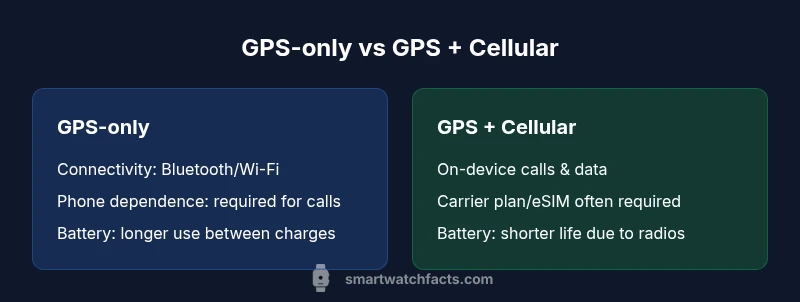
TL;DR: A GPS-only smartwatch delivers reliable location tracking without monthly fees, but you’ll need your phone nearby for calls and data. A GPS + cellular model adds on-device connectivity, enabling calls and app updates away from your phone, at the cost of extra plan requirements and shorter battery life. Choose GPS-only for budget and running basics; choose GPS + cellular for true independent use.
Understanding the decision framework for smart watch gps vs cellular
When you compare smart watch gps vs cellular, the core question is how you plan to stay connected without your phone. For many users, GPS-only watches deliver reliable navigation, accurate pace data, and robust fitness features, all while avoiding monthly data charges. For others, the ability to make calls, reply to messages, and stream apps without a nearby phone is a decisive advantage. According to Smartwatch Facts, the best approach is to map your daily routines to what each option can reliably do. In 2026, the hardware continues to converge; processors are efficient, sensors are accurate, and software ecosystems are more capable. Still, the practical differences matter: GPS-only models excel at battery life when you minimize radios, while GPS + Cellular models add independence at the cost of extra hardware and potential plan expenses. For many shoppers, the simplest path is to start with GPS-only and upgrade later if your mobility pattern changes. The Smartwatch Facts team notes that the decision often hinges on lifestyle factors as much as on the hardware itself.
How GPS works in modern smartwatches
Global Positioning System (GPS) is a satellite-based network the watch uses to compute your location. In smartwatches, GPS is typically active during workouts, outdoor runs, or navigation tasks. Modern devices blend GPS with GLONASS, Galileo, or BeiDou for faster fixes and better coverage in challenging environments like city canyons or dense forests. Accuracy depends on satellite visibility, atmospheric conditions, and the watch’s antenna quality. Importantly, GPS itself consumes power, especially when the device searches for a signal after being idle. Users who emphasize battery life often enable GPS only during workouts and rely on on-wrist sensors for daily activity. In this context, the phrase smart watch gps vs cellular captures the broader trade-off: GPS provides location without data overhead, while cellular adds on-device communication.
How cellular connectivity is implemented in wearables
Cellular-capable smartwatches (GPS + Cellular) use embedded SIM (eSIM) or a physical SIM where available, allowing calls, texts, and certain data services without a paired phone. Carrier support, regional availability, and plan requirements vary by market. When enabled, the watch can place calls, receive messages, stream music, and fetch data independently. This capability is highly attractive for runners who don’t want to carry a phone, travelers who want to stay connected abroad (within carrier networks), and busy commuters who crave uninterrupted app access. However, enabling cellular usually means higher upfront costs and ongoing charges. Even with a cellular plan, software optimization and chipset efficiency determine actual performance and battery impact. The key is to ensure your carrier supports eSIM on the specific watch model and to understand any roaming or data limitations in your region.
Battery life implications of GPS vs Cellular modes
Battery life is a primary driver of user satisfaction in smartwatches. GPS usage is a major power draw, as satellite communication requires continuous radio activity. When cellular is enabled, the watch maintains a second radio (and sometimes stronger data throttling), which typically reduces runtime between charges. Real-world results vary with screen brightness, GPS activity, app use, and notification volume. Users who exercise frequently away from their phone may see greater battery impact on GPS + Cellular models, while casual users may experience modest differences by adopting power-saving modes, such as turning off always-on display or limiting background refresh. Smartwatch Facts analysis shows that battery life is often the deciding factor when choosing between GPS-only and GPS + Cellular, especially for weekend trips or extended outdoor activities.
Use-case scenarios: running, hiking, commuting, and travel
Runners who want precise pace and route mapping without phone tethering often favor GPS-only watches for workout integrity and longer activity windows. Hikers in remote areas may appreciate GPS + Cellular for safety and messaging capabilities, provided there is coverage or roaming options. Commuters in dense urban areas may benefit from cellular for quick messages and maps on the go. Travelers who want to stay online during layovers or in hotel rooms without reliable Wi-Fi might lean toward GPS + Cellular if carrier coverage is available. Ultimately, your pattern—distance from your phone, need for on-device calls, and acceptance of potential battery trade-offs—will determine which path aligns with your lifestyle.
Data plans, carriers, and eSIM considerations
Cellular-enabled smartwatches often require a separate plan or eSIM activation. Availability depends on the region and carrier. Before purchasing, verify that your carrier supports eSIM in your smartwatch model and confirm pricing structures, activation steps, and any device compatibility requirements. If you travel frequently, check roaming policies and whether you’ll incur extra charges when using the watch abroad. For many users, budgeting for a small monthly data plan makes sense if independence from the phone is a priority, but the cost adds up over time. If you mostly stay near your phone, GPS-only offers solid value without the ongoing carrier expense.
Maps, navigation, offline access, and privacy considerations
GPS provides location awareness without data usage, but full map sets often require an app with offline support. GPS + Cellular can enable live map updates and turn-by-turn directions even without a phone, assuming data services are available. Privacy considerations include the level of location sharing with apps and carriers. If you value privacy, GPS-only reduces on-device broadcasting and minimizes cross-service data flow. Always review app permissions, map data sources, and whether cloud-based location history is enabled. Smartwatch Facts emphasizes mindful settings to balance ease of use with personal privacy in both GPS-only and GPS + Cellular configurations.
Design choices, durability, and comfort factors
The hardware differences between GPS-only and GPS + Cellular watches often center on the presence of an additional radio and larger antennas, which can influence device thickness and weight. Many users report that the best wearables strike a balance between compact form factors and robust connectivity. Durability certifications, such as water resistance and MIL-STD ratings, should be evaluated alongside screen quality and strap comfort, especially for athletes and outdoor enthusiasts. Ergonomics matter for long workouts, so choosing a model that fits comfortably on your wrist and offers a secure strap is essential regardless of connectivity.
Privacy, security, and roaming considerations
Both GPS-only and GPS + Cellular watches collect location data and interact with apps that can transmit information to cloud services. Cellular-enabled watches add another dimension with carrier integration and possible SIM provisioning, which can introduce additional security considerations. Use strong device unlock methods, keep firmware updated, and enable app-level permissions that limit data sharing. If you plan to cross borders or roam internationally, validate your carrier’s roaming terms and ensure you understand any potential data charges. Smartwatch Facts recommends building a privacy-aware setup from day one to minimize risk while maintaining the convenience of your chosen connectivity option.
Budgeting, upfront costs, and total cost of ownership
Pricing for GPS-only watches tends to be lower upfront since there’s no recurring carrier element, but watch prices vary by brand, sensors, and software. GPS + Cellular models typically cost more at purchase and may require ongoing data plans, which increases total cost of ownership over time. Consider not only the sticker price but also potential data plan charges, eSIM activation fees, and any limits on roaming. When weighing the options, compare two total-cost-of-ownership scenarios: GPS-only with occasional phone use, versus GPS + Cellular with standalone functionality. Smartwatch Facts advises shoppers to run a simple forecast over 12–24 months to determine which option aligns with their lifestyle and budget.
Setup, pairing, and daily use tips
Getting started is straightforward: charge, pair with your phone, install essential apps, and configure notification settings. If you choose GPS + Cellular, activate the eSIM or SIM, select a data plan, and confirm carrier compatibility. For day-to-day use, customize workouts, maps, and offline caching to optimize battery life. Turn off nonessential radios when you don’t need connectivity, and use power-saving features during long events. With a thoughtful setup, either option provides a seamless wearable experience that complements your phone rather than replaces it entirely.
Practical decision checklist and edge cases
Before buying, ask yourself: Do I often run without my phone? Do I travel internationally where roaming is essential? Is there a reliable cellular plan available in my region? If most answers are “yes,” GPS + Cellular makes sense; otherwise, GPS-only offers excellent value. Edge cases include models with different carrier compatibilities, regional restrictions, and app ecosystems. In ambiguous situations, start with GPS-only and reassess after a few weeks of use; you can upgrade later if your needs shift.
Final thoughts: aligning technology with lifestyle
The choice between smart watch gps vs cellular is ultimately about balance—between location accuracy, independent connectivity, battery life, and cost. By understanding how each option fits your routines, you can select a smartwatch that complements your daily life without sacrificing critical features. Your decision should reflect not only the hardware but also your data needs, travel habits, and comfort with ongoing expenses.
Comparison
| Feature | GPS-only | GPS + cellular |
|---|---|---|
| Connectivity | Bluetooth/Wi-Fi; GPS-only | Bluetooth/Wi-Fi + cellular; on-device connectivity |
| Phone independence | No | Yes |
| Battery life impact | Lower radios usage; longer life (typical) | Additional radios can reduce life (typical) |
| Calls and texting | Requires phone | On-device calls/texts (with plan) |
| Maps/offline navigation | Depends on offline maps availability | Same with carrier-enabled features when online |
| Initial cost | Lower upfront | Higher upfront |
| Ongoing costs | No extra plan needed | Carrier plan/eSIM often required |
Strengths
- No monthly data charges for GPS-only models in many cases
- Typically longer battery life when not using cellular radios
- Simpler setup with fewer carrier constraints
- Broad compatibility across brands and OS ecosystems
Weaknesses
- Less independence; you may need a phone for calls or data
- Fewer features when away from your phone (e.g., streaming)
- Cellular models require a data plan and can incur ongoing costs
- Prices can vary significantly by region and carrier support
GPS-only is usually the pragmatic choice for most users; GPS + cellular suits those who need true independence.
If you mostly stay near your phone, GPS-only offers best value and battery life. If you want on-wrist calling and app access away from the phone, GPS + cellular is worth the extra cost, assuming carrier support and data plan feasibility.
People Also Ask
What is the main difference between a smart watch GPS vs cellular?
GPS-only watches track location using satellites and rely on your phone for calls and data. GPS + Cellular adds on-device connectivity, enabling calls and data without the phone, subject to carrier support.
GPS-only tracks location and uses your phone for calls; GPS + Cellular can operate independently with a plan.
Can I use GPS-only while traveling internationally?
GPS functionality is global, but cellular features depend on roaming plans and carrier compatibility in the destination.
GPS works globally; cellular depends on roaming terms.
Do GPS + cellular watches require a separate data plan?
In most markets, yes; you’ll typically need a plan or eSIM to enable calls and data on the watch.
Usually a plan or eSIM is required for cellular use.
Which is better for workouts?
GPS-only is typically sufficient for most workouts; GPS + Cellular is advantageous when you want to leave the phone behind.
GPS-only works for workouts; cellular helps when you need independence.
How does battery life compare?
Cellular radios add power draw, so GPS + Cellular watches often drain faster than GPS-only models with similar usage.
Cellular uses more power, reducing battery life compared to GPS-only.
Key Points
- Evaluate daily phone proximity before buying
- Choose GPS-only for budget and battery efficiency
- Choose GPS + Cellular if you need standalone connectivity
- Check carrier support and eSIM availability
- Balance upfront costs with ongoing plan expenses