Smart Watch Not Working on Tattoo: Troubleshooting Guide
Urgent guide to fix smart watch not working on tattoo readings. Learn why tattoos affect sensors, quick fixes, and when to seek help from Smartwatch Facts.


Dealing with a smart watch not working on tattoo? The optical heart-rate sensor often struggles to read through dense ink, causing erratic readings. Reposition the watch over tattoo-free skin, ensure a snug fit, and try alternate sensor modes if available. Update firmware and recalibrate if issues persist. According to Smartwatch Facts, tattoos can reduce PPG accuracy on wearables, especially with dark inks.
Why the 'smart watch not working on tattoo' problem happens
Tattooed skin presents a unique challenge for optical heart-rate sensors that rely on light to detect blood flow. The color and density of tattoo ink can absorb or scatter the emitted light, weakening the signal the sensor uses to compute heart rate. In practice, this means readings may be slow to initialize, appear erratic, or stop updating altogether on tattooed areas. According to Smartwatch Facts, tattoo ink density and shade play a significant role in how severely readings are affected. The Smartwatch Facts team found that models using reflective infrared or green-light sensors tend to struggle more with certain inks and skin tones, especially when the tattoo covers a large area. If you notice a persistent drop in accuracy on tattooed skin, consider moving the device to a non-tattooed area to confirm baseline behavior. This is not a device failure; it’s a sensor limitation that can often be mitigated with one of the fixes described below.
Why the 'smart watch not working on tattoo' problem happens
Tattooed skin presents a unique challenge for optical heart-rate sensors that rely on light to detect blood flow. The color and density of tattoo ink can absorb or scatter the emitted light, weakening the signal the sensor uses to compute heart rate. In practice, this means readings may be slow to initialize, appear erratic, or stop updating altogether on tattooed areas. According to Smartwatch Facts, tattoo ink density and shade play a significant role in how severely readings are affected. The Smartwatch Facts team found that models using reflective infrared or green-light sensors tend to struggle more with certain inks and skin tones, especially when the tattoo covers a large area. If you notice a persistent drop in accuracy on tattooed skin, consider moving the device to a non-tattooed area to confirm baseline behavior. This is not a device failure; it’s a sensor limitation that can often be mitigated with one of the fixes described below.
Related factors to watch
Other conditions—such as sweaty or oily skin, a loose strap, or a near-forearm location with irregular contours—can compound tattoo-related interference. Environmental factors like bright ambient light or wearing the watch over a highly contoured or bumpy tattoo area can also degrade readings. Always test under consistent conditions to isolate tattoo effects from other variables.
Steps
Estimated time: 25-35 minutes
- 1
Check sensor placement
Ensure the watch sits snugly with the sensor centered over the non-tattooed skin when possible. If a tattoo covers the area, try moving to a different part of the forearm or another location on the wrist that isn’t tattooed.
Tip: Loosen the strap slightly to avoid pressure points, then retighten for a secure fit. - 2
Dry and clean the sensor surface
Wipe the sensor window and nearby skin with a clean, dry cloth. Remove any moisture, lotion, or sweat that could distort the light signal before starting a measurement.
Tip: Avoid using abrasive cleaners; a soft microfiber cloth works best. - 3
Test with a tattoo-free zone
If possible, perform a quick test on a clean area where there is no tattoo. Compare the readings to see if tattoo interference is the primary issue.
Tip: Document a baseline reading for future reference. - 4
Update firmware and recalibrate
Check for available firmware updates and install them. Then run the sensor calibration in the device’s health or sensor settings to recalibrate.
Tip: Restart the watch after updating to ensure changes take effect. - 5
Try alternate sensing mode
If your watch supports alternative HR sensing methods, switch to the other mode to see if readings stabilize on tattooed skin.
Tip: Some watches offer a multi-sensor approach; use it if available. - 6
Use an external monitor if needed
If readings remain unreliable, pair the watch with an external chest-strap HR monitor for accurate tracking during workouts.
Tip: Check compatibility with your device before buying.
Diagnosis: Smartwatch fails to read heart-rate or shows inaccurate readings when worn over tattooed skin.
Possible Causes
- highTattoo pigment and ink density interfere with optical sensor light, reducing signal quality
- mediumStrap position or tightness causing sensor occlusion
- lowSkin moisture or sweat under tattoo layers interfering with contact
- lowFirmware calibration drift or sensor requires update
Fixes
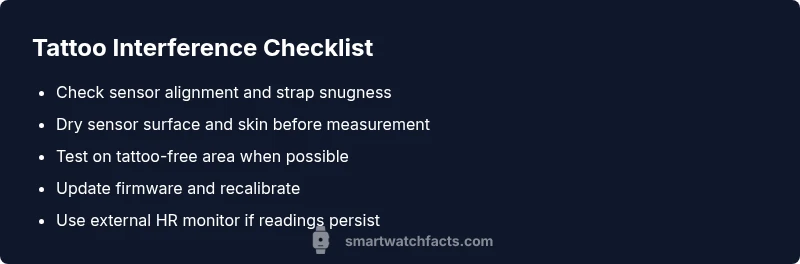
- easyReposition the watch so the sensor sits over tattoo-free skin or adjust strap to reduce occlusion
- easyDry the skin and clean the sensor area before measurement
- easyTry alternate measurement modes if available (e.g., PPG vs. ECG or skin-contact options)
- easyUpdate firmware and recalibrate the sensor in settings
- mediumIf readings persist, consider an external heart-rate monitor compatible with your watch
People Also Ask
Can tattoos permanently ruin heart-rate readings on smartwatches?
No—tattoos can temporarily affect optical HR sensors by blocking or scattering light. Readings often rebound when the watch is positioned on tattoo-free skin or after recalibration. In some cases, switching sensors or updating firmware helps.
Tattoos don't permanently ruin readings, but they can affect accuracy until you adjust placement or recalibrate.
Will cleaning the sensor help with tattoo interference?
Cleaning and drying the sensor area can improve signal quality, especially if skin oil or sweat is present. This is a simple first step before changing placement or updating software.
Cleaning the sensor often helps, especially if moisture or oils are present.
Do all watches suffer the same from tattoo interference?
Not all models are equally affected. Sensor technology, ink density, and tattoo location all influence how much interference you’ll see. Some watches perform better with certain inks or on smaller tattooed areas.
Results vary by model, ink, and placement.
Is dark ink worse than colored ink for sensor readings?
Dark inks can absorb more light, potentially causing more interference than lighter shades. However, effects differ by device, ink type, and skin tone. Experiment with placement to compare results.
Dark inks may interfere more, but it varies by device.
When should I contact support or seek professional help?
If readings remain consistently unstable after trying the recommended steps and firmware updates, contact support or visit a service center. Persistent issues may indicate hardware calibration needs or sensor damage.
If readings stay unstable after fixes, contact support.
Can removing the watch relief tattoo-related issues?
Removing is not practical for daily wear, so focus on placement, calibration, and using alternative sensors or external monitors when needed rather than removing the tattoo.
Removing isn’t practical; adjust placement and calibration instead.
Watch Video
Key Points
- Reposition to tattoo-free skin when possible
- Keep strap snug but not tight, and dry skin before measurement
- Update firmware and recalibrate regularly
- If unstable, consider external HR monitor