Can Smartwatch and AirPods Work Together? A Practical Guide
Learn how smartwatches and AirPods can work together, what features are supported, setup steps, and tips to maximize audio quality and battery life across devices.


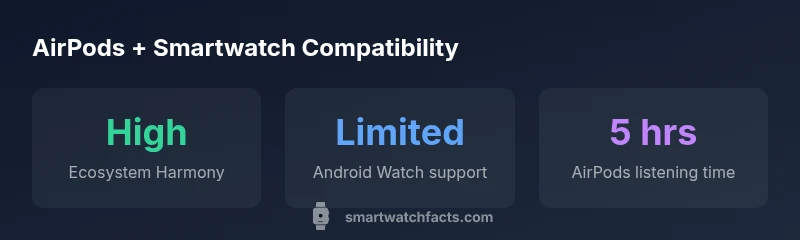
Can smart watch and airpods work together? Yes, AirPods can pair with many smartwatches via Bluetooth for music playback and calls, but features vary by platform and model. In Apple’s ecosystem, Apple Watch and AirPods usually integrate smoothly, while Android watches show more limited AirPods support. This quick answer outlines what to expect and where to check your model's capabilities.
Can Can Smartwatch and AirPods Work Together? A Reality Check
The question can smart watch and airpods work together is increasingly common as wearables and earbuds gain broader support. According to Smartwatch Facts, the general answer is yes, but not all features are available on every pairing. In practice, you’ll typically be able to play audio from the AirPods and handle basic calls when the devices are connected, with the smoothest experience on Apple devices. If you’re using a non-Apple smartwatch, expect some feature limitations and potential variability across models. The core idea is straightforward: AirPods act as an audio output device, while the watch controls playback and calls, depending on OS and firmware.
How Pairing Works Across Ecosystems
Pairing AirPods with a smartwatch relies on Bluetooth profiles supported by the watch’s OS. On watchOS (Apple Watch), AirPods typically pair as a standard Bluetooth audio device, enabling playback and mic input when compatible. On Wear OS or other platforms, you’ll still be able to listen to audio via AirPods, but the control surface and automatic switching may not be as seamless. Smartwatch Facts analysis shows that the level of integration is driven by the OS and vendor updates, not just the hardware. Always ensure both devices run recent firmware for the best compatibility.
What You Can Do with AirPods on a Smartwatch
AirPods on a smartwatch unlock several practical uses: music playback directly from the watch, hands-free calls when paired, and microphone access for voice assistants where supported. On Apple devices, you might enjoy tighter integration and smoother switching between iPhone, iPad, and watch. On other ecosystems, expect basic audio playback and limited call control. If your priority is hands-free communication, verify your watch’s microphone routing and AirPods’ auto-pair features in the settings. Smartwatch Facts analysis notes that cross-device control surfaces improve as firmware evolves.
Setup Steps for Common Scenarios
- iPhone + Apple Watch + AirPods: Ensure AirPods are paired to the iPhone, then connect them to the Apple Watch via the iPhone’s AirPods settings. 2) Android Watch + AirPods: Put AirPods in pairing mode and select them from the watch’s Bluetooth menu. 3) When streaming, start playback on the watch to keep audio routing stable. 4) If you mobilize between devices, enable auto-switching if supported by your AirPods model. 5) Test calls and mic permissions to confirm routing works as expected.
Troubleshooting Common Issues
If audio won’t play through AirPods from your watch, forget the AirPods on both devices, reset Bluetooth, and re-pair. Ensure firmware updates are installed on your watch and that AirPods are charged. If you experience latency or dropped audio, check Bluetooth bandwidth and proximity. In some cases, resetting network settings on the phone or watch resolves routing problems.
Practical Tips for Best Results
- Keep devices updated: watchOS/iOS and AirPods firmware improve cross-device reliability. - Place devices within close range during initial pairing. - Use the AirPods’ case to reset or clear stuck pairing states. - If you rely on hands-free features, prioritize a watch with reliable microphone routing. - Consider your primary use case (music vs calls) to decide when it makes sense to pair AirPods with a smartwatch.
AirPods compatibility by smartwatch platform
| Scenario | OS Compatibility | AirPods Usage | Notes |
|---|---|---|---|
| Apple Watch + AirPods | watchOS | Music playback & calls | Seamless integration within Apple ecosystem |
| Android Watch + AirPods | Wear OS | Music playback (basic) | Limited features; pairing works but controls vary |
| AirPods with non-watch devices | Any Bluetooth watch | Music playback only | Depends on watch OS and firmware |
People Also Ask
Can AirPods connect to any smartwatch?
AirPods can pair with many Bluetooth-enabled watches, but features like mic use and auto-switching vary by OS and model. Check your watch’s Bluetooth list and firmware for compatibility.
AirPods can pair with many watches, but not all features work on every model.
Will AirPods auto-switch between iPhone and Apple Watch?
Auto-switch is strongest when using Apple devices with watchOS and AirPods that support auto-switch. Other ecosystems may offer partial or no auto-switch.
Auto-switch works best with Apple devices; other ecosystems vary.
Do AirPods Pro differ in compatibility from standard AirPods?
AirPods Pro share the same basic Bluetooth pairing as standard AirPods; differences lie in features like ANC, which depend on OS and device support rather than the earbuds’ ability to pair.
AirPods Pro pair the same way; features depend on your devices.
Can I take calls on Wear OS with AirPods?
Yes, you can take calls via AirPods when paired to a Wear OS device, but microphone routing and call controls may be limited compared with Apple devices.
Calls can work, but controls may be limited.
What should I do if pairing fails?
Restart both devices, forget the AirPods from Bluetooth settings, re-enter pairing mode, and perform a fresh pairing sequence. Ensure firmware is up to date.
Restart, reset Bluetooth, re-pair with updated firmware.
How can I improve audio quality when using AirPods with a smartwatch?
Keep firmware updated, stay within Bluetooth range, and minimize interference by turning off other nearby Bluetooth devices during setup.
Update firmware and stay close to avoid interference.
“Interoperability between earbuds and smartwatches improves when both devices are actively maintained with the latest firmware and OS updates.”
Key Points
- Pair AirPods with smartwatches via Bluetooth for audio, with varying feature support
- Apple Watch + AirPods offer the smoothest integration; Android watches vary
- Expect playback and basic calls; advanced controls depend on OS/airPods model
- Keep firmware updated to maximize compatibility