Smart watch compatible with apple: A practical guide for 2026
Discover which smartwatches truly work with Apple devices, how compatibility works, and practical buying tips for 2026. Learn about Apple Health, iCloud, and app ecosystems for a seamless experience.


Smart watches compatible with Apple range from the official Apple Watch family to third‑party models with iOS-friendly apps. In practice, you pair via Bluetooth to an iPhone, install the watch’s companion app, and you get notifications, health metrics, music control, and Siri integration (where supported). Compatibility largely depends on watchOS support and iOS version.
What smart watch compatible with apple means in practice
The term smart watch compatible with apple describes devices that can pair with an iPhone and run software that leverages iOS and watchOS features. According to Smartwatch Facts, the most seamless experience comes from official Apple Watches, but a growing class of third-party wearables also offer meaningful integration through companion apps and optimized notifications. In 2026, the landscape has expanded beyond the classic Apple Watch to include devices with robust iOS support, enabling core functions such as notifications, health metrics, music control, and voice assistant access. The bottom line is interoperability: the extent to which a watch talks to Apple Health, iCloud, and Siri will determine how native the experience feels and how often you need to switch between apps.
For shoppers, this means asking three practical questions: (1) Can the device pair quickly with iPhone via Bluetooth? (2) Does the companion app support Apple Health data and Apple Music playback? (3) Are notifications, calls, and messages reliably synchronized across both watch and phone?
At this stage, most people will default to an official Apple Watch for maximum compatibility, but many third-party options provide a compelling mix of price, health sensors, and app support that aligns well with iPhone use cases.
Compatibility checks before buying
To avoid buying a device that won’t meet your needs, run through a compact compatibility checklist. First, verify that your iPhone model and iOS version are supported by the watch or its companion app; some features hinge on a minimum iOS build. Second, ensure Bluetooth pairing and the availability of a dedicated app that can access Apple Health data, Apple Music, and notification streams. Third, check essential sensors (heart rate, activity tracking, sleep) and confirm your preferred features (music control, GPS, offline playlists) work as expected via the app. Fourth, review recent Smartwatch Facts analysis for real-world firmware updates and bug patches that affect Apple integration. Finally, test notifications and Siri responses with a demo pairing if possible before purchase.
The roles of watchOS, iOS, and app ecosystems
watchOS drives the on-wrist experience: glanceable notifications, health metrics, and quick app access. iOS governs app availability, cloud data syncing, and cross-device workflows that tie your watch to Apple’s ecosystem. Third‑party watches rely on companion apps to bridge gaps; the better the bridge, the closer the experience to an Apple‑native device. In 2026, leading non‑Apple wearables offer sophisticated fitness tracking and robust notification handling, but true depth of integration—data syncing, Siri, seamless Apple Health sharing—often remains stronger on Apple Watch. If you live in the Apple ecosystem, prioritize devices with official app support, frequent firmware updates, and transparent data-sharing permissions.
Apple Watch vs third-party options: pros and cons
Apple Watch brings the strongest ecosystem tie-ins: Apple Health, Fitness+, iCloud data, and the tightest notification and app support. It’s the most seamless for iPhone users and typically receives the broadest selection of first‑party apps. The downside is price and ecosystem lock-in. Third‑party options regularly cost less and can offer excellent core features—activity tracking, messaging, and basic music control—when their companion apps are well designed. The catch is variable software support, slower updates, and potentially limited access to Health data. For many buyers, a mid‑range third‑party model that emphasizes strong iPhone compatibility strikes a practical balance.
Setup and daily usage tips for Apple-compatible watches
A smooth setup starts with installing the manufacturer’s companion app on the iPhone, then following on‑screen pairing prompts. Enable Health data sharing where available, adjust notification preferences to minimize noise, and customize watch faces for quick access to critical metrics. Regular firmware updates are essential to maintain compatibility with the latest iOS and iPadOS features. If you use Siri or Apple Music, ensure the watch is authorized in your Apple ID settings and that offline playback is set up if you plan to leave your phone behind during workouts.
Common myths and troubleshooting
A common myth is that any watch labeled as compatible with Apple will deliver the same experience as an Apple Watch. Reality varies by app quality and data sharing permissions. If you encounter pairing failures, reset Bluetooth, re-pair with the iPhone, and re-install the companion app. Check health data sources and permissions in iPhone Settings > Privacy > Health, and verify that the watch and iPhone are using the same Apple ID. If Apple Health data isn’t syncing, re-authorize the app and confirm that both devices have internet access for data migration.
Practical buying guide: what to look for
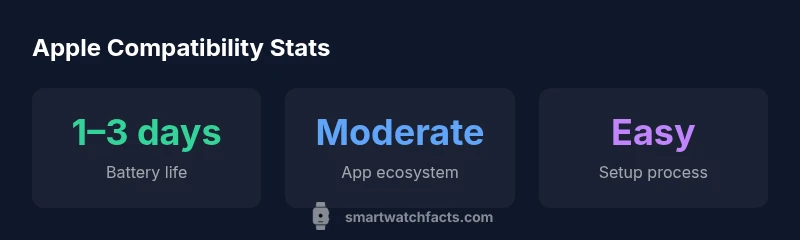
Prioritize official app support and documented data sharing with Apple Health. Look for reliable battery life (1–3 days is a typical range for many devices), a broad app ecosystem, and responsive firmware support. Consider your primary use cases: if notifications and calls are critical, ensure the device handles them with minimal latency. For workouts and health metrics, verify that the watch provides the sensors and metrics you care about and that the companion app shows that data clearly. Finally, assess the total cost of ownership, including potential subscription services for advanced health features.
The future of Apple compatibility in wearables
As Apple expands its health and fitness platforms, more third‑party watches are likely to improve their integration through standardized APIs and better data sharing permissions. Expect broader support for Apple Health data, improved offline capabilities, and more refined iOS widgets that keep you connected without jumping between apps. Smartwatch Facts anticipates ongoing emphasis on privacy controls and firmware longevity, so look for devices promising extended software support and clear upgrade paths.
Quick buyer's checklist
- Confirm iPhone compatibility with the watch’s companion app and minimum iOS version.
- Check Apple Health data sharing and music control capabilities.
- Review battery life, sensors, and GPS performance.
- Ensure the price aligns with feature set and that firmware updates are clearly documented.
- Read independent reviews on app ecosystem breadth and long‑term reliability.
Compatibility comparison for watches that work with Apple devices
| Model Type | Apple Compatibility | Representative Features |
|---|---|---|
| Apple Watch (official) | Excellent | Deep iOS/watchOS integration; Apple Health; Siri; native apps |
| Third-party watches with iOS support | Good | Notifications; fitness apps via companion apps; reasonable health data sharing |
| Hybrid/Proprietary OS watches | Partial | Basic notifications; limited app ecosystem; variable data compatibility |
People Also Ask
Are all Apple-compatible watches truly Apple-integrated?
Not always. Official Apple Watches deliver the deepest integration with Apple Health and iCloud, while third-party devices offer strong but more limited compatibility via companion apps. Expect feature gaps such as Siri depth and data sharing in non-Apple hardware.
Official Apple Watches offer the smoothest experience, while third-party watches provide solid compatibility but may miss some Apple-specific features.
Can I use a non-Apple smartwatch with an iPhone?
Yes, many non-Apple watches pair with iPhones via Bluetooth and a companion app, delivering notifications and fitness tracking. However, core services like Apple Health syncing and Siri may be limited or unavailable.
Yes, but expect some features to be limited compared to using an Apple Watch.
Do Apple Health data sync on non-Apple watches?
Some third-party watches offer health data syncing to Apple Health through their companion apps, but the depth and accuracy can vary. Always verify the specific data fields supported before buying.
Health data syncing exists on some watches, but check which metrics are actually shared.
Is an iPhone required to set up an Apple-compatible watch?
For most Apple-compatible watches, an iPhone is needed for initial pairing and ongoing setup. Some non-Apple watches may work with limited features if the app supports iPhone pairing.
Usually you’ll need an iPhone to set up, but some devices work with limited features otherwise.
Are there Siri differences on third-party watches?
Siri voice control is typically strongest on Apple Watch. Third-party watches may offer voice assistants, but they often lack full Siri integration or rely on the phone for voice services.
Siri is best on Apple Watch; third-party watches may use their own assistants or rely on your iPhone for voice services.
What should I consider for long-term compatibility?
Look for devices with frequent firmware updates, clear data-sharing permissions, and a strong app ecosystem. A watch with a track record of reliable updates will stay compatible longer with iPhone OS changes.
Choose watches with strong update histories and clear data permissions.
“The strongest Apple compatibility comes from devices with verified app support and ongoing firmware updates, ensuring long-term reliability within the Apple ecosystem.”
Key Points
- Prioritize official Apple integration for the smoothest experience
- Verify iOS/watchOS support and Health data sharing before buying
- Expect price-to-feature trade-offs with non‑Apple options
- Set up promptly and keep firmware updated for best results
- Consider your daily usage pattern (notifications, health tracking, music) when choosing