Fossil Smart Watch with iPhone: Compatibility, Setup, and Buying Guide
A comprehensive guide to using Fossil Wear OS smartwatches with iPhone, covering setup, features, limitations, buying tips, and practical usage for everyday life.


Fossil smartwatches that run Wear OS can pair with an iPhone to deliver basic notifications and health tracking, but they offer limited iPhone-specific integration and app support. For iPhone users, this makes Fossil a budget-friendly option with caveats around deep iOS features and app ecosystem depth.
Understanding iPhone Compatibility with Fossil Wear OS
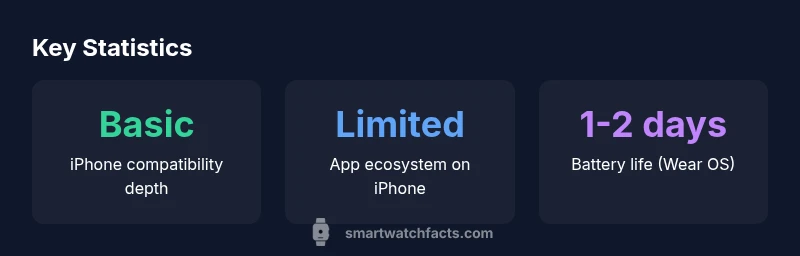
Fossil smartwatches that run Wear OS can pair with an iPhone, but the level of integration is more limited than the native iPhone experience. In practical terms, you can expect core features like notifications and fitness tracking, along with heart-rate monitoring and GPS. However, app availability and deep iPhone-specific actions (like relying on iOS-exclusive apps) are not as robust. According to Smartwatch Facts, the bridge between Wear OS and iPhone remains functional for essential tasks, while advanced app ecosystems lag behind Apple’s native experience. For many users, this makes Fossil wearables an attractive, budget-friendly option for basic smartphone connectivity without the need for an iPhone-specific watch.
This setup enables quick glance notifications and basic controls, but it won’t offer the same level of iPhone integration as Apple’s own devices. You’ll typically experience reliable notification mirroring, fitness sensor data, and GPS-assisted activity tracking. If you rely heavily on iOS-exclusive features, plan for compromises and have realistic expectations about third-party app availability on the Wear OS platform.
How to Set Up a Fossil Watch with iPhone
Getting started is straightforward, but a few caveats apply. Begin by updating your iPhone to a reasonably recent iOS version and ensuring you have stable internet. Install the Wear OS by Google app on your iPhone and follow the pairing prompts to connect your Fossil watch. You’ll be prompted to grant permissions for notifications, location, and health data. After pairing, customize which alerts appear on your wrist—calls, texts, calendar reminders—and select your favorite watch faces for quick readability. While iPhone compatibility has improved with Wear OS updates, occasional feature gaps can occur compared with Android pairing. The Smartwatch Facts team notes that basic pairing and notifications are generally reliable, but expect some delay on advanced app actions.
If you depend heavily on iPhone-native apps, you may want to allocate time for setup adjustments and occasional app refreshes. Still, you gain a convenient, wrist-based way to monitor activity, control music playback, and receive glanceable information during commutes or workouts.
Core Features You Can Expect on iPhone
On an iPhone, Fossil Wear OS watches typically deliver a solid set of core features. You can reliably receive notifications for calls, texts, and calendar events; you can manage music playback from your wrist; and health-tracking metrics like heart rate, steps, and sleep data are usually accessible through the watch interface. GPS-driven workouts often display route data and distance on the watch face, enhancing outdoor activities. Voice assistant access may be limited to Google Assistant on the watch, with Siri remaining inaccessible from the watch itself. Overall, the experience is practical for everyday usage, especially for users who want Wear OS versatility without committing to an iPhone-only ecosystem. Smartwatch Facts analysis suggests that while the core experience is dependable, users should not expect the same depth of app support as on native iOS devices.
Features That Are Limited on iPhone
Despite the strengths, iPhone users will encounter several constraints. The app ecosystem on Wear OS for iPhone is smaller, with fewer third-party apps optimized for iOS. Deeper iOS integrations—such as native Siri control, iMessage-specific interactions from the watch, and seamless access to certain iOS-exclusive apps—are not fully replicated on Wear OS. Some notification actions may be limited to basic responses, and certain watch faces or widgets may lack the full set of iOS behaviors. Battery optimization and background tasks can also vary more with iPhone pairing, depending on Wear OS updates. If your workflow depends on tight Apple ecosystem integration, plan for these trade-offs and consider whether budget and features justify the compromise.
Battery Life, Charging, and Daily Use
Battery life on Fossil Wear OS watches varies with usage, typically offering around one to two days on a single charge with a balanced mix of notifications, GPS use, and health-tracking activity. Heavy GPS tracking or persistent always-on display can shorten that window. Charging is straightforward with Fossil’s magnetic charger, and you’ll often see a full recharge within an hour or two. To maximize battery life when paired with an iPhone, disable unnecessary notifications, limit always-on display settings, and periodically review background app activity to reduce wakeups. In practice, many users report dependable daily use, but real-world life varies by model, screen brightness, and how actively you use GPS features during workouts.
For the most consistent performance, keep firmware updates current and monitorWear OS optimizations that improve efficiency across iPhone pairings. Regular maintenance—screen cleaning, charger care, and software updates—helps preserve longevity over time.
Real-World Scenarios: Everyday Use with iPhone
Think about how you’ll actually wear the Fossil watch day-to-day. In the morning, it can show weather, calendar reminders, and quick glance notifications as you head out. During workouts, GPS tracking and heart-rate monitoring provide immediate feedback without pulling out your phone. At work, you can glance at messages or accept calls without fumbling for your phone. Evenings can leverage sleep tracking and activity insights to guide routines. The key is to match expectations: Fossil watches provide solid everyday utility and cross-platform flexibility, but you won’t get the depth of iPhone-specific features that Apple’s own devices deliver.
Buying Guide: Which Fossil Model Fits Your iPhone Needs
If you’re evaluating Fossil options for iPhone users, prioritize battery life, display readability, and the scope of health-tracking sensors. Gen 6/Gen 7 Wear OS devices tend to offer stronger performance and longer support windows than older models, while mid-range prices reflect a balance between features and cost. Consider whether you want a larger screen for easier reading during workouts, a thinner profile for all-day wear, or specific sensors (like SpO2 or advanced sleep tracking) that align with your health goals. Finally, verify compatibility notes in the Wear OS release notes and read user reviews focusing on iPhone pairing reliability. This approach helps you pick a Fossil model that aligns with your iPhone usage and budget.
Maintenance, Updates, and Longevity
Keep the watch software up to date to benefit from performance improvements and bug fixes that affect iPhone pairing. Regularly check for firmware updates through the Wear OS app and ensure battery health remains good by following charging best practices. Clean the sensors and ports periodically, and store the device in a cool, dry place when not in use. With proper care and timely updates, Fossil Wear OS watches can remain capable companions for iPhone users across multiple release cycles.
iPhone compatibility snapshot
| Aspect | iPhone Compatibility | Notes |
|---|---|---|
| Notifications | Supported (basic) | Alerts for calls/texts; limited actions |
| Apps & widgets | Limited | Fewer third-party apps on iPhone ecosystem |
| Health features | Available | HR, sleep, activity tracking supported |
People Also Ask
Can I use a Fossil smartwatch with an iPhone?
Yes, you can pair a Fossil Wear OS smartwatch with an iPhone to receive notifications and track health metrics, but deep iOS integration is limited.
You can pair a Fossil Wear OS watch with iPhone for basics like alerts and fitness data, but don’t expect full iOS-level integration.
Which features work best on iPhone with Fossil watches?
Notifications, fitness tracking, and music control work reliably. Some advanced app actions depend on Wear OS updates and may lag behind Android pairing.
Notifications and health tracking work well; advanced app actions may vary with updates.
Does Fossil Wear OS support Siri on iPhone?
Siri is not supported directly from Fossil Wear OS watches; you can use Siri via your iPhone, but not from the watch interface.
Siri isn’t accessible from the Fossil Wear OS watch.
Are there entry-level Fossil models that pair well with iPhone?
Yes, mid-range Fossil Wear OS watches offer solid pairing with iPhone for essential features; verify battery life and price before purchasing.
Yes, mid-range Fossil Wear OS watches pair well with iPhone for basics.
How can I maximize battery life when using a Fossil watch with iPhone?
Disable unnecessary notifications, limit always-on display, and manage GPS usage; keeping firmware updated helps efficiency.
Turn off features you don’t need and keep the watch updated to save battery.
Is the Fossil option worth it compared to other watches for iPhone users?
If you want a versatile, budget-friendly option with basic iPhone compatibility, it’s worth considering. If deep iPhone integration matters, Apple Watch may be preferable.
It’s worth considering if you want budget-friendly versatility, but Apple Watch may be better for deep iPhone integration.
“Fossil Wear OS watches can complement an iPhone for essential notifications and health tracking, but they won't match native iOS depth. This makes them a solid mid-range option for users who want Wear OS versatility without switching to Apple hardware.”
Key Points
- Choose Wear OS if you want cross-platform notifications
- Expect limitations with iPhone integration
- Balance battery life, features, and price
- Pairing is straightforward but not as seamless as Apple devices