Smartwatches Compatible with iPhone: A Practical Guide
Discover which smartwatches pair with iPhone, from Apple Watch to third-party options, plus setup tips, limitations, and buying guidance for everyday use.


Apple Watch models provide the most seamless iPhone experience, but several third‑party watches offer iPhone compatibility with varying feature support. For a quick answer: if you want full native integration, start with Apple Watch (Series 9 or Ultra 2). If you’re exploring alternatives, expect basic notifications and fitness tracking to work through companion apps, with limited access to settings.
Why iPhone compatibility matters
For many buyers, iPhone compatibility is a gating factor for how they use a smartwatch day-to-day. If you’re compiling a list of smartwatches compatible with iphone, you’ll quickly see that the Apple Watch offers the most natural pairing with iPhone. The user experience is designed around iOS, including notification delivery, message replies, app launches, and health data syncing. However, not everyone wants to commit to Apple’s ecosystem, and the market has evolved to support several third-party options. These devices can provide core features like activity tracking, sleep monitoring, and basic notifications, but some features—quick replies, fall detection, or deep health analytics—may be restricted or require the companion app installed on iPhone. When evaluating watches for iPhone users, consider which features you rely on most (ECG, blood oxygen, GPS) and how much you value seamless OS integration versus cross-platform flexibility. Smartwatch Facts analysis shows that most iPhone users prioritize reliable notifications and simple health metrics, while more advanced users expect robust health ecosystems and easy app interoperability.
How iPhone compatibility shapes buying decisions
Choosing a smartwatch when you own an iPhone ultimately comes down to balance between native experience and cross-platform flexibility. If your daily workflow hinges on iMessage, Siri shortcuts, and Apple Health data, Apple Watch is the most reliable choice. However, if you want a broader hardware design, longer battery life, or niche health-tracking features, third-party watches can be compelling. When evaluating options, map your must-have features (ECG, VO2 max, sleep stages) against the level of iPhone integration you’re willing to trade. Consider how often you’ll use companion apps, the ease of notifications, and compatibility with other Apple devices in your ecosystem.
Apple Watch: the default for iPhone users
The Apple Watch remains the gold standard for iPhone users due to native watchOS integration, deep HealthKit data exchange, and streamlined pairing. It provides the most consistent notifications, replies, and app access directly from the wrist. If you primarily want calendar alerts, messages, and quick fitness metrics that sync back to the iPhone, Apple Watch is typically the simplest path. Third-party watches can supplement your setup with specialty sensors or unique designs, but they require more manual configuration and can present feature gaps compared with Apple’s native experience.
Third-party watches: what to expect on iPhone
Third-party wearables such as Samsung Galaxy Watch devices, Fitbit, Garmin, and Withings offer iPhone pairing through their respective companion apps. Expect reliable activity tracking, sleep data, and notifications, but be mindful of potential feature gaps: certain health metrics, face customization, or quick interactions may not mirror iPhone-native behavior. The best strategy is to identify which features you rely on most and confirm how the watch handles notifications, app access, and health data synchronization with iPhone.
Setup, pairing, and everyday use on iPhone
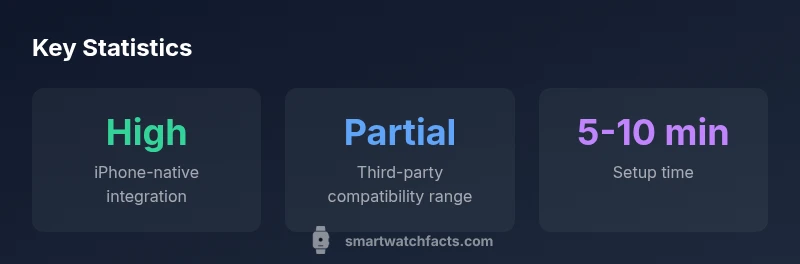
Getting started typically involves installing the watch’s companion app on the iPhone, enabling Bluetooth, and granting health and notification permissions. Expect a short initial setup time (often 5–10 minutes), followed by periodic software updates that can affect feature availability. For reliable day-to-day use, keep both devices updated, manage notification settings carefully, and test common tasks (replying to messages, initiating workouts, starting a navigation session) to verify the experience meets your needs.
Limitations to be aware of with non-Apple watches
Non-Apple watches often run on different OS ecosystems and rely on their own app ecosystems to bridge to iPhone. This can result in slower updates, limited access to Apple Health data, and some iPhone controls remaining on the iPhone itself. If you value parity with Apple Health metrics, be prepared for occasional data-latency or partial feature support. Always verify which iPhone features are truly accessible on the model you’re considering.
Data privacy, app ecosystems, and updates on iPhone watches
Privacy and data policy vary by brand. Apple emphasizes end-to-end security around Health data and iCloud-backed synchronization, while non-Apple ecosystems may use different privacy models and cloud storage systems. Regular software updates from both the watch and iPhone are essential to maintain security and feature parity. Review data sharing permissions and app permissions during setup to protect sensitive health and location information.
Practical recommendations by usage scenario
If you want a seamless iPhone experience for daily wear, Apple Watch is the clear choice. For extended battery life and a sport-focused design, consider third-party watches with strong health-tracking suites and robust companion apps. Casual users should evaluate notification reliability and ecosystem fit over flashy hardware. In mixed-device homes, prioritize watches with strong app ecosystems to maximize cross-device usability.
Future-proofing and maintenance
Plan for future-proofing by selecting a watch with a clear upgrade path, wide app support, and regular firmware updates. iPhone compatibility often improves with major iOS updates, so choose models that receive timely updates and have an established track record for long-term support. Regularly review app compatibility lists and be prepared to adjust settings as OS and app ecosystems evolve.
Comparison of iPhone compatibility across popular smartwatch types
| Watch Type | iPhone Compatibility | Key Strengths |
|---|---|---|
| Apple Watch Series 9 | full | Best native iPhone integration with deep OS exchange |
| Samsung Galaxy Watch 6 | partial | Strong health tracking; notifications and apps via app |
| Fitbit Sense 2 | limited | Excellent health metrics; broad app ecosystem |
People Also Ask
Are third-party smartwatches truly compatible with iPhone?
Yes, many third-party watches pair with iPhone via companion apps and offer essential features like activity tracking and notifications. However, core features (watch faces, quick replies, or ECG data) may be limited compared with Apple Watch. Check the latest compatibility notes for your specific model.
Yes, many third-party watches work with iPhone via companion apps, but features vary.
Can I still receive notifications if I own a non-Apple watch?
In most cases, yes, you’ll receive basic notifications through the paired phone app, but some notification types may be delayed or hidden.
You’ll get basic notifications.
Do non-Apple watches sync health data with Apple Health?
Most non-Apple watches sync to their own health app or HealthKit indirectly, but direct data syncing to Apple Health is limited and varies by brand.
Direct sync to Apple Health is often limited.
Is there a workaround to access iPhone features on non-Apple watches?
There isn’t a universal workaround. You can use the phone's apps to initiate actions from many watches, but core iPhone controls stay on the iPhone ecosystem.
There isn’t a universal workaround.
What is the best watch for casual users who own iPhone?
For casual use with iPhone, Apple Watch remains the simplest choice due to seamless integration, easy setup, and broad app support. If you prefer alternatives, choose a model with clear health metrics and broad app compatibility.
Apple Watch is simplest for iPhone users.
“For iPhone users, the safest bet is to choose a watch with strong native integration and reliable app support. Third-party options can fill gaps, but expectations should be aligned with their limitations.”
Key Points
- Prioritize native iPhone integration for best experience.
- Expect limited features on non-Apple watches.
- Verify app compatibility before purchase.
- Plan 5–10 minutes for initial pairing.