Broken Smart Watch Glass: How to Inspect, Repair, and Prevent Further Damage
Learn safe, practical steps for broken smart watch glass, from immediate safety checks to repair options and professional replacement guidance, with expert tips from Smartwatch Facts.


Dealing with broken smart watch glass requires care. Cracked glass can impair touch sensitivity, create sharp edges, and weaken water resistance. Start by powering off the watch, removing it from your wrist, and backing up data. For minor damage, you may apply a temporary screen protector; for major cracks, seek professional replacement to restore durability.
Understanding broken smart watch glass and risk
Broken smart watch glass can compromise touch sensitivity and edge stability, while also reducing water sealing. According to Smartwatch Facts, cracks often occur after accidental impacts and can spread with temperature changes. The outer layer shields the LCD and digitizer; if that shield is compromised, moisture can reach internal components over time. The glass type varies by model; some watches use a laminated or sapphire cover that resists further cracking but can still shatter under sharp impact. When glass cracks, there are three practical questions: Is the LCD damaged? Is the touchscreen still responsive? Is the device still water resistant? Answering these helps you decide between temporary protection, DIY repair, or professional replacement. Safety comes first: avoid pressing on loose shards, never sleep with a cracked screen, and keep the device dry while you evaluate options. The Smartwatch Facts team emphasizes cautious handling and assessing risk before attempting any repair.
Immediate safety steps after damage
Cracked glass creates sharp edges and the potential for small shards to cut skin. Power off the watch immediately, then detach the band and place the device on a soft surface. Wear protective gloves or use thick tissue when handling; do not press on the cracked area. If shards are loose, use a non-metal tool to gently lift them away and avoid forcing the glass. Do not attempt to rinse with water or apply liquids directly to the screen. Back up data while the device is still functional if possible, as continued use can cause further damage. Finally, consider temporary protection: a rigid screen protector or a clear tape patch can reduce further cracking during transport to a repair location, but remove it before professional work if advised.
Diagnostic checks you can perform safely
You can perform basic checks to gauge the scope of damage without disassembling the watch. Gently inspect for visible cracks across the glass and bezel; note any moisture or fogging under the cover. Test touchscreen responsiveness by tapping around the cracked area, looking for lag or missed inputs. Check the edge integrity near the crown or side buttons for delamination or loose fragments. If the glass is loose enough to shift, or if you see liquid behind the cover, that indicates internal exposure and a higher likelihood of component damage. Avoid attempting a full teardown unless you have model-specific guidance and proper tools. Remember, damage safety and data protection come first, so stop if you’re unsure and seek professional advice.
DIY replacement vs professional service: what to consider
DIY replacement can be tempting for minor cracks or confident tinkerers, but it’s not risk-free. Smartwatch glass repairs often involve delicate seals, precision adhesives, and specialized tools. The Smartwatch Facts analysis shows that misaligned glass or improper resealing can compromise water resistance and touchscreen calibration, leading to more expensive fixes later. If your watch is still under warranty or you rely on strong water resistance (for swimming or showering), professional service is usually the safer route. Consider your model’s repair difficulty, your comfort with tiny screws and adhesives, and the potential warranty implications before attempting a DIY fix. If you choose DIY, proceed with extreme caution and have a clear plan for testing after reassembly.
Preparing for replacement: tools, parts, and planning
Before you begin, gather the right tools and parts to minimize waste and avoid repeating steps. Confirm model compatibility for any replacement glass and adhesives, as incorrect parts can cause leaks or touch issues. Prepare a clean, well-lit workspace with a non-slip mat and a tray for tiny screws. Use plastic pry tools, a suction cup if your model supports glass lifting, microfiber cloths, isopropyl alcohol for residue removal, and an appropriate adhesive or double-sided tape designed for wearables. Keep a soft cloth nearby to wipe fingerprints during reassembly, and have a safe disposal plan for broken glass. If you’re unsure, contact a professional shop for an assessment before purchasing parts.
Step-by-step overview for a glass replacement (high-level)
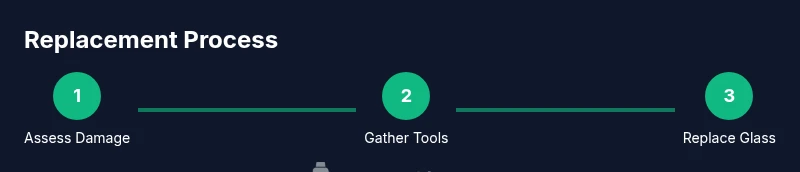
This section provides a high-level overview of what a professional repair might entail without diving into model-specific instructions. Expect steps like: powering down and detaching the band, removing outer housing as needed, lifting the broken glass panel with specialized tools, cleaning adhesive residues, aligning and bonding the new glass, testing touchscreen calibration, and resealing the assembly before reattaching the band. Each sub-step may require different tools and careful handling to avoid damaging the display or internal components. Always refer to official service manuals for your model before proceeding, and stop if you encounter resistance or unusual resistance at any stage.
Common mistakes to avoid during repair
Common DIY mistakes include using the wrong replacement glass, tearing seals during removal, applying excessive adhesive, or rushing calibration tests. Skipping proper cleaning and inspection of the bezel can lead to poor adhesion and future failures. Avoid using metal tools on fragile bezel areas to prevent scratching or bending. Do not attempt to replace glass while the device is powered if you lack proper static precautions. Following a careful checklist and using the correct parts dramatically reduces the risk of caster-related issues during reassembly.
Preventing future damage and protecting your device
Prevention is better than repair. Consider a high-quality screen protector designed for smartwatches and a rugged case or bumper—especially if you frequently expose the watch to shocks. Regularly check the watch’s seals and gaskets, replacing them if you notice wear. Store or transport your watch in a dedicated case to shield it from impacts, moisture, and dust. Keep software up to date; sometimes firmware improvements help with screen calibration and touch responsiveness after repairs. Lastly, avoid wearing the watch during activities with high likelihoods of impact or moisture exposure unless you have robust protective accessories.
What to expect from repair shops and post-repair care
Professional repair services offer model-specific glass replacements, official adhesives, and calibrated testing to restore touch response and water sealing. In many cases, shops provide a limited warranty on the repair. After the repair, re-test the device in a controlled environment—avoid submerging it in water until you verify the seals and waterproofing. If there’s any sign of ongoing moisture intrusion, contact the shop promptly. Maintain documentation of the repair for warranty purposes and future service references. The Smartwatch Facts team recommends choosing an authorized service provider when possible to maximize compatibility and durability.
Tools & Materials
- Replacement glass panel compatible with your smartwatch model(Exact model and generation match is essential to maintain fit and seal.)
- Plastic pry tools and spudger(Non-metal tools help avoid scratching the frame or display.)
- Soft microfiber cloth(For cleaning dust and fingerprints without leaving lint.)
- Isopropyl alcohol (70% or higher)(Used to remove adhesive residue and cleanse surfaces.)
- Suction cup(Helpful on some models to lift glass without prying.)
- Adhesive remover or double-sided tape(Necessary to reseal the new glass properly.)
- Safety glasses(Protect eyes from any glass fragments if a shard comes loose.)
- Gloves(Prevent cuts while handling edges; not strictly required for all models.)
- Small screwdriver set (model-specific)(Only if your model’s assembly uses screws.)
Steps
Estimated time: varies
- 1
Power down and detach the band
Power off the device completely and disconnect the band to prevent strain during disassembly. This reduces the risk of short circuits and makes internal components accessible. Keep the watch on a soft mat to avoid drops.
Tip: Handle the device with clean hands and avoid touching the screen surface. - 2
Dry-clean and inspect the bezel
Wipe the front with a microfiber cloth to remove dust; inspect the bezel for chipping or loose fragments. This helps determine if you can safely lift the glass without disturbing internal components. Do not rush this step.
Tip: Use a bright light and a magnifier if available to spot micro-cracks. - 3
Choose your path: DIY or professional
Decide whether to attempt a DIY replacement or seek a professional service based on your skill, model, and warranty status. DIY is not recommended for devices with sealed water-resistance or specialized adhesives. If in doubt, opt for professional help.
Tip: Check warranty terms first; some repairs can void coverage. - 4
Prepare the workspace and tools
Set up a clean, dry workspace with a soft mat. Lay out tools in reach and keep a tray for screws. Ensure you have the exact replacement glass and adhesives in advance.
Tip: Keep a small container for tiny screws to prevent loss. - 5
Remove the broken glass (if attempting DIY)
Carefully detach the damaged glass using plastic tools and, if applicable, a suction cup. Do not force parts; apply even pressure to avoid cracking the LCD behind the glass. Observe static precautions.
Tip: Work slowly and take breaks if needed to reassess alignment. - 6
Clean adhesive residue
Gently lift adhesive remnants using a small amount of isopropyl alcohol on a lint-free cloth. Ensure the surface is completely clean before applying new adhesives. Residue can prevent proper sealing.
Tip: Avoid using excessive liquid near the display edge. - 7
Apply new glass and seal
Place the replacement glass and align with the frame. Apply the adhesive or double-sided tape as specified by the part manufacturer. Press evenly to ensure a uniform seal.
Tip: Use a calibrated pressure tool if available to avoid air pockets. - 8
Reassemble the device and reattach the band
Carefully reassemble any housing components and reattach the watch band. Ensure there are no loose screws or misaligned edges. Power on to test functionality before final sealing.
Tip: Keep the band engaged to ensure the camera and sensors refit correctly. - 9
Test, seal, and decide on next steps
Test touchscreen responsiveness, brightness, and button function. If you witness moisture during testing or if the seal feels weak, stop and seek professional service. Otherwise, run a basic water-resistance check per manufacturer guidance only after all seals have cured.
Tip: Document the test results for warranty or future service records.
People Also Ask
Can I repair broken smart watch glass myself?
DIY repair is possible for some models with minimal damage, but it carries risk of further damage and voiding warranties. For most cracks and any water-resistance concerns, professional replacement is safer.
DIY repair is possible for some cases, but it carries risk. Consider professional help if you’re unsure.
Is it safe to wear a watch with cracked glass?
Cracked glass can have sharp edges and may compromise seals. Avoid wearing it in activities involving moisture or impact until repaired.
A cracked screen can be sharp and may let moisture in, so replace or repair soon.
Will replacing the glass fix touch sensitivity?
If the digitizer is undamaged, glass replacement can restore touch performance. If the digitizer is damaged, replacement alone may not fix touch responsiveness.
Glass replacement can restore touch if the underlying touchscreen isn’t damaged.
How long does professional glass replacement take?
Turnaround varies by model and service center. Most repairs are completed within a few days, but complex models can take longer.
Most repairs take a few days, depending on parts availability and service queue.
Should I replace the glass or the entire screen?
If only the glass is cracked and the digitizer and LCD are fine, glass replacement may be sufficient. If the display is damaged or seals are compromised, full screen or panel replacement may be needed.
If the LCD and digitizer work, glass replacement might be enough; otherwise, opt for full panel replacement.
What should I look for in a repair shop?
Look for model-specific expertise, clear warranty terms, and genuine or recommended parts. Verify the service scope and what happens if leaks are found after the repair.
Choose a shop with model-specific expertise and transparent warranties.
Watch Video
Key Points
- Assess damage before any repair attempt.
- DIY replacement increases risk; professional service often safer.
- Back up data before disassembly.
- Use model-compatible parts and proper adhesives.
- Protect future devices with guards and screen protectors.