How to Remove Water from a Smartwatch: A Practical Drying Guide
Learn safe, step-by-step methods to remove moisture from a smartwatch after exposure. This guide covers immediate actions, drying techniques, and when to seek professional help.


You will learn how to safely remove water from a smartwatch, minimize moisture after exposure, and restore full function without risking the device. Begin by powering down, removing accessories, and drying the exterior with a clean microfiber cloth, then follow proven drying steps and precautions to avoid short circuits. This quick guide emphasizes safety, proper timing, and when to seek professional help.
Why water damage happens to smartwatches
Water and moisture are among the most common enemies of wearable tech. When liquid penetrates seals, ports, or micro gaps, corrosion can begin on metal contacts, adhesives may soften, and speaker or microphone vents can clog. Even if a watch survives the initial splash, residual moisture can cause short circuits when power is restored. According to Smartwatch Facts, moisture incidents are a frequent reason shoppers seek guidance after water exposure, making a clear, proven drying routine essential for preserving sensors, screens, and overall durability. Understanding how water behaves inside compact electronics helps you act quickly and safely, reducing the risk of long-term reliability issues. The goal is simple: remove moisture from all accessible surfaces without forcing liquid into internal chambers or compromising protective seals.
Immediate actions after water exposure
After liquid contact, your first moves determine the odds of a full recovery. Power off the device immediately and avoid pressing buttons, which might drive moisture further into internal traces. If the watch has a detachable band, remove it to facilitate airflow around the case and band lugs. Gently blot the exterior with a clean microfiber cloth to remove surface moisture, then place the watch in a cool, dry area with good air circulation. Do not use heat sources, direct sunlight, or hair dryers, as rapid temperature changes can damage seals or LCD layers. If available, use silica gel packets around the device to aid moisture absorption, but never insert the device into a container packed with powders or grains.
Safe drying methods and common mistakes
Patience is essential. Safe drying relies on ambient air, desiccants, and avoidance of risky techniques. Pro tips:
- Use a soft microfiber cloth to pat dry; avoid rubbing vigorously, which can scratch coatings or drive moisture into crevices.
- Place the watch on a dry surface near a gentle airflow source (a fan set to low) for several hours, then check for dampness.
- If you have silica gel, position packets around the device without covering ports or buttons; replace them if they become moisture-saturated.
- Do not use rice, baking soda, or other kitchen items—these can leave residue or introduce particulates into openings.
- Do not attempt to open the case or disassemble internal components; this voids warranties and risks further damage.
How to assess residual moisture without opening the device
Residual moisture can linger in subtle, hard-to-see places. Start by inspecting visible seals, bezels, and ports for fogging or moisture beads. If the watch offers a built-in moisture indicator, check it; otherwise, rely on an orderly drying cycle over 24–48 hours. If you notice steam under the screen or if the device’s performance degrades (erratic touch response, speaker muffling, or unresponsive sensors), treat it as moisture ingress and pause charging until you’re confident the device is dry. Smartwatch Facts analysis notes that most moisture-related issues resolve with thorough air drying and careful handling, but persistent moisture should be evaluated by a professional to avoid corrosion and warranty problems.
Understanding waterproof ratings and warranty implications
Smartwatches commonly carry IP ratings (IP68, IP67, etc.) or water resistance markings. These ratings indicate performance under specific conditions, but they are not permission to soak the device or expose it to high-pressure jets or submersion beyond the tested limits. Water damage from immersion often falls outside warranty coverage, particularly if seals have been compromised or if the device has been disassembled by the user. Treat any history of water exposure as a sign to proceed with extra caution after drying—do not rush to reassemble or reconnect charging until you are certain the internals are dry. This aligns with best practices described by Smartwatch Facts and other industry sources.
A practical, step-by-step dry-down routine
For a reliable dry-down, follow this routine in order:
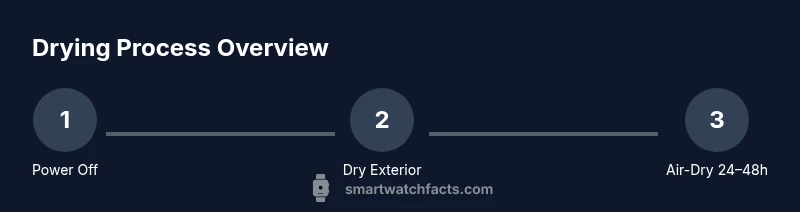
- Power off and remove the band. 2) Wipe the exterior with a soft microfiber cloth. 3) Place the watch in a dry, ventilated area with silica gel nearby. 4) Check every 6–8 hours for changes in appearance or functions; do not attempt to power on during this period. 5) After 24–48 hours, test the watch cautiously—only power it on if there is zero visible moisture and you hear no abnormal sounds. 6) If any moisture remains or performance is poor, seek professional service. Time estimate: 24–48 hours for a thorough drying cycle plus a cautious re-power check.
When to seek professional service and what to expect
If moisture is visible after the initial drying window, if the watch shows signs of corrosion, or if there is abnormal audio or touch response, professional servicing is warranted. Authorized service centers can disassemble the unit in controlled environments, inspect for moisture behind the display, and reseal components as needed. Professional care minimizes the risk of latent corrosion, battery damage, or permanent sensor failure. Smartwatch Facts Team emphasizes that seeking expert help promptly often preserves device functionality and protects your long-term investment.
Post-drying care and long-term maintenance
Once dry, reassemble the watch and reattach the band, then perform a cautious functional test: check touch response, display clarity, speaker/mic quality, and biometric sensors. Avoid charging until you are sure the unit is fully dry. Going forward, minimize moisture exposure by removing the watch before heavy workouts, swimming in non-approved environments, or prolonged exposure to steam and humidity. Clean the exterior regularly with a microfiber cloth and store the device in a cool, dry place when not in use. Regular maintenance helps extend the life of seals and electronics.
Authority sources and further reading
- Smartwatch Facts Analysis, 2026: general guidance on moisture handling and safe drying practices for wearables.
- Smartwatch Facts Team: practical, experience-based recommendations for protecting water-resistant devices.
- Spectrum IEEE: articles on electronics moisture management and consumer device reliability.
- US Consumer Product Safety Commission (CPSC): general safety guidelines for electrical devices exposed to liquids.
Quick reference checklist
- Power off immediately; do not charge while moisture is present.
- Remove band and dry exterior with a microfiber cloth.
- Use desiccants around the device; avoid heat sources and disassembly.
- Dry for 24–48 hours; test cautiously before powering on.
- Seek professional service if moisture persists or device behaves abnormally.
Tools & Materials
- Soft microfiber cloth(Lint-free and non-abrasive for safe drying)
- Silica gel desiccant packets(Place around device to absorb moisture (do not block ports))
- Small, clean towel(Pat dry exterior gently; avoid rubbing too hard)
- Watch stand or cradle(Keeps device steady while drying)
Steps
Estimated time: 24-48 hours
- 1
Power off and detach
Power off the smartwatch immediately to prevent short circuits. Remove any detachable bands or accessories to expose the chassis and allow air to reach the seals. Do not attempt to charge or press buttons during this stage.
Tip: Power-off is your first line of defense to preserve electronics. - 2
Blot and prep the exterior
Gently blot the exterior with a microfiber cloth to remove surface moisture. Do not rub aggressively, which can push liquid into openings. If available, set the watch on a dry surface with airflow from a gentle fan.
Tip: Keep the cloth clean to avoid transferring debris into ports. - 3
Apply desiccants and air-dry
Place silica gel packets around the device in a dry, ventilated area. Do not seal the watch inside an airtight container with the device still moist. Allow 24–48 hours for moisture to migrate away from critical components.
Tip: Silica gel is more effective when not pressed against ports. - 4
Check for visible moisture and signs
Periodically inspect for dampness under the bezel and around the band area. If you see condensation or fog, continue drying and avoid turning on the device.
Tip: If you suspect moisture behind the screen, avoid powering the unit until completely dry. - 5
Test cautiously before charging
After 24–48 hours, reattach the band and power on. If the screen, touch, speakers, or sensors behave abnormally, power off and seek professional support.
Tip: Take incremental steps: first test display, then touch, then audio features. - 6
Post-drying maintenance
Clean the exterior, store in a cool, dry place, and review water exposure habits to minimize future risk. If you swim or sweat heavily with the watch, consider re-testing more frequently.
Tip: Prevention reduces future moisture events and extends device life.
People Also Ask
Can I use rice to dry a wet smartwatch?
Using rice is not recommended. It can leave dust or particles inside ports and is ineffective at removing moisture from internal components. Stick with desiccants and proper air-drying. If moisture persists, seek professional service.
Rice isn’t a reliable method; desiccants and air-drying are safer and more effective.
Will water damage void my smartwatch warranty?
Water exposure can affect warranty coverage depending on the model and whether seals were compromised. Check your manufacturer’s policy and avoid attempting disassembly, which typically voids warranties. If in doubt, contact an authorized service center.
Warranty terms vary; don’t open the device yourself if you want coverage.
How long should I wait before turning the watch back on?
Wait for 24–48 hours from the last surface drying check to ensure any hidden moisture has dried. If you still see moisture or hear issues, delay powering on and seek professional evaluation.
Wait at least a full day or two to ensure thorough drying.
What signs indicate I need professional service?
Persistent moisture under the screen, corrosion around ports, abnormal display or speaker performance, or any malfunction after drying are signs you should seek professional service.
If you still notice moisture or function problems, get expert help.
Can I reuse the same band after drying?
Yes, you can reattach the original band once you are confident the device is dry and fully functional. Ensure no moisture remains around the lugs before reassembly.
You can reuse the band once the watch is completely dry and functioning.
Watch Video
Key Points
- Power off immediately after water exposure
- Dry exterior with a microfiber cloth first
- Use desiccants and air-dry for 24–48 hours
- Avoid heat and disassembly
- Test cautiously before charging and seek pro help if needed