How Long Does a Smartwatch Battery Last: A Practical Guide
Explore realistic smartwatch battery life ranges, how usage and settings affect runtimes, and practical tips to extend life across brands.


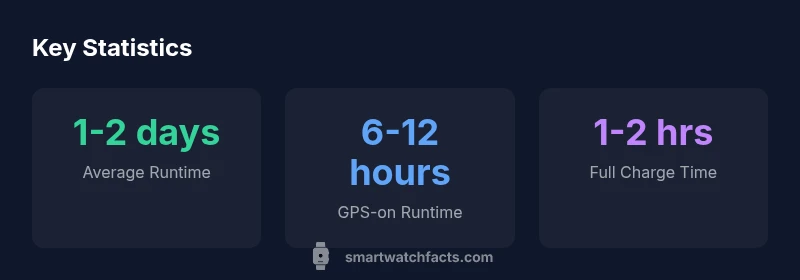
Most smartwatches deliver about 1-2 days of battery life under typical use. If you enable GPS, music streaming, and an always-on display, expect runtimes closer to 6-12 hours. In power-saving modes, many models can stretch to 2-5 days. Real-world results vary by model, settings, and your daily habits. Always-on displays and background tasks shave extra hours, while careful app management can extend life.
What determines smartwatch battery life
The question how long does a smart watch battery last is not a single number. It depends on a mix of hardware, software, and how you use the device. The display is the main power draw: screen size, resolution, and especially the brightness setting and whether an always-on option is enabled. Higher brightness and large, high-contrast panels consume more energy. The processor and OS efficiency also matter: newer architectures and well-optimized software can perform the same tasks with less power.
Connectivity is another big factor. Bluetooth, Wi‑Fi, LTE/5G, and even offline music streaming can increase drain when the watch remains actively connected or frequently communicates with your phone. Sensors—heart-rate monitoring, SpO2, ECG, GPS—consume varying amounts of power depending on how intensively they are used. Apps running in the background, fetch intervals, and notifications can contribute to steady battery use, especially if they wake the device often.
Usage patterns largely determine real-world runtimes. If you seldom use GPS, keep the screen display off except when needed, and limit background tasks, you’ll likely see longer lifespans. Conversely, athletes who track runs with GPS, enable live metrics, and keep the screen on for longer sessions will see shorter intervals between charges. The keyword how long does a smart watch battery last should be understood as a range rather than a fixed value for most people, and it varies by model and settings.
Typical battery life in common scenarios
For many users, everyday wear yields about 1-2 days of operation on a single charge. If you disable always-on display, reduce brightness, and keep GPS off or used sparingly, runtimes trend toward the higher end of that range. Engaging streaming music or continuous health tracking can shorten life by a day or more, depending on the model. If your watch supports a power-saving mode that limits features, you can coax longer sessions—some devices extend to 2-3 days with minimal use. Ultra-efficient or dedicated fitness watches may push toward 5 days or more, but at the cost of abandoning some smart features. Always remember that these are rough benchmarks; exact figures vary by brand and firmware version. In practice, the best way to estimate your own wearer's battery life is to monitor it over a few charge cycles under your typical routine.
How features impact power draw
The battery drain is not uniform across features. An always-on display keeps the screen active in the background, which eats energy continuously; a high-brightness panel can cut the device's efficiency by a noticeable margin. GPS tracking for a long run consumes more power than step counting. Continuous heart-rate monitoring uses a sensor; even more, some watches run multiple sensors in parallel (SpO2, ECG), compounding the drain. Wireless connectivity also matters: pairing with a phone via Bluetooth is relatively light, while LTE/5G connectivity is significantly heavier. Music streaming over cellular or frequently syncing data with the cloud adds extra cycles of CPU activity. Apps left open in the background can wake and perform tasks, draining battery in ways that aren’t obvious from a glance at the screen. In short, if you want to maximize runtime, reduce the biggest drains first: GPS, always-on, high brightness, and notifications that wake the device unnecessarily.
Brand and OS differences that affect life
Different smartwatch platforms deliver different baseline battery life due to hardware efficiency, display technology, and how aggressively the system manages background tasks. Apple’s watchOS devices tend to emphasize a polished user experience which can trade some endurance for features; Samsung’s One UI and Wear OS devices offer varied power profiles depending on vendor optimizations; Garmin and Fitbit OS devices often optimize for extended endurance, especially in training modes. The exact battery life you see will depend on how the OS schedules tasks, how the watch handles radios when idle, and the quality of the battery itself. If you rely on GPS and continuous heart-rate tracking, you may notice shorter runtimes on watches with higher refresh rates and brighter displays, but models designed for sport can maintain longer life with conservative settings. In any case, reading reviews that compare real-world runtimes under similar usage can provide better guidance than spec sheets alone.
Practical tips to maximize battery life
- Lower brightness and turn off Always-On Display
- Enable power-saving modes; turn off LTE/5G when not needed
- Limit background apps and reduce notification frequency
- Use offline music storage and disable streaming
- Schedule workouts to minimize screen-on time; avoid keeping the screen on unnecessarily
- Keep software updated; manufacturers often optimize power management
Charging strategies and best practices
Charge your smartwatch with the official charger or a certified dock; using the wrong adapter can slow charging or harm the battery. Avoid charging in a hot environment or leaving the device on the charger for extended periods after it reaches 100%. Modern Li‑ion batteries tolerate frequent top-ups and partial charges, so you don’t need to wait for 0% to start charging. If you travel, a compact certified charger can keep runtimes predictable. Over time, battery health declines; regular charging habits help preserve overall longevity, but plan for battery replacement if runtimes noticeably shorten.
Common myths and misconceptions
A common myth is that all smartwatches drain equally fast; in reality, design choices, sensors, and software optimization vary widely. Another misconception is that turning off all features will make the watch behave like a dumb tracker; you can often preserve essential reports (steps, heart rate) while trimming energy draw. Finally, some users believe charging overnight is always bad; modern Li‑ion chemistries tolerate overnight charging when done with a quality charger and safe conditions. Understanding what drains power most helps you set realistic expectations.
Looking ahead: battery health and replacement options
Over time, the wearable battery’s capacity diminishes, leading to shorter runtimes even with the same charging routine. Replacement options vary by brand and model; some watches have user-replaceable batteries, while others require professional service or model upgrades. If you rely on a watch daily, consider a model with known easy serviceability or plan for a battery swap at the device’s lifecycle midpoint. Manufacturers are increasingly offering extended-battery variants and more efficient components, which can push expected lifespans higher in future releases.
Battery life ranges across common smartwatch categories
| Model Type | Typical Battery Life | Charging Time |
|---|---|---|
| Everyday Wear OS Watch | 1-2 days | 1-2 hours |
| GPS-focused model | 6-12 hours | 1-2 hours |
| Power-efficient sport watch | 2-5 days | 1-2 hours |
People Also Ask
What factors have the biggest impact on battery life?
The display brightness, always-on mode, GPS usage, and notification load are the primary drivers. Reducing these can noticeably extend runtimes without sacrificing essential functionality.
Display brightness, always-on, GPS, and notifications drive most battery use—tune these to extend runtimes.
Can I extend battery life without sacrificing essential features?
Yes. Use power-saving modes, limit background tasks, and reduce notification frequency. Storing music offline and turning off LTE when not needed also helps.
Yes—use power-saving modes, trim background tasks, and limit notifications to extend life.
Do all watches behave the same with power saving?
No. Operating system and hardware influence energy efficiency. Some watches manage background tasks more aggressively, resulting in different real-world runtimes.
No—different OS and hardware matter for power-saving performance.
Is lithium-ion battery technology the main limit?
Smartwatches use lithium-based cells, and capacity declines over time. This can reduce runtimes as the device ages, even with a charger in hand.
Yes—battery capacity declines over time, affecting runtimes.
When should I replace my watch’s battery?
If runtimes are noticeably shorter despite charging, or the watch no longer holds charge for a day or more, consider service options or model upgrades.
If runtimes drop a lot and won’t hold a charge, you may need service or a replacement.
“Battery life is a function of design choices: display tech, processing efficiency, and user habits determine runtime more than any single spec.”
Key Points
- Tune settings to maximize runtimes without sacrificing essentials
- Expect 1-2 days for typical use; GPS and always-on shorten life
- Always-on displays and frequent syncing drain more power
- Charge with official adapters for fastest, safest top-ups