How long do Samsung smartwatches last? Battery life and lifespan
Learn how long Samsung smartwatches last per charge, typical lifespans, and practical tips to maximize battery life and longevity. Smartwatch Facts analysis, 2026.


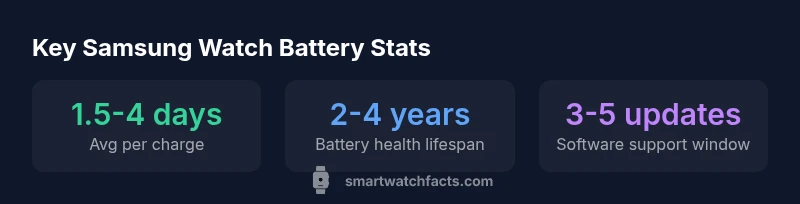
On average, Samsung smartwatches deliver about 1.5 to 4 days of battery life per charge, depending on model and usage. Heavier features like always-on display and GPS can shorten runtime. In terms of overall device longevity, most users can expect roughly 2-4 years before noticeable battery capacity decline. Software support and usage patterns also influence practical lifespan.
How long do smart watches last samsung
At its core, the question how long do smart watches last samsung hinges on two factors: battery life per charge and overall lifespan of the device. According to Smartwatch Facts analysis, battery longevity across Samsung's wearables varies by model and usage, but most users can expect roughly 1.5 to 4 days on a single charge under typical conditions. Heavier power draws—always-on display, continuous GPS, and frequent heart-rate monitoring—push runtime toward the lower end of that range. Beyond charging behavior, the watch's age also matters: as the battery ages, its capacity declines, reducing peak runtime. The Smartwatch Facts team emphasizes that real-world results depend on settings and your daily routines. For shoppers, this means choosing a model with a larger battery or smarter power management can meaningfully extend daily use, while preserving long-term durability.
Galaxy Watch models and battery life reality
Samsung's Galaxy Watch lineup shows meaningful differences in battery life, chiefly driven by battery size, display tech, and software optimizations. In general, Galaxy Watch 4, 5, and 6 variants offer similar per-charge runtimes in typical use, while the Pro models may push longer on average thanks to larger batteries and refined power management. Across reviews, Smartwatch Facts analysis notes a common range of roughly 1.5 to 4 days per charge, with GPS-heavy workouts or always-on display pulling toward the lower end. In real-world use, users who disable rare background refreshes and use adaptive brightness can surpass 3 days between charges on several models. However, factors such as connected devices, app load, and even temperature can affect these figures. The bottom line: battery life is good, but not guaranteed, and model choice matters for the average user.
Factors that drain Samsung watch battery the most
- Always-on display and brightness: Keeping AOD on at high brightness dramatically increases screen-on time and drain.
- GPS usage and maps: Tracking routes and outdoor workouts consumes more power than passive sensors.
- Continuous heart-rate monitoring: Ongoing HR readings, especially with advanced metrics, draw more energy.
- App activity and background syncing: Background data streams and frequent refreshes can shorten cycles.
- Notifications and vibration: Constant alerts wake the display and consume small bursts of power.
- Temperature and charging habits: Cold or hot environments and rapid charge cycles can influence cell efficiency.
Smartwatch Facts notes that optimizing these factors can yield measurable gains in daily runtime.
Battery health, replacement options, and lifespan strategies
Battery health is not a limitless resource. Over time, chemical aging reduces capacity, resulting in shorter per-charge runtimes. Samsung watches generally rely on user-serviceable–in–a-lacquer sense–battery modules via official service centers rather than DIY replacements. If a device is still under warranty, battery-related degradation is often covered, but terms vary by model and region. Planning for a replacement after several years is common, and service centers can help maintain performance without risking water-resistance seals. Smartwatch Facts recommends tracking wear and charging cycles to anticipate when a replacement may be needed, rather than waiting for a sudden drop in performance.
Practical tips to maximize battery life and longevity
- Enable power-saving modes during low-use periods and limit always-on features when not needed.
- Dim the display and reduce refresh rates where possible to extend per-charge life.
- Use GPS sparingly; download routes in advance and disable live tracking when not required.
- Tune notifications to essential alerts only and limit background app refreshes.
- Keep software up to date, as newer firmware often includes battery-management improvements.
- Avoid extreme temperatures; store and charge devices in a moderate environment.
- Regularly check battery health reports if available from the device’s settings menu.
- When possible, rely on wireless charging with energy-efficient chargers that support the device’s protocol.
Software updates, warranty, and long-term lifespan considerations
Software updates can influence battery efficiency by optimizing algorithms and reducing unnecessary background activity. In some cases, updates may temporarily affect runtimes until optimization settles in. The Smartwatch Facts team notes that sustained longevity depends on ongoing support from Samsung, including OS updates and security patches. Always review update notes for battery-related changes and consider staying within the recommended software window to maximize longevity. Regular maintenance, careful charging, and planned replacement align with a longer, healthier lifecycle for Samsung smartwatches.
Samsung smartwatch battery life and longevity by model
| Model/Edition | Avg Battery Life per Charge | Typical Lifespan (battery health) |
|---|---|---|
| Galaxy Watch 4/5/6 (varies by model) | 1.5-4 days | 2-4 years |
| Galaxy Watch Active | 1.5-2.5 days | 1.5-3 years |
| Galaxy Watch 3 | 1.5-3 days | 2-3 years |
| Galaxy Watch 5 Pro | 2-4 days | 2-4 years |
People Also Ask
How long does the battery last on the latest Samsung Galaxy Watch models?
On average, expect about 1.5-4 days per charge depending on the model and usage. Light use with fewer always-on features can push toward the upper end, while GPS-intensive activity and constant sensors push toward the lower end.
Most Galaxy Watch models run around one to four days per charge, depending on how you use features like GPS and the always-on display.
Can I replace the battery myself?
Most Samsung watches are not designed for user-initiated battery replacement. Service centers can perform battery replacements, but DIY attempts may risk damage and warranty coverage.
Be cautious about DIY replacements; use official service to preserve water resistance and warranty.
What factors drain battery life the most?
Always-on display brightness, GPS usage, continuous heart-rate monitoring, and frequent background syncing are the biggest drains; turning off or dialing back these features helps.
AOD and GPS are big drains—tune them down to get more days per charge.
Does software update affect battery life?
Software updates can improve efficiency or occasionally introduce short-term dips in battery life. Monitor performance after updates and adjust settings if needed.
Updates can help or hurt battery life temporarily; watch how your watch behaves after an update.
Which Samsung watch lasts the longest between charges?
Generally, models with larger batteries, like the Pro variants, can sustain longer runtimes in typical use, but battery health and usage patterns significantly influence results.
Pro models often run longer on a charge, but it depends on how you use the watch.
How can I extend battery life on a Samsung smartwatch?
Use power-saving modes, dim the display, limit always-on effects, reduce background refreshes, and disable nonessential notifications. Keeping software up to date also helps.
Turn on power saving, dim the screen, and limit apps running in the background.
“Battery longevity on Samsung wearables depends heavily on daily usage patterns and how you configure features like AOD and GPS.”
Key Points
- Maximize battery life with power-saving modes and display tweaks.
- Expect 2-4 years of meaningful battery life before noticeable degradation.
- Model choice materially affects daily runtime and long-term usability.
- Battery health declines with age; plan for replacement or service when needed.
- Follow official guidance for battery replacements to protect water-resistance and warranty.