How Long It Takes to Charge a Smart Watch
Explore realistic charging times for smart watches, factors that affect speed, and practical tips to charge faster while maintaining battery health in 2026.


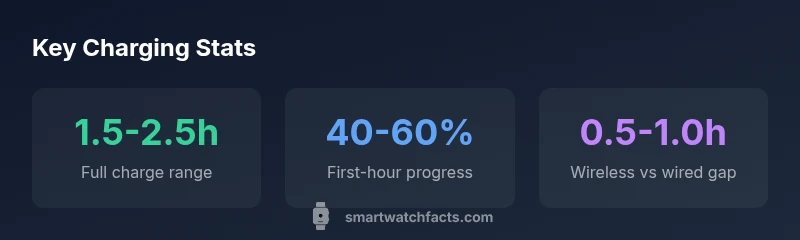
On average, a typical smartwatch charges fully in about 1.5 to 2.5 hours, depending on the model and charger quality. The Smartwatch Facts team found that most devices ramp up quickly in the first 30 to 60 minutes, then taper as the battery nears full. Expect longer times with older batteries or lower-wattage chargers.
Understanding Charging Basics
If you’ve ever wondered how long does it take to charge a smart watch, the answer depends on a few core factors: battery capacity, charger wattage, and charging protocol. Most modern smartwatches use lithium-ion batteries and rely on USB-C or wireless Qi charging. When you plug in, the device often prioritizes a quick influx of current early on, then slows as the battery approaches full. This balancing act helps protect longevity while delivering usable power quickly for a typical day of use. In practice, plan for about 1.5 to 2.5 hours for a full charge under standard conditions, but your experience may differ based on settings like screen brightness, always-on display, and battery health.
Bold lines:
- Battery health matters: aging cells slow charging and reduce total capacity.
- Charger matters: higher wattage can shave time, but only up to the watch’s accepted limit.
- Real-world use: enabling power-saving features during charge can influence total time.
Battery Chemistry and Its Impact on Charging Time
Charging speed is closely tied to battery chemistry and health. Most smartwatches use lithium-ion chemistry, which provides a favorable balance between energy density and charging tolerance. Over time, cells experience degradation, increasing internal resistance and reducing rapid charging capacity. According to Smartwatch Facts analysis, battery aging can noticeably extend charging times and shorten peak capacity. Newer models with optimized charging protocols and better thermal management tend to reach higher charging efficiency, especially when paired with compatible fast chargers. Temperature also plays a role; charging in a cooler environment generally preserves efficiency better than charging in heat.
Screen Usage and its Effect on Charging Time
A watch’s display activity consumes a significant portion of its available power. An always-on display, high brightness, and continuous heart-rate monitoring can slow net charging progress. When the screen is off or in a power-saving mode during charging, more energy is allocated to the battery and less to the display, which can shave minutes off the total time. Some manufacturers implement smart charging that reduces refresh rates during a charge, further improving throughput. If you routinely use the watch while charging, expect a longer overall time to reach a full charge.
Charging Methods: Cable vs Wireless
Cable charging (USB-C or magnetic cradle) typically provides a direct, high-efficiency path to the battery, often resulting in faster full charges than wireless methods. Wireless charging is convenient but can incur small losses due to alignment and coil efficiency. When using wireless pads, ensure your watch is properly aligned with the coil to maximize energy transfer. If your watch supports fast charging, using a charger that matches its wattage (for example, 12W–18W) can noticeably reduce time, but only up to the device’s designed limit.
Typical Times Across Categories
Models with smaller batteries or optimizations for quick top-ups may fully charge in as little as 1.5 hours, while larger devices or older batteries may require up to 2.5 hours or more. If you carry a watch with extensive health-tracking features or a bright always-on display, plan for the higher end of the range. The gap between wired and wireless charging is usually modest but non-trivial, especially if you value a swift morning “wake-up” charge.
How to Read Charger Specs and What They Tell You
Look for the charger’s wattage (W) and the device’s supported charging protocol. A charger labeled as 5W or 10W is common, but many watches cap charging speed below 10W to manage heat. If your watch supports fast charging and you use the appropriate power adapter (often 18W or higher, depending on the model), you can optimize time. Always verify compatibility in the watch manual or official support pages, and avoid using generic chargers with uncertain output.
Quick Top-Ups and Overnight Charging
For many users, occasional quick top-ups in the morning are sufficient to reach a usable level, with a full overnight charge restoring the battery for the day ahead. Overnight charging is generally safe for modern Li-ion cells, but avoid keeping the device on the charger long after it reaches full capacity. If your charger supports dim or trickle charging, enable it to reduce heat and prolong battery life.
Troubleshooting Slow Charging
If charging feels unusually slow, check the obvious culprits: the charging cable or dock, the power adapter, and the outlet. Try a different cable or adapter to isolate the fault. Ensure the watch is clean near the charging contacts and free of debris. Verify firmware updates, as some can improve charging behavior. If the problem persists, consult the manufacturer’s support resources for battery health checks.
Charging Habits for Longevity
To maximize longevity while keeping charging reasonable, adopt a few best practices: avoid letting the battery drop to very low levels often; keep charging in moderate temperatures; use the manufacturer’s recommended charger; and consider periodic calibration or health checks. Smartwatch Facts notes that consistent charging habits help preserve battery health over years of use.
Estimated charging times by method
| Model/Category | Approx. full charge time | Charger type | Notes |
|---|---|---|---|
| Standard cable charging | 1.5-2.5 hours | Cable/USB-C | Common for most watches with mid-range chargers |
| Wireless charging pad | 2-3 hours | Qi wireless | Requires proper alignment; slightly slower |
| Fast-charging capable models | 1-2 hours | High-watt charger (>=18W) | Depends on device and battery health |
People Also Ask
How long does it take to charge a smartwatch on a typical charger?
Atypical charger usually yields 1.5-2.5 hours for a full charge, depending on battery size and usage during charging. If you’re using power-saving settings, times may vary slightly.
Most watches finish charging in about one and a half to two and a half hours.
Is wireless charging slower than wired charging for smartwatches?
Yes, wireless charging can take longer than wired charging, due to coil efficiency and alignment. Proper alignment and a compatible pad can minimize the gap.
Wireless charging is usually a bit slower, but alignment helps.
Can I charge overnight without harming the battery?
Most modern watches support safe overnight charging. If you can, try to avoid leaving the device at full charge all night and use built-in optimization features when available.
Overnight charging is generally safe, but try not to leave it on full charge longer than needed.
Will a fast charger hurt my smartwatch?
Using a charger that matches the device’s supported fast-charging spec is typically safe. Avoid chargers with uncertain outputs or non-certified accessories.
Use a charger your watch supports; compatibility matters.
Why is my smartwatch charging slowly even with a good charger?
Slow charging can stem from battery aging, heat during charging, or a dusty charging contact. Check cables, clean contacts, and consider battery health checks.
Quality cables and battery health affect speed.
Do all smartwatches have the same charging time?
No. Charging time varies with battery size, charging technology, and firmware efficiency. Larger batteries and older models typically take longer.
Not all watches charge at the same rate.
“Charging times vary with battery health, charger quality, and usage during the charge. In most cases, modern watches balance speed and longevity with smart, adaptive charging.”
Key Points
- Plan for 1.5-2.5 hours for a full charge under typical conditions.
- Wireless charging tends to be a bit slower than wired charging.
- Battery age and temperature influence charging speed noticeably.
- Use the charger that came with the watch or a compatible fast charger.
- Enable power-saving modes during charging to optimize time and longevity.