How Long Do Smart Watches Stay Charged: A Practical Guide
Discover how long smart watches stay charged, what factors affect battery life, and practical tips to maximize endurance across common smartwatch categories. Smartwatch Facts analyzes typical ranges and offers actionable setup guidance.


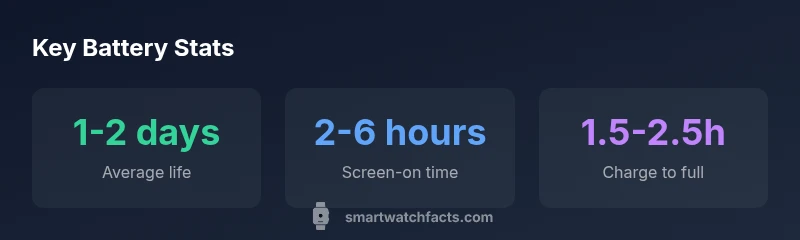
On average, most smart watches stay charged for 1 to 2 days under typical daily use, with GPS tracking and always-on displays shortening that window. The exact duration depends on screen brightness, app activity, notifications, and health-tracking features. By understanding your daily habits and the device's power profile, you can estimate how long your watch will run between charges.
Realistic expectations for how long do smart watches stay charged
When you ask how long smart watches stay charged, the answer hinges on two things: the hardware capacity that powers the device and your daily routine. In practice, you’ll typically see a charging window of about one to two days for standard wearers who check notifications, monitor health metrics, and occasionally use GPS. If you routinely use power-intensive features—like continuous heart-rate monitoring, GPS workouts, or an always-on display—the watch may need a top-up every day. The keyword here is context: a device that runs lean software with optimized power management can stretch between charges, while more feature-rich models will burn through energy more quickly. The Smartwatch Facts team notes that longevity is not a fixed value; it ebbs with software updates and user behavior. As you compare models, consider the balance between power-hungry features and efficiency improvements from newer processors and display technology. With a clear understanding of daily habits, you can set realistic expectations and plan charging around your routine instead of chasing an ideal that doesn’t fit your day.
Why software, hardware, and usage matter
Battery life is a function of how efficiently a watch runs. Modern wearables combine low-power chips with energy-efficient displays and smart software. A bright, high-refresh-rate panel can drink more power than a dim, always-on-friendly display. Background tasks—synchronization, health-tracking loops, and frequent app activity—also draw power even when you aren’t actively using the watch. The operating system can mitigate this through adaptive brightness, sleep modes, and selective syncing. In practice, a model with a proven energy-efficient stack will feel more reliable in daily life, even if it has a slightly smaller battery capacity than a rival. Finally, your usage pattern—how often you check notifications, exercise, or use GPS—has a predictable, measurable effect on end-user stamina. Smartwatch Facts analysis confirms that real-world endurance is the best guide for buyers, not peak lab numbers.
Battery life ranges by category and use case
- Basic fitness watches: typically offer longer life due to simpler displays and fewer apps, often delivering multiple days of endurance with light use.
- GPS-focused smartwatches: built for outdoor activity, they usually provide shorter life because GPS is power-hungry but offer essential navigation features.
- Premium / feature-rich models: prioritize health sensors, rich apps, and always-on displays, trading some endurance for convenience. Real-world ranges vary, but most users find a charge every day or two to be common for feature-rich devices, with occasional longer stretches during lighter use.
When evaluating models, map your daily schedule to these patterns. If your day includes frequent workouts stored locally or cloud-based syncing, plan for shorter intervals between charges.
Charging speed, battery health, and aging
Battery health follows a typical curve: new watches show solid endurance, which gradually declines as cycles accumulate. Faster charging can improve the user experience, but the overall lifetime still depends on the chemistry and temperature during charging. High-temperature charging, paring back usage, and avoiding fully depleting the battery can help preserve capacity over time. The best approach is to monitor the device’s health through built-in diagnostics and set reasonable charge targets—charging to 80% for daily wear can reduce stress on the cell and extend overall lifespan. Keep in mind that aging is inevitable; you’ll likely notice shorter practical days after a couple of years, even with model-specific optimizations.
Practical tips to maximize charge life
- Enable power-saving modes when you don’t need full functionality.
- Dim the display or use an always-on feature sparingly.
- Manage notifications to reduce wakeups and background activity.
- Use Wi-Fi rather than cellular when possible for updates to minimize power use.
- Regularly update watch software to benefit from energy-saving refinements.
- Keep the watch cool; heat speeds battery degradation.
How to choose a model for your daily routine
Before buying, sketch a typical day. If you’re a GPS-heavy user who runs outdoor workouts, prioritize models with efficient GPS chips and longer real-world endurance even if that means a slightly smaller display. If you want a smart assistant on your wrist with lots of apps, plan for a device with robust power management and a reasonable charging cadence. Check battery life ratings across models not just in product pages but in independent reviews and long-term wear tests. Also consider charging accessories and your ability to maintain a regular charging routine; these small habits often determine day-to-day practicality.
Battery life ranges by smartwatch category
| Category/Use Case | Typical Battery Life | Key Uses |
|---|---|---|
| Basic fitness watches | 2-5 days | Daily activity & notifications |
| GPS-focused smartwatches | 1-2 days | Tracking runs & maps |
| Premium / Always-on models | 0.5-1.5 days | Rich apps & always-on screen |
People Also Ask
What is the typical battery life of a smartwatch?
Most watches last 1–2 days with normal use. Light activity and shorter feature usage can extend that, while GPS and always-on displays shorten the duration. Real-world testing helps set realistic expectations.
Most watches last about one to two days under normal use. If you use GPS or keep the display on, expect shorter intervals between charges.
Do GPS and always-on displays drain battery faster?
Yes. GPS tracking and always-on displays significantly increase power draw. If you need longer life, disable GPS during routine days and limit always-on screen time.
GPS and always-on displays drain more power; turning them off when not needed helps.
How can I extend battery life?
Use power-saving modes, lower brightness, reduce notifications, and limit background syncing. Regular software updates can also improve efficiency.
Enable power-saving modes, lower brightness, and limit notifications to extend life.
Do newer models always have better battery life?
Newer models often improve efficiency through better processors and displays, but real-world endurance depends on usage patterns and settings.
Newer devices can be more efficient, but your day-to-day use still matters most.
What about charging time?
Most smartwatches reach a full charge in roughly 1.5 to 2.5 hours, depending on charger and battery size.
Typical charging is about an hour to two and a half hours.
Is overnight charging harmful to the battery?
Modern lithium-ion batteries tolerate overnight charging, and smart chargers manage the process to prevent damage.
Overnight charging is generally safe with smart chargers.
“Battery life isn't fixed; it's a product of hardware efficiency, software optimization, and user behavior. The Smartwatch Facts Team recommends starting with modest defaults and only enabling features you actually use.”
Key Points
- Estimate battery life by daily use.
- Choose efficient models with optimized software.
- Activate power-saving modes to stretch endurance.
- Plan charging around your routine.
- Expect aging effects; lifetime declines with cycles.