Samsung Smartwatch Battery Life in 2026: Practical Guide
Discover realistic Samsung smart watch battery life expectations in 2026. This analytical guide covers factors affecting endurance, practical tips to extend life, model comparisons from Smartwatch Facts, and smart charging strategies.


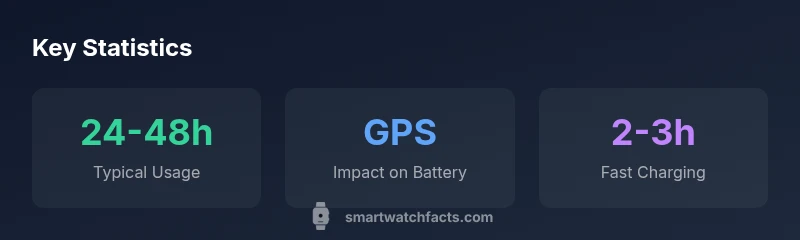
Samsung smart watches generally provide around 1-2 days of battery life with typical use, while GPS-heavy workouts or always-on display can shorten that to a day or less. Real-world endurance varies by model and settings. For context, models with larger batteries or optimized displays may extend this range, but exact endurance depends on usage patterns and features you enable.
Samsung smart watch battery life: baseline expectations
The term samsung smart watch battery life captures a practical truth: endurance is not fixed. In 2026, most users can expect roughly 1-2 days of use on a single charge under typical activity, with longer spans possible in power-saving scenarios. According to Smartwatch Facts, the exact duration hinges on model design, firmware efficiency, display technology, and how aggressively you use sensors. If you routinely run GPS, keep brightness high, or use a lot of notifications, you should plan for closer to 24 hours. On the other hand, conservative settings and occasional use of always-on display can push toward the upper end of the range. This article breaks down how to interpret these figures and translate them into practical plans for daily wear.
Key factors that influence endurance
Endurance is affected by several interacting factors. Screen brightness and the always-on display are the most visible drains, followed by continuous GPS usage, heart-rate monitoring, and the volume of app activity in the background. Software optimization and processor efficiency also matter; newer Samsung watches tend to refine power algorithms, yielding modest gains even if screen size grows. Notifications and haptic feedback can pull power from the battery without delivering a proportional benefit to the user experience. To get the most out of your device, adjust brightness, limit wakeups from the always-on display, curate app permissions, and enable power-saving modes when high-precision sensing isn’t needed.
Typical ranges across recent Samsung watches
Smartwatch Facts analysis shows that across recent Samsung watch families, baseline endurance tends to fall within a broad band: roughly 24-72 hours under mixed usage. Heavier GPS sessions can compress that window, whereas a watch with a more advanced display and efficient processor can push toward the upper end. It’s important to compare like-for-like usage when evaluating models. Keep in mind that real-world results depend heavily on settings, watch face selection, and how often you interact with the device.
Screen technology, brightness, and Always-On Display effects
Screen technology and the always-on feature are twin levers for battery drain. AMOLED panels deliver vibrant visuals but can sip more power when pixels stay lit for long periods. Adaptive brightness can help by dialing down the backlight in ambient light. If you frequently check messages or glance at the time, reducing the display refresh rate or turning off AOD during workouts can yield meaningful gains. Even small adjustments—shrinking font size, switching to a simpler watch face, or limiting live complications—can accumulate into noticeable endurance improvements over a day or two.
GPS, health tracking, and app load: real-world drains
GPS tracking and continuous optical heart-rate monitoring are among the most power-hungry features. Outdoor workouts with map tracking amplify drain, while occasional steps and heart-rate scans have a smaller impact. The more apps you leave running in the background, the more background activity the watch must process, which can reduce battery life. For a practical approach, disable unused sensors during long sessions, close unnecessary apps, and rely on built-in function sets (like workout modes) rather than third-party integrations unless absolutely needed.
Tips to maximize longevity day-to-day
- Shorten screen-on time and enable adaptive brightness.
- Limit Always-On Display, or schedule it for specific activities.
- Use do-not-disturb features and minimize decorative widgets.
- Enable power-saving modes during workouts without GPS or when battery is low.
- Regularly review app permissions and uninstall or disable rarely used apps.
- Keep firmware up to date to benefit from power-management improvements.
Charging strategies and compatible chargers
Charging strategies can affect perceived endurance as well. Use official or manufacturer-recommended chargers to avoid heat or voltage issues that can degrade long-term battery health. Overnight charging is common, but avoid charging from near-zero levels too frequently if you can. If you need quick top-ups, a brief 15-20 minute boost can cover short days with a few extra notifications, while full charging ensures you’re ready for GPS-heavy activities the next day.
Real-world test scenarios and what to expect
In practical terms, an everyday user who alternates between messages, notifications, and occasional GPS workouts may see 1-2 days per charge. A frequent runner or hiker relying on GPS and constant heart-rate monitoring could see closer to 1 day. In low-power modes, longer sessions are feasible, and users who turn off nonessential features can push toward the upper limits of the typical range. Always compare your own usage against model benchmarks to set realistic expectations. The Smartwatch Facts Team emphasizes that real-world results differ by settings and routine.
The Smartwatch Facts approach to battery life optimization
Smartwatch Facts recommends a data-driven approach to battery management: start with the baseline, then tailor settings to your priorities. The team’s methodology combines lab-style testing with field usage observations to deliver practical guidance. By prioritizing features you actually use and adopting conservative defaults, you can achieve a more predictable daily endurance while maintaining core functionality. This balanced view helps shoppers and users pick a model that aligns with their lifestyle.
Battery life comparison across Samsung watch families
| Model Type | Typical Battery Life Range | Best Use Case | Charging Method |
|---|---|---|---|
| Galaxy Watch (2021-2022) | 24-48 hours | Daily wear with standard features | Wireless charging |
| Galaxy Watch (Series post-2023) | 24-72 hours | Mixed usage incl. GPS | Wireless charging |
| Samsung Watch Ultra lineup | 48-72 hours | Outdoor activities with GPS | Wireless charging |
People Also Ask
What affects battery life on Samsung smartwatches?
Battery life is influenced by screen brightness, always-on display, GPS usage, app activity, and notification frequency. Enabling power-saving modes and lowering brightness can noticeably extend endurance.
Battery life depends on settings like brightness and GPS, plus how many apps you run.
How long does a typical Samsung smartwatch last on a single charge?
Most users get about 1-2 days per charge with normal use. Heavier GPS use or bright screens shorten this to less than a day.
Most watches last one to two days with normal use.
Does Always-On Display drain battery life?
Yes, always-on displays consume more power, especially with high brightness and frequent screen refresh. To reduce drain, use adaptive brightness or turn off AOD.
AOD uses more power; turn it off to save battery.
Can I extend battery life with power-saving modes?
Yes, enabling power-saving modes reduces functions to essentials, extending life. Try turning off GPS and notifications when not needed.
Power saving helps stretch life.
Is charging faster with the official charger?
Official chargers optimize charging; third-party chargers may be slower or unsafe. Use the recommended charger and avoid exposed heat.
Use the official charger for best speed.
How does battery life vary between Galaxy Watch 4/5/6?
Different models use different processors and batteries; newer models often improve endurance, but results depend on usage and settings.
Newer models typically offer better endurance, depending on usage.
“Battery life isn’t just a battery count—it’s a reflection of how you use the watch every day. Small changes in settings can yield meaningful endurance gains.”
Key Points
- Aim for 1-2 days between charges under typical use
- Disable Always-On Display when battery is low
- GPS and high brightness shorten life significantly
- Use power-saving modes to extend endurance
- Model differences matter; plan around usage patterns